# Promise

## Overview

Promise lets you display accurate delivery date predictions on product pages, at checkout, and in post-purchase communications to improve conversion and customer satisfaction.&#x20;

You can use parcelLab’s API and self-service Promise configuration in the App to display accurate pre-checkout delivery predictions based on your carriers and warehouses. These predictions are powered by our machine learning algorithm that accounts for distribution setup, holidays, operating hours, weather, and other operational constraints.

## Data Requirements

To use <code class="expression">space.vars.Product\_Promise</code>, the following keys need to be sent to parcelLab in tracking records for communications. This ensures the data is available to reference in your <code class="expression">space.vars.Product\_Promise</code> configuration.

<details>

<summary>Keys for v4 API (new integrations)</summary>

| Key            | Type   | Description                                    |
| -------------- | ------ | ---------------------------------------------- |
| service\_level | String | Product or service level from carrier.         |
| warehouse      | String | Warehouse from which the delivery was shipped. |

</details>

<details>

<summary>Keys for v2 API (existing integrations only)</summary>

| Key                 | Type   | Description                                    |
| ------------------- | ------ | ---------------------------------------------- |
| courierServiceLevel | String | Product or service level from carrier.         |
| warehouse           | String | Warehouse from which the delivery was shipped. |

</details>

To display the generated promise date in communications, the following keys need to be sent to parcelLab when creating a tracking.

<details>

<summary>Keys for v4 API (new integrations)</summary>

<table><thead><tr><th width="243">Key</th><th>Type</th><th>Description</th></tr></thead><tbody><tr><td>announced_delivery_date</td><td>Date</td><td>The predicted delivery date that is generated using parcelLab <code class="expression">space.vars.Product_Promise</code> and displayed to the customer at checkout.</td></tr><tr><td>additional_fields</td><td>String</td><td><a href="https://app.gitbook.com/s/ew6OnyRUe6InzC96WnMr/data-elements/data-model#custom-fields">Custom field</a> where the key-value pair is the request ID of the API call (for example: <code>requestID: "gxFAiZfP"</code>).</td></tr></tbody></table>

</details>

<details>

<summary>Keys for v2 API (existing integrations only)</summary>

<table><thead><tr><th width="243">Key</th><th>Type</th><th>Description</th></tr></thead><tbody><tr><td>announced_delivery_date</td><td>Date</td><td>The predicted delivery date that is generated using parcelLab <code class="expression">space.vars.Product_Promise</code> and displayed to the customer at checkout.</td></tr><tr><td>customFields</td><td>String</td><td><a href="https://app.gitbook.com/s/m5MUhYrMmT0cei4QdxGn/data-elements/data-model#custom-fields">Custom field</a> where the key-value pair is the request ID of the API call (for example: <code>requestID: "gxFAiZfP"</code>).</td></tr></tbody></table>

</details>

For further details on how to send parcelLab the promise date for use in communications, refer to the section [Using Promise Dates in Communications from parcelLab](#using-promise-dates-in-communications-from-parcellab).

For a list of input fields required to configure <code class="expression">space.vars.Product\_Promise</code> in the <code class="expression">space.vars.Product\_App</code> (that is: Service Levels, Warehouses and Delivery Methods), refer to the Promise Configuration Template.

{% file src="<https://1156682959-files.gitbook.io/~/files/v0/b/gitbook-x-prod.appspot.com/o/spaces%2F-LPf1Lv1YUuLYva6LrXQ%2Fuploads%2F7xsQ5XK3d945L1lbcmMA%2FPromise%20Configuration%20Template.xlsx?alt=media&token=d2e530bb-3cf0-428e-99c9-bf9ae182010c>" %}

## Displaying <code class="expression">space.vars.Product\_Promise</code> on Your Website

The following sections describe the recommended process for integrating parcelLab <code class="expression">space.vars.Product\_Promise</code> into your online shop and using the generated promise date in your post-purchase communications.

### Call the Promise API

After publishing your <code class="expression">space.vars.Product\_Promise</code> configuration in the <code class="expression">space.vars.Product\_App</code>, you can retrieve promise dates by calling the <code class="expression">space.vars.Product\_Promise</code> API.

For details on using the <code class="expression">space.vars.Product\_Promise</code> API, please refer to our API documentation:

* [v4 API (new integrations)](https://app.gitbook.com/s/ew6OnyRUe6InzC96WnMr/promise/api)
* [v2 API (existing integrations only)](https://app.gitbook.com/s/m5MUhYrMmT0cei4QdxGn/promise/promise-dates)

### Best Practices for Displaying Promise

This section provides an overview of ways to display promise dates and recommendations for where to display them.

The potential inputs that can be used from your customers to generate a forecasted delivery date are described in the following table.

<table><thead><tr><th width="162">Input</th><th>Accuracy</th><th>Use</th></tr></thead><tbody><tr><td>Zip Code</td><td>This is the most accurate input for the model to generate a promise.</td><td><p>There are two ways to use a zip code input:</p><ol><li>Add a snippet to capture the customer’s desired shipping postal code.</li><li>Pull this from the customer’s profile.</li></ol></td></tr><tr><td>Country</td><td>This is not the most precise input but still provides a good estimate for shoppers.</td><td>Pull this from the browsing country.</td></tr></tbody></table>

You can choose to display the promise date as one of the following:

* Single date (January 1, 2023)
* Date range (January 1-3)

<code class="expression">space.vars.Product\_Promise</code> dates can be displayed on product landing pages or product detail pages.
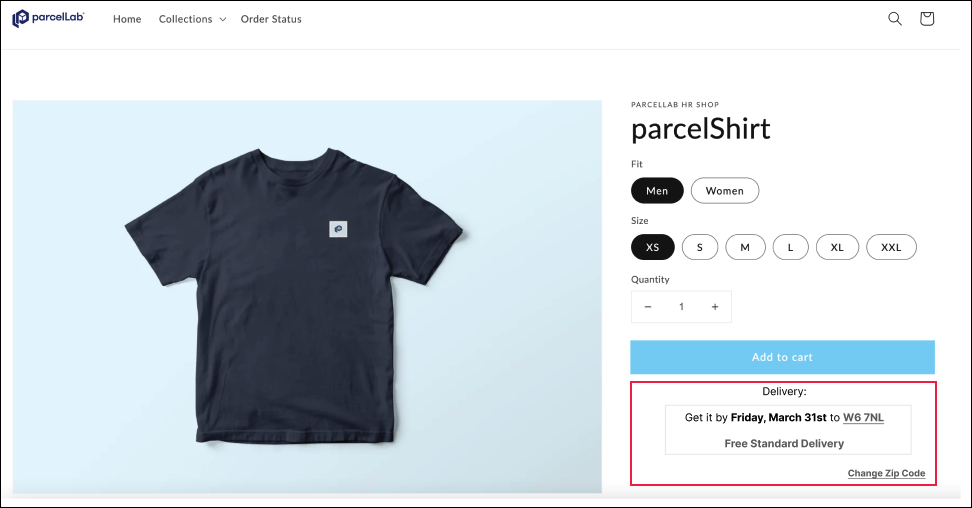
<figure><img src="https://1156682959-files.gitbook.io/~/files/v0/b/gitbook-x-prod.appspot.com/o/spaces%2F-LPf1Lv1YUuLYva6LrXQ%2Fuploads%2FF8bx2obeMtCyk6oLCl1B%2FPromiseDatePDP.png?alt=media&#x26;token=d4633454-923e-4784-b14b-c1a937adc383" alt=""><figcaption><p>Promise date displayed on a product detail page</p></figcaption></figure>

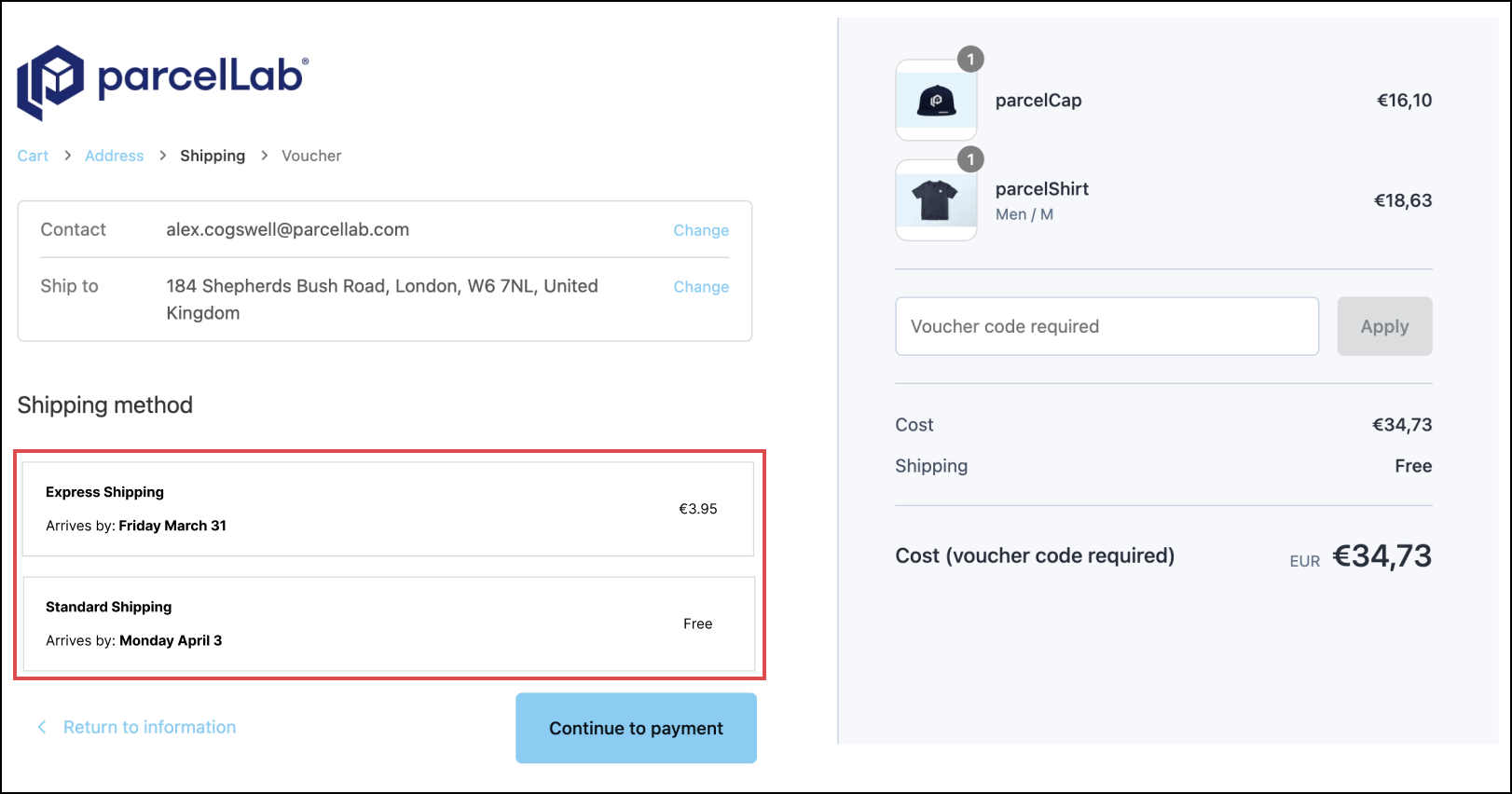
<figure><img src="https://1156682959-files.gitbook.io/~/files/v0/b/gitbook-x-prod.appspot.com/o/spaces%2F-LPf1Lv1YUuLYva6LrXQ%2Fuploads%2FONHbR21PdZnalWrzN6YG%2FPromiseDateCheckout.png?alt=media&#x26;token=5bb97126-3c52-4b97-b4f1-f16641ea911a" alt=""><figcaption><p>Promise date displayed at checkout</p></figcaption></figure>

### Using Promise Dates in Communications from parcelLab

This section describes the recommended flow for integrating <code class="expression">space.vars.Product\_Promise</code> into your website and post-purchase communication, including the following key points:

* Calling the <code class="expression">space.vars.Product\_Promise</code> API at checkout
* Transmitting <code class="expression">space.vars.Product\_Promise</code> data back to parcelLab for sending order and delivery notifications.

{% hint style="info" %}
You can calculate accurate delivery dates for orders with a known dispatch date by using the `_now` and `_dispatchNow` parameters together to bypass warehouse cutoff logic and estimate delivery based on the exact shipment time.
{% endhint %}

When displaying a promise date at checkout, we recommend the following procedure:

1. Call the <code class="expression">space.vars.Product\_Promise</code> API at checkout.
2. Display a promise date to the shopper based on your desired business outcome (for example: displaying the earliest date to push conversion).
3. Save the displayed date against the customer’s order.

{% hint style="success" %}
If possible, save both the displayed promise date and `requestID` from the API response.
{% endhint %}

To ensure continuity, we recommend:

1. Using the promise date generated by parcelLab as the announced delivery date (`announced_delivery_date` key) when creating an order or creating a tracking record.
2. Including the `requestID` of the API call as a custom field.

This ensures that parcelLab can correctly measure whether the promise date is met and enables troubleshooting any issues that arise.

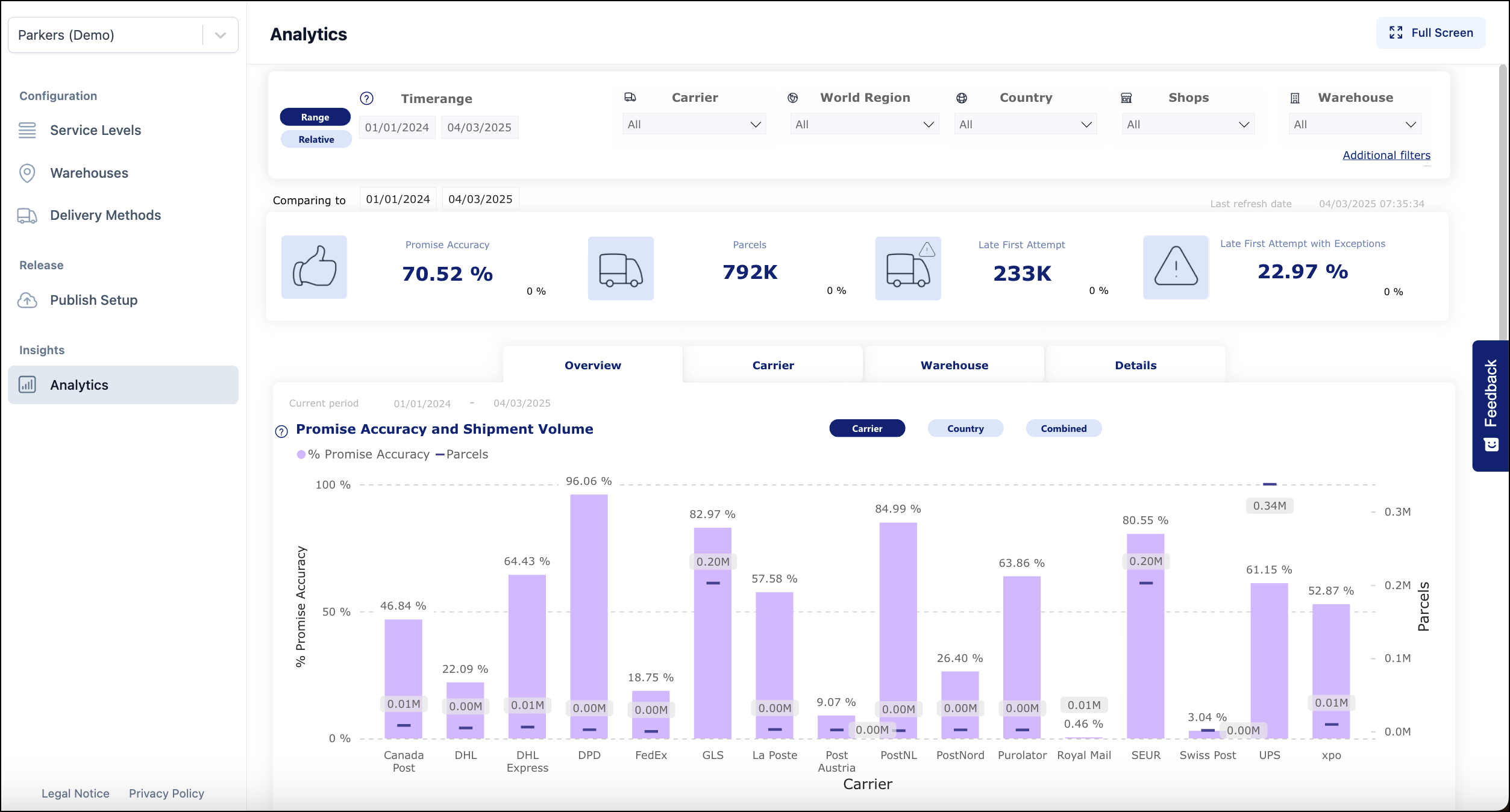
The reporting on <code class="expression">space.vars.Product\_Promise</code> fulfillment can be viewed in the Insights section of the <code class="expression">space.vars.Product\_Promise</code> module in the <code class="expression">space.vars.Product\_App</code>.

<figure><img src="https://1156682959-files.gitbook.io/~/files/v0/b/gitbook-x-prod.appspot.com/o/spaces%2F-LPf1Lv1YUuLYva6LrXQ%2Fuploads%2FP99Cz5IF21A4h9xgL8Jg%2FPromiseInsights.png?alt=media&#x26;token=d2b7cb95-f3ab-4637-af03-a959a29424b6" alt="Promise Analytics report within the Promise module"><figcaption></figcaption></figure>

For further information on Promise fulfillment and performance, see our Promise analytics documentation.

{% content-ref url="promise-insights" %}
[promise-insights](https://docs.parcellab.com/docs/convert/promise-insights)
{% endcontent-ref %}