# Scans and Status Events

## Overview

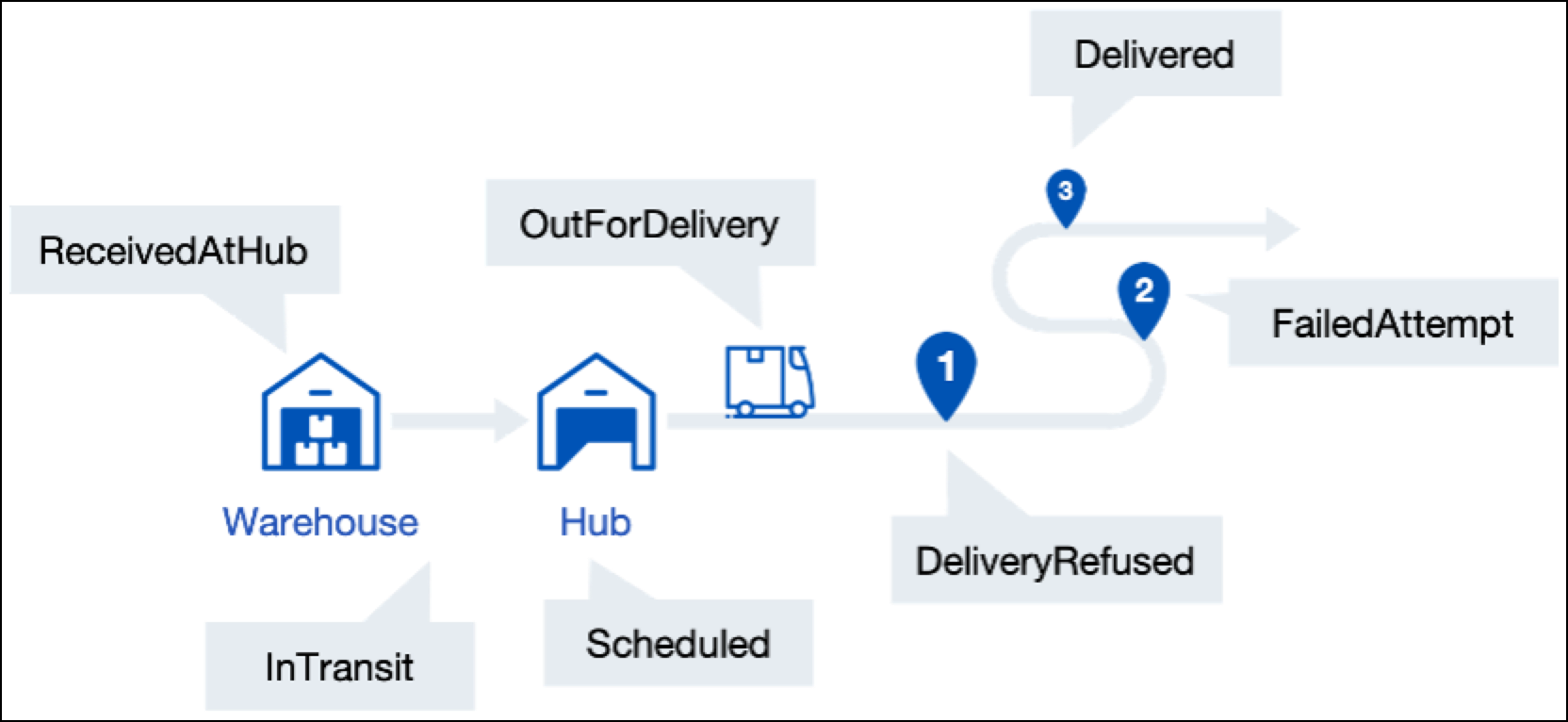
Events happen during the delivery process, either through scans (for example: goods receipt scan at the warehouse) or events of the delivery (for example: confirmation of the planned delivery time via phone with the recipient).

<figure><img src="/files/t3fKXltkO3xwXI9E3hR0" alt="Illustration of the carrier&#x27;s delivery checkpoints from the retailer&#x27;s warehouse to the end-customer"><figcaption></figcaption></figure>

When the information is received at parcelLab from the carrier scans, the process used ensures the best quality data is provided. The data is processed and communicated to your customers to keep them informed on the progress of their order. This involves matching the data against our internal triggers for emails, calculating transit times, and translating it to send the order updates via email to the customer and providing it on your Order Status page.

## Structure of an Event

The structure of an event (this includes both scans and status events) is described in the following table.

<table><thead><tr><th width="243">Field</th><th width="288">Value</th><th>Required?</th></tr></thead><tbody><tr><td><code>Shipment</code></td><td>The shipment identifier (for example: barcode, order number or tracking number).</td><td>Required</td></tr><tr><td><code>Timestamp</code></td><td>The date and time of the event in format <code>YYYY-MM-DD HH:mm:ss+-HH:mm</code>.</td><td>Required</td></tr><tr><td><code>Location</code></td><td>The location of the event (for example: a depot or city).</td><td>Optional</td></tr><tr><td><code>StatusCode</code></td><td>The applicable status code.</td><td>Required</td></tr><tr><td><code>ReasonCode</code></td><td>The reason code for the <code>Exception</code> status code.</td><td>Required for <code>Exception</code></td></tr><tr><td><code>Details</code></td><td>The details of the status, which is required for the <code>Scheduled</code> status code and optional for all others.</td><td>Required for <code>Scheduled</code></td></tr></tbody></table>

Events can be transferred as .json and via SFTP or the parcelLab API. See our status model for the list of available status codes, exception reasons, delivery location codes, and next actions.

{% content-ref url="/pages/-LcBrVLrJiv4Kd--KkGw" %}
[Status Model](/docs/developers/v2/data-elements/status-model.md)
{% endcontent-ref %}

## Send Status Events

Details of how the `webhook/{courier}/` endpoint can be used to update the status of an individual delivery are described below.

<details>

<summary><mark style="color:green;">POST</mark> Send Status Events</summary>

You can update the status of a delivery using the `webhook/{courier}/` endpoint (that is: this endpoint would be called on a specific status or scan event).

The details of the Send Status Events API are described in the following section.

**API Details**

<mark style="color:green;">`POST`</mark> `https://webhooks-api.parcellab.com/webhook/{courier}/`

**Header**

| Name         | Type   | Description                             |
| ------------ | ------ | --------------------------------------- |
| content-type | string | 'application/json' or 'application/xml' |

**Request Body**

| Name   | Type  | Description                        |
| ------ | ----- | ---------------------------------- |
| Events | array | `JSON` or `XML` as described below |

**Responses**

* 202 - accepted
* 400 - if data is ill formatted, the response will describe the issue with the payload (for example: `Invalid events, every "Event" needs a key "Shipment"`)
* 401 - if no or an invalid token is provided

</details>

Status events can be transmitted as shown below in the .json example. The payload can alternatively be sent as a file via SFTP.

{% hint style="info" %}
For further details on file transfers, see how you can [send files to parcelLab](/docs/developers/v2/data-elements/carrier-integration/data-transmission.md).
{% endhint %}

{% tabs %}
{% tab title="events-info.json" %}

```javascript
{
    "shipment": "D000000000001",
    "event": {
        "timestamp": "02-02-2025 12:00:00.000",
        "location": "London",
        "status_code": "In Transit",
        "reason_code": "",
        "additional_details": "Weather"
    },
    "estimated_date_of_delivery": "02-02-2025 11:30:00"
}
```

{% endtab %}
{% endtabs %}

### Example Payload/File

In this example, the payloads/files in .json and show different events with different status codes with reason codes and optional details.

{% tabs %}
{% tab title="sample-event-message.json" %}
{% code overflow="wrap" %}

```json
{
  "tracking_number": "D000000000001",
  "events": [
    {
      "timestamp": "2025-01-01T00:00:00.000Z", // Timestamp in Zulu or with specified timezone
      "location": "New York, NY", // Location in clear text
      "status_code": "In Transit", // Any status code as per your status data model or as clear text
      "reason_code": "", // Optional reason code
      "additional_details": "" // Any further free text information that is not standardized
    },
    {
      "timestamp": "2025-01-02T00:00:00.000Z",
      "location": "New York, NY",
      "status_code": "Exception",
      "reason_code": "Misrouted in network",
      "additional_details": ""
    },
    {
      "timestamp": "2025-01-03T10:00:00.000Z",
      "location": "New York, NY",
      "status_code": "Out for delivery",
      "reason_code": "",
      "additional_details": ""
    },
    {
      "timestamp": "2025-01-03T10:00:00.000Z",
      "location": "New York, NY",
      "status_code": "Failed delivery attempt",
      "reason_code": "Customer not met",
      "additional_details": ""
    },
    {
      "timestamp": "2025-01-05T10:00:00.000Z",
      "location": "New York, NY",
      "status_code": "Delivered",
      "reason_code": "Signed by recipient",
      "additional_details": "Received by John Doe"
    }
  ],


  // POD as URL to image or PDF
  "proof_of_delivery": "https://example.com/pod/D000000000001.jpg",


  // POD as base64 encoded string
  "proof_of_delivery": "data:image/jpeg;base64,...base64encodedstring...",


  // EDD as date
  "estimated_date_of_delivery": "2025-01-05",


  // EDD as time window
  "estimated_date_of_delivery": {
    "start": "2025-01-05T09:00:00.000Z",
    "end": "2025-01-05T17:00:00.000Z"
  }
}
```

{% endcode %}
{% endtab %}
{% endtabs %}


---

# Agent Instructions: Querying This Documentation

If you need additional information that is not directly available in this page, you can query the documentation dynamically by asking a question.

Perform an HTTP GET request on the current page URL with the `ask` query parameter:

```
GET https://docs.parcellab.com/docs/developers/v2/data-elements/carrier-integration/scans-and-status-events.md?ask=<question>
```

The question should be specific, self-contained, and written in natural language.
The response will contain a direct answer to the question and relevant excerpts and sources from the documentation.

Use this mechanism when the answer is not explicitly present in the current page, you need clarification or additional context, or you want to retrieve related documentation sections.