> For the complete documentation index, see [llms.txt](https://docs.parcellab.com/docs/llms.txt). Markdown versions of documentation pages are available by appending `.md` to page URLs; this page is available as [Markdown](https://docs.parcellab.com/docs/engage/messages-and-journeys/overview/article-lists.md).
# Product List
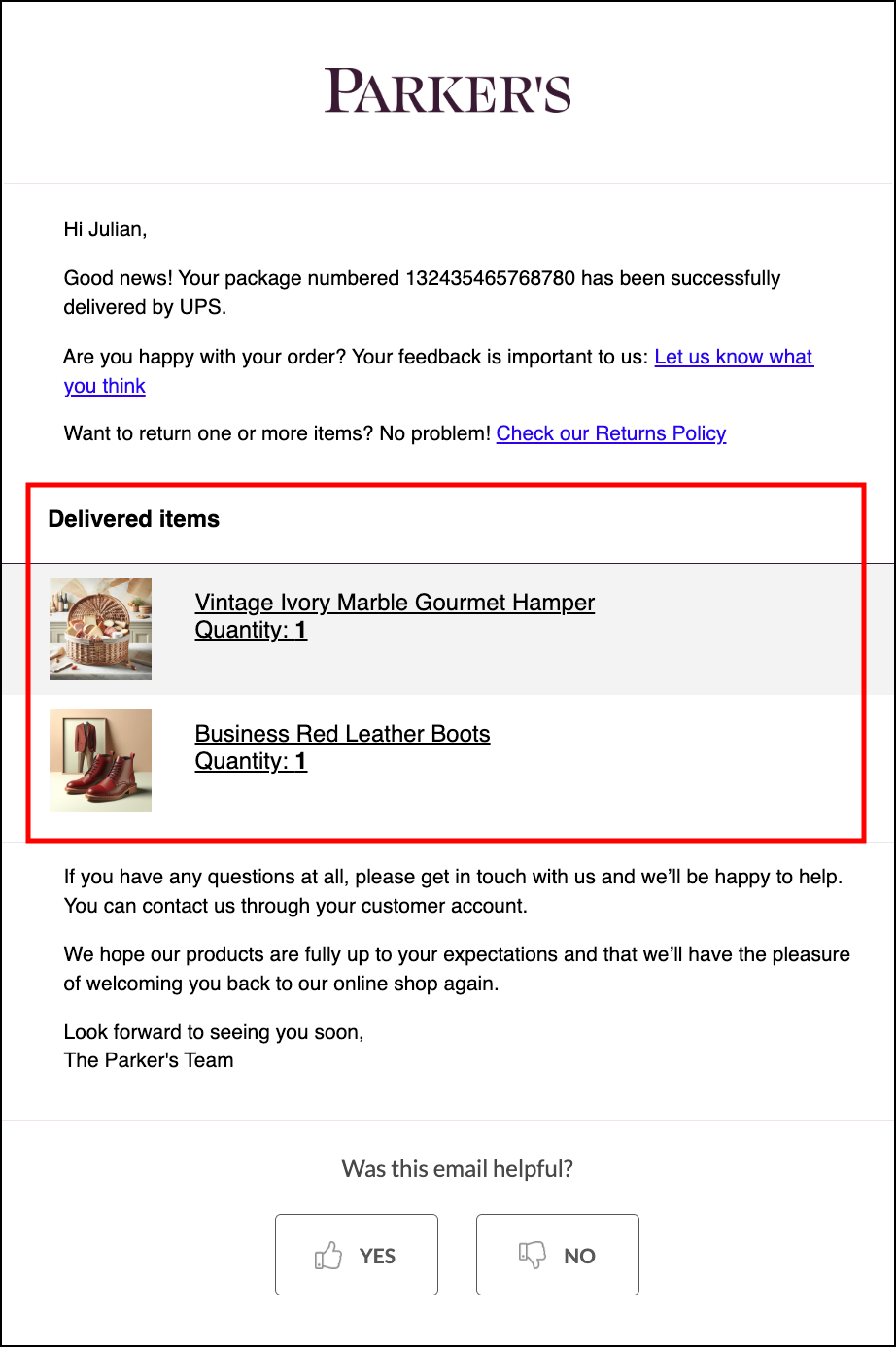
Use the Product List feature to incorporate purchased products in communications to keep customers informed about their order and increase the chance of further engagement with your brand.
## Overview
You can display an product lists in your customer emails and on your space.vars.Product\_OrderStatus after a customer has placed an order, based on the order and product information you send to parcelLab.
{% hint style="info" %}
If you provide a link to your online shop, parcelLab can forward the customer to the shop’s webpage when they click a purchased product.
{% endhint %}
## Email HTML: articlesTableWithImages
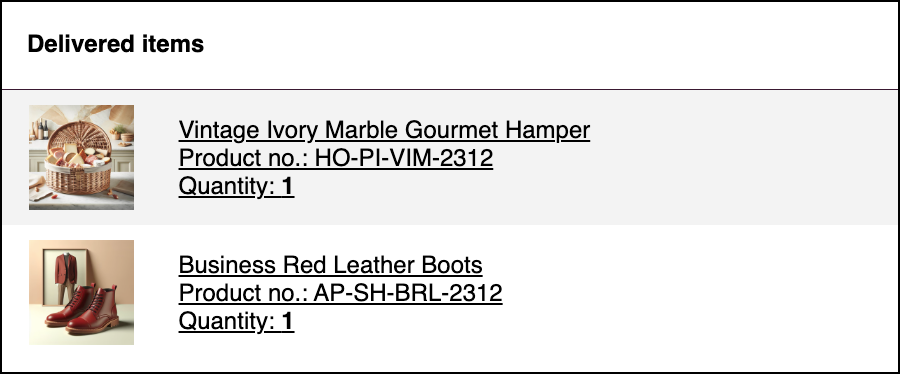
Use `{{articlesTableWithImages}}` to insert a complete product table. It includes the table wrapper and one row per product. Product links are included when `articleUrl` is available; a missing image uses the default product-image placeholder.
The standard image row uses the class `pl-articles-table-row`. Its outer image cell is 90 pixels wide with 10 pixels of padding. The nested image cell is 70 pixels wide. The image has `width="70"`, `height="auto"`, and inline `height:auto;width:100%;` styles. The first row and alternating rows have a `#F3F3F3` background.
Default HTML structure with one linked product
This fragment shows the default table after inserting an example product. Shop-style and translation placeholders remain visible. Whitespace is added for readability. Account-specific templates, product-review messages, and later email processing can change the final HTML; use a preview with your tracking data to check your account's output.
```html
```
Without `articleUrl`, the two `` elements are omitted and their contents remain. Additional products repeat the product row.
### Change Image Dimensions for One Message
The placeholder has no width or height argument. A size set on an outer wrapper does not replace the nested cell width and image styles.
For a change limited to one message, use a separate email template assigned only to that message, or insert a dedicated product-list snippet in that message. Keep shared templates and snippets unchanged. If you retain the generated table, scope your CSS to a wrapper around this placeholder in the message, and update the image and its containing cells together. For example, this CSS changes the default image width to 100 pixels:
```html
{{articlesTableWithImages}}
```
Email clients can handle CSS differently. Send test emails to the clients you support. If CSS does not give the required result, use a dedicated product-list snippet with explicit cell widths, image `width`/`height` attributes, and inline styles. Ask your parcelLab representative to help adapt an account-specific product table.
## Configuring the Product List Feature
The following sections describe the configuration required for the Product List feature.
### Customer Requirements
To integrate purchased products in email communication, you need to provide the following information to parcelLab:
* The relevant product data and images (or a path to an image) of an order before dispatch communication via the parcelLab data integration.
* In which emails to display the content (for example: out for delivery emails).
* A URL to forward the customer to your online shop when they click the purchased products.
{% hint style="info" %}
Product-specific URLs can be included in the list of purchased products (that is: clicking on the product will direct customers to the product’s page in the online shop).
{% endhint %}
## Implementation Process
When parcelLab has the required information, the setup process can begin.
#### Products in Data Transfer
The article list in the emails has different detail levels. A simple list only features article numbers, names, and quantities.
As described in the data model, the article list has to be transmitted when creating a `tracking`. The following example shows how an article list is structured.
{% code title="article-list.json" %}
```javascript
[
{
articleNo: 'article number (String)', // required
articleName: 'article name (String)', // required
quantity: Integer, // optional
},
...
]
```
{% endcode %}
The more detailed article list features an image per row and links back to the product page within the shop. For the system to show this article list, the simple article list must be transmitted for every `tracking`.
Detailed article list
Extending the article list can be achieved through one of the following ways:
* Add the `articleUrl` and `articleImageUrl` parameters to each object of the `articles` array to extend the transmitted article list.
{% hint style="info" %}
However, in most cases this is *not* possible as the warehouse software generating the shipment labels does not have these detailed information related to the shop articles.
{% endhint %}
* Import product feeds to extend the data in the article list, which is supported by parcelLab.
{% hint style="info" %}
A product feed is a complete article master list, which is formatted as a .csv file and can be accessed via HTTPS. It contains the article number provided when creating the tracking and information that should be extended on a per-article basis (for example: article name, product page URL, and product image URL (thumbnail)).
{% endhint %}
#### **External Product Feed via HTTPS**
Use an external product feed when your order or warehouse system can only send basic article numbers, but the article list in messages should still include details such as product names, product links, or product images.
The feed must be a CSV file that parcelLab can retrieve from an HTTPS URL. It should use UTF-8 encoding, include a header row, and contain one row per article, SKU, or product variant. The value in `articleNo` must match the article number sent in the `articles` array when creating the tracking. parcelLab uses this value to find the matching feed row and enrich the article in the message.
| Column | Required | Description |
| ------------------ | ----------- | --------------------------------------------------------------------------------------------------------------- |
| `articleNo` | Yes | Article number, SKU, or product variant ID sent in `articles[].articleNo`. This is the lookup key for the feed. |
| `articleName` | Recommended | Display name for the article. |
| `articleUrl` | Recommended | Absolute HTTPS URL to the article page in the online shop. |
| `articleImageUrl` | Recommended | Absolute HTTPS URL to the article image or thumbnail. |
| Additional columns | Optional | Further article attributes, such as brand, category, size, or color, if agreed during implementation. |
{% code title="product-feed.csv" %}
```csv
articleNo,articleName,articleUrl,articleImageUrl
"AP-SH-TWC-2315","Trendy White Cotton Sneakers","https://www.example.com/products/trendy-white-cotton-sneakers","https://www.example.com/images/trendy-white-cotton-sneakers.jpg"
"AP-OU-BOD-2312","Olive Denim Jacket","https://www.example.com/products/olive-denim-jacket","https://www.example.com/images/olive-denim-jacket.jpg"
```
{% endcode %}
{% hint style="info" %}
The product feed enriches articles that are already sent with a tracking. It does not replace transmitting the article list, because parcelLab needs `articleNo` from the tracking to find the matching row in the feed.
{% endhint %}
Share the HTTPS feed URL with your parcelLab contact as part of the implementation. Keep the URL stable and ensure parcelLab can access it without manual login.
#### Article Lists on the Order Status Page
When article lists are configured, an order summary is displayed on the right-hand side of the space.vars.Product\_OrderStatus.
{% hint style="info" %}
For further information, see [how article lists are configured on the Order Status page](https://github.com/parcelLab/gitbook-documentation/tree/main/developers/status-updates/configuration/README.md#article-lists).
{% endhint %}
Order Status page with purchased products
---
# Agent Instructions
This documentation is published with GitBook. GitBook is the documentation platform designed so that both humans and AI agents can read, navigate, and reason over technical content effectively. Learn more at gitbook.com.
## Querying This Documentation
If you need additional information that is not directly available in this page, you can query the documentation by asking a question.
Perform an HTTP GET request on the following URL with the `ask` and `goal` query parameters:
```
GET https://docs.parcellab.com/docs/engage/messages-and-journeys/overview/article-lists.md?ask=&goal=
```
`ask` is the immediate question: it should be specific, self-contained, and written in natural language.
`goal` is what the user is ultimately trying to achieve, the reason they need the answer. Sharing it helps GitBook give you a better, more relevant answer. A goal is most helpful when it describes the outcome the user wants rather than restating the question. For example, with `ask=how do I create an API token`, a goal like `automate deployments from our CI pipeline` lets GitBook tailor the answer to that use case.
The response will contain a direct answer to the question and relevant excerpts and sources from the documentation.
Use this mechanism when the answer is not explicitly present in the current page, you need clarification or additional context, or you want to retrieve related documentation sections.