> For the complete documentation index, see [llms.txt](https://docs.parcellab.com/docs/llms.txt). Markdown versions of documentation pages are available by appending `.md` to page URLs; this page is available as [Markdown](https://docs.parcellab.com/docs/engage/messages-and-journeys/overview/attachments.md).
# Attachments
Send documents to your customers in email communication to reduce costs and provide traceability of sent documents.
## Overview
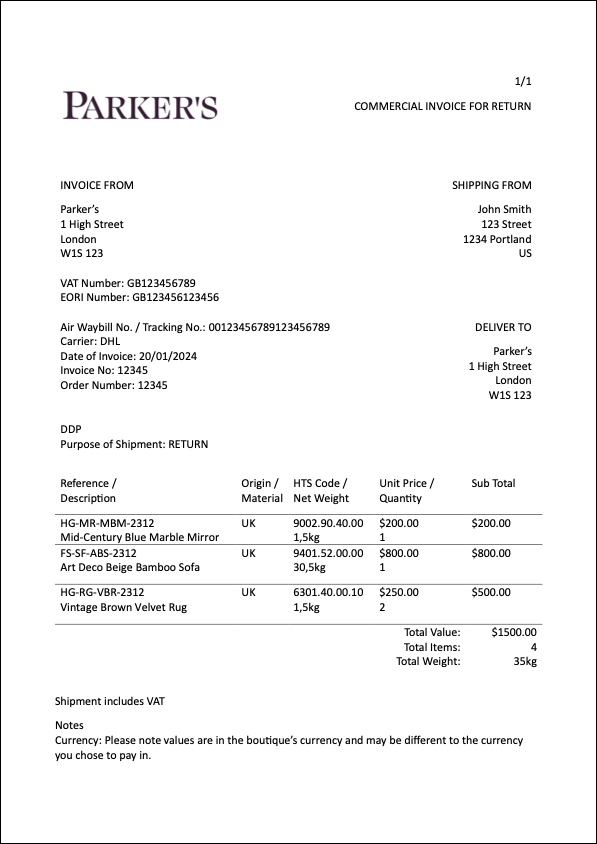
You can send documents to customers as email attachments, which can be used for the following purposes:
* Documents that are business critical that need to be reliably delivered (for example: invoices) via email, either as a stand-alone email, or part of your delivery communication.
* Proof that the correct documents and communication have been sent to customers (for example: order confirmations and return labels).
{% hint style="success" %}
Customer service teams can find the attachments in the parcelLab App to deal with customer inquiries relating to documents sent via email.
{% endhint %}
{% tabs %}
{% tab title="Email Attachment" %}
{% endtab %}
{% tab title="Example Invoice" %}
{% endtab %}
{% endtabs %}
## Configuring Attachments in Email Communication
The following sections describe the configuration required for to include attachments in email communication.
### Customer Requirements
To integrate file attachments in email communication, you need to provide the following information to parcelLab:
* The necessary documents (that is: a PDF per order or tracking) through SFTP or via API.
* The filenames of the .pdf documents, which need to include the reference number of the corresponding order or tracking.
{% hint style="info" %}
The naming structure of the filenames you use needs to be consistent so it can be uniquely identified (for example: the order number or order number and date).
{% endhint %}
### Implementation Process
When parcelLab has the required information, the setup process can begin.
Feedback is sent back to your online shop if any attachments fail to reach the recipient. This can include the following issues:
* Hard bounces - email address errors.
* Soft bounces - inbox full warnings.
* Missing order invoices - failure to attach documents.
This information can be communicated to you as a report via email, SFTP, or webhooks.
{% hint style="info" %}
Hard bounces require you to contact the customer (for example: to check you have the correct email address for the customer).
{% endhint %}
---
# Agent Instructions
This documentation is published with GitBook. GitBook is the documentation platform designed so that both humans and AI agents can read, navigate, and reason over technical content effectively. Learn more at gitbook.com.
## Querying This Documentation
If you need additional information that is not directly available in this page, you can query the documentation by asking a question.
Perform an HTTP GET request on the following URL with the `ask` and `goal` query parameters:
```
GET https://docs.parcellab.com/docs/engage/messages-and-journeys/overview/attachments.md?ask=&goal=
```
`ask` is the immediate question: it should be specific, self-contained, and written in natural language.
`goal` is what the user is ultimately trying to achieve, the reason they need the answer. Sharing it helps GitBook give you a better, more relevant answer. A goal is most helpful when it describes the outcome the user wants rather than restating the question. For example, with `ask=how do I create an API token`, a goal like `automate deployments from our CI pipeline` lets GitBook tailor the answer to that use case.
The response will contain a direct answer to the question and relevant excerpts and sources from the documentation.
Use this mechanism when the answer is not explicitly present in the current page, you need clarification or additional context, or you want to retrieve related documentation sections.