> For the complete documentation index, see [llms.txt](https://docs.parcellab.com/docs/llms.txt). Markdown versions of documentation pages are available by appending `.md` to page URLs; this page is available as [Markdown](https://docs.parcellab.com/docs/engage/messages-and-journeys/overview/parcellab-sms.md).
# parcelLab SMS
Use the parcelLab SMS feature to proactively update your customers on their order status via text messages.
## Overview
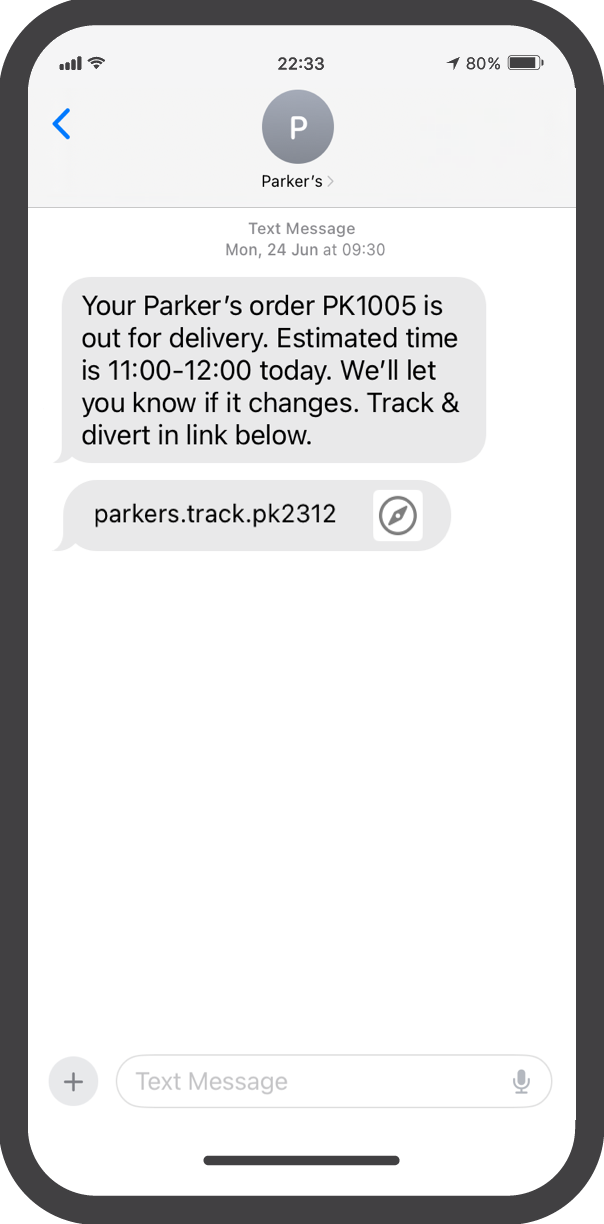
You can set up order and return status updates through SMS. Messages can be set up using the [Trigger Builder](/docs/engage/messages-and-journeys/configuration/trigger-builder.md) and [Conditional Placeholders](/docs/engage/messages-and-journeys/configuration/conditional-placeholders.md).
{% tabs %}
{% tab title="SMS Out for Delivery Message" %}
{% endtab %}
{% tab title="SMS Order Delivered Message" %}
{% endtab %}
{% endtabs %}
## Configuring SMS Notifications using parcelLab SMS
The following sections describe the configuration required for SMS notifications when using parcelLab SMS.
SMS notifications from parcelLab can be customized to include a shortened link to a tracking page. This provides the option for customers to contact you or your customer service, since replies are not supported for SMS.
Sender names can be customized depending on which country you are configuring SMS notifications for as follows:
* In most European countries, the sender is an 11-character alphanumeric number that can be customized.
* In the USA or Canada, the sender is an actual phone number that cannot be customized. The sender can also be a shortcode that is unique to us as parcelLab.
{% hint style="info" %}
For further details, please contact your parcelLab representative.
{% endhint %}
### Customer Requirements
For the feature to work, we will need to receive information to complete the setup that includes:
* Whether you have an existing messaging service.
* The message body required.
* The triggers to be used.
To enable SMS communication, you need to provide the following information from your customers:
* Phone number
* Opt-in flag for receiving SMS notifications
{% hint style="info" %}
You can also [activate the SMS opt-in field on your Order Status page](https://github.com/parcelLab/gitbook-documentation/tree/main/developers/status-updates/configuration/README.md#sms-opt-in) to allow your customers to opt in to receive SMS updates if this information has not already been provided. Submitting the SMS opt-in information (that is: phone number) will update the tracking object information.
{% endhint %}
For setting up the messaging service, you need to provide the following information:
* Countries in which the SMS will be sent
* SMS-friendly sender name (optional)
Depending on the country that you are sending SMS messages to, you may need to provide additional information about your company to register it as an SMS sender with the respective country’s telecommunication agencies.
{% hint style="info" %}
For more information on this requirement, please contact your parcelLab representative.
{% endhint %}
### Implementation Process
In this section, the next steps in the setup process are described.
SMS messages are sent from an Alphanumeric Sender (11 characters), a long code phone number, or a short code, depending on the destination country. The messages can include a shortened link to the tracking page with contact possibilities.
{% hint style="info" %}
SMS messages are automatically restricted during default silent hours (10pm-8am local time of recipient), which cannot be changed.
{% endhint %}
A trigger will be sent to the messaging service’s system. Triggers include the full text message and translations.
{% hint style="info" %}
Messages from Alpha Sender IDs will be outbound only; replies are not supported. We can track click rates, but not open rates.
{% endhint %}
## Configuring Notifications from your SMS Provider
If you have an existing SMS provider, we can send triggers to their system that include the full text message and translations via webhook.
### Customer Requirements
For the feature to work, we will need to receive information to complete the setup that includes:
* Credentials to your messaging service
* The message body required
* The triggers to be used
{% hint style="info" %}
For more information on using your own SMS provider, please contact your parcelLab representative.
{% endhint %}
## SMS Analytics in the space.vars.Product\_pLApp
The **Analytics** module in the space.vars.Product\_pLApp contains an **SMS** report within the **Communication Insights** dashboard. The space.vars.Report\_CISMS report provides an overview of the performance of SMS communications sent during the delivery process.
The core metrics are described in the following table.
| Metric | Description |
| ------------------ | --------------------------------------------- |
| SMS Click Rate | Percentage of SMS messages that were clicked. |
| Number of SMS sent | Total number of SMS messages sent. |
| Clicks per SMS | Average number of clicks per SMS message. |
---
# Agent Instructions
This documentation is published with GitBook. GitBook is the documentation platform designed so that both humans and AI agents can read, navigate, and reason over technical content effectively. Learn more at gitbook.com.
## Querying This Documentation
If you need additional information that is not directly available in this page, you can query the documentation by asking a question.
Perform an HTTP GET request on the following URL with the `ask` and `goal` query parameters:
```
GET https://docs.parcellab.com/docs/engage/messages-and-journeys/overview/parcellab-sms.md?ask=&goal=
```
`ask` is the immediate question: it should be specific, self-contained, and written in natural language.
`goal` is what the user is ultimately trying to achieve, the reason they need the answer. Sharing it helps GitBook give you a better, more relevant answer. A goal is most helpful when it describes the outcome the user wants rather than restating the question. For example, with `ask=how do I create an API token`, a goal like `automate deployments from our CI pipeline` lets GitBook tailor the answer to that use case.
The response will contain a direct answer to the question and relevant excerpts and sources from the documentation.
Use this mechanism when the answer is not explicitly present in the current page, you need clarification or additional context, or you want to retrieve related documentation sections.