> For the complete documentation index, see [llms.txt](https://docs.parcellab.com/docs/llms.txt). Markdown versions of documentation pages are available by appending `.md` to page URLs; this page is available as [Markdown](https://docs.parcellab.com/docs/platform/app-store/magento-2.md).
# Magento 2
The Magento 2 Webhook Extension for parcelLab enables fast and simple integration.
{% hint style="success" %}
For Magento `2.4.6+`, please use version `2.4.24` of the plugin or later.\
For previous versions of Magento, please use version `2.4.21` of the plugin.
{% endhint %}
## Installation and Setup Guide
{% hint style="danger" %}
If you have [Mageplaza Webhook](https://www.mageplaza.com/magento-2-webhook/) already installed, **DO NOT INSTALL** this extension and follow our setup guide instead: [Setup Guide with Mageplaza Webhook](https://github.com/parcelLab/magento-2-webhook/blob/2.4.24/setup-guide-with-mageplaza.md)
{% endhint %}
To install the Magento 2 Webhook extension:
1. Run the following command in Magento 2 root folder:
```
composer require parcellab/magento-2-webhook
php bin/magento setup:upgrade
php bin/magento setup:static-content:deploy
```
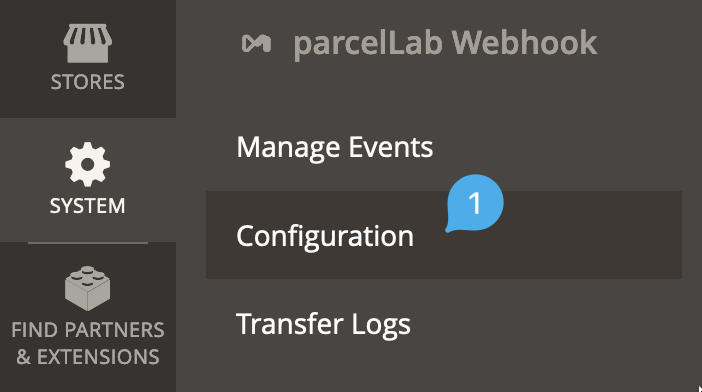
2. After successful installation and deploy log in to your Admin Backend of Magento, navigate to `System > parcelLab Webhook > Configuration`.
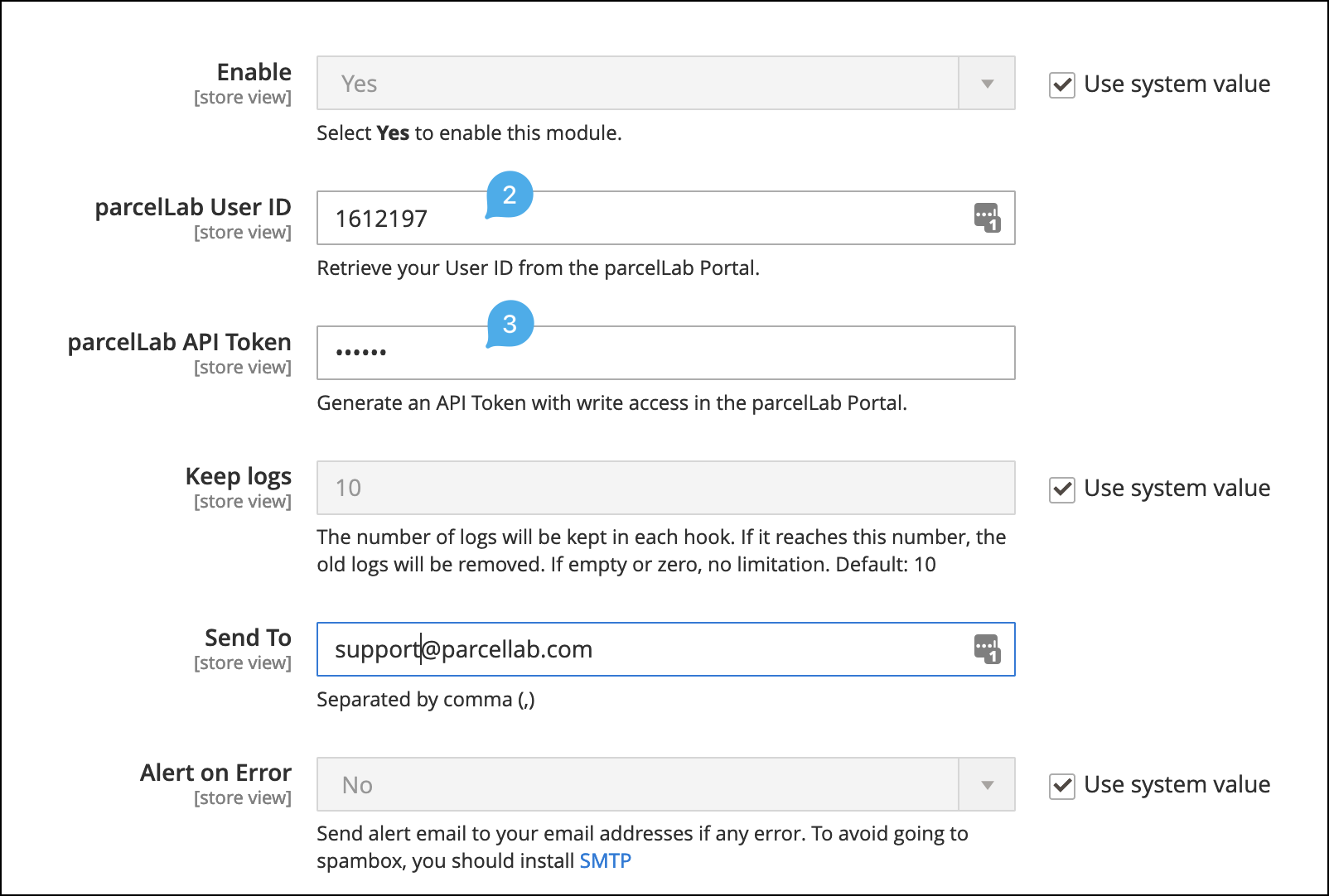
In this screen, you will have to enter your parcelLab API credentials.
3. Generate a new **parcelLab API Token** with `write` access in the parcelLab Portal.
4. Enter the newly generated **parcelLab API Token** together with your **parcelLab User ID.**
When entering your credentials:
* Use your **parcelLab User ID**, not an email address.
* Use the plain **API token** value from parcelLab. Do not use an encoded or encrypted token.
* In the same screen, set **Enabled** to **Yes**. This setting is separate from the event configuration and must also be enabled.
* Save the configuration and flush the Magento cache before testing.
{% hint style="warning" %}
The plugin must be enabled in `System > parcelLab Webhook > Configuration` in addition to enabling the events in `Manage Events`. If `Enabled` remains `No`, the events can still appear active, but the webhook request body will not be sent to parcelLab.
{% endhint %}
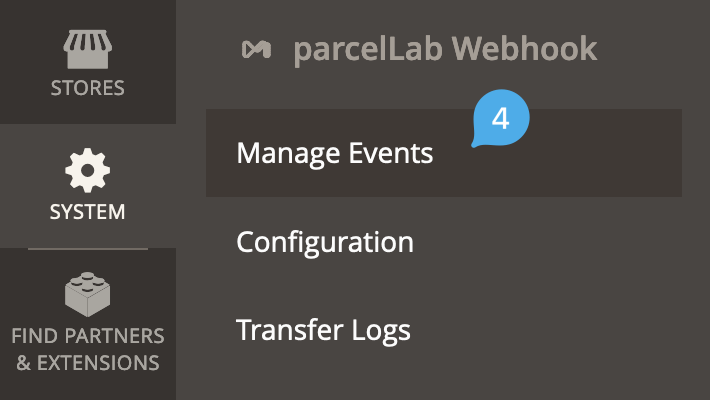
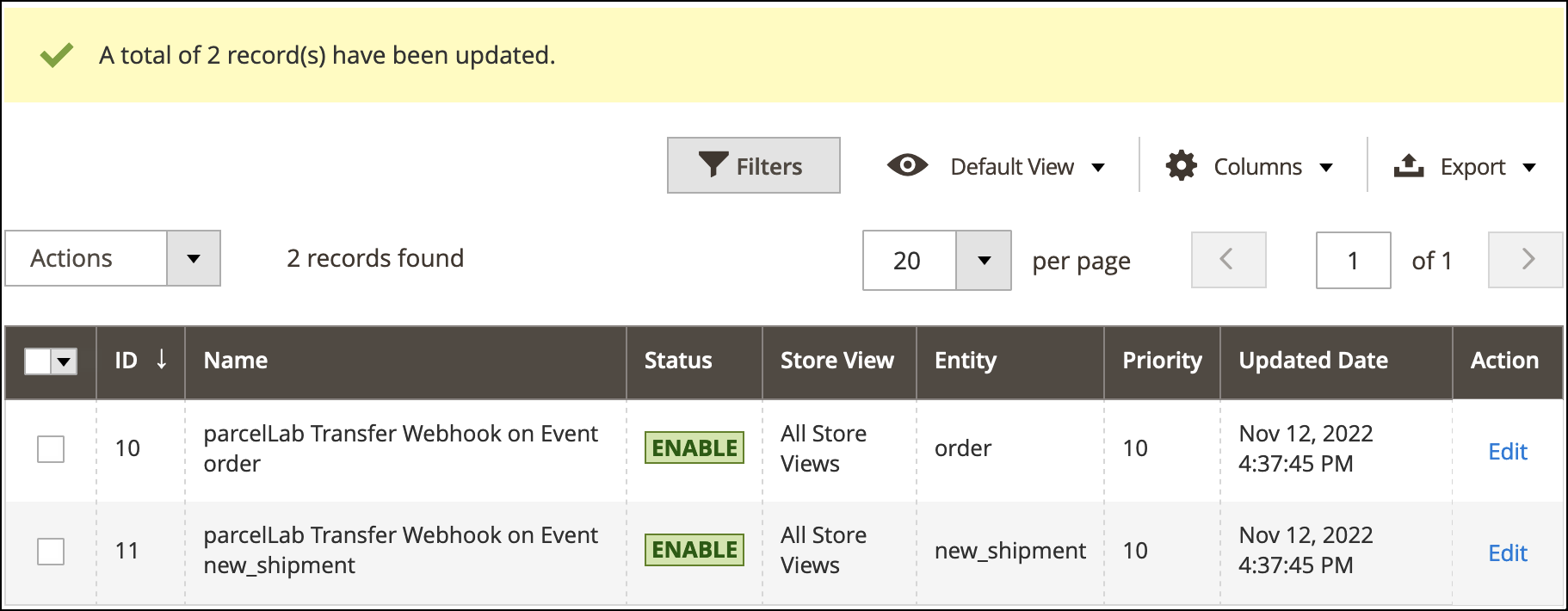
5. Navigate to `System > parcelLab Webhook > Manage Events`.
\
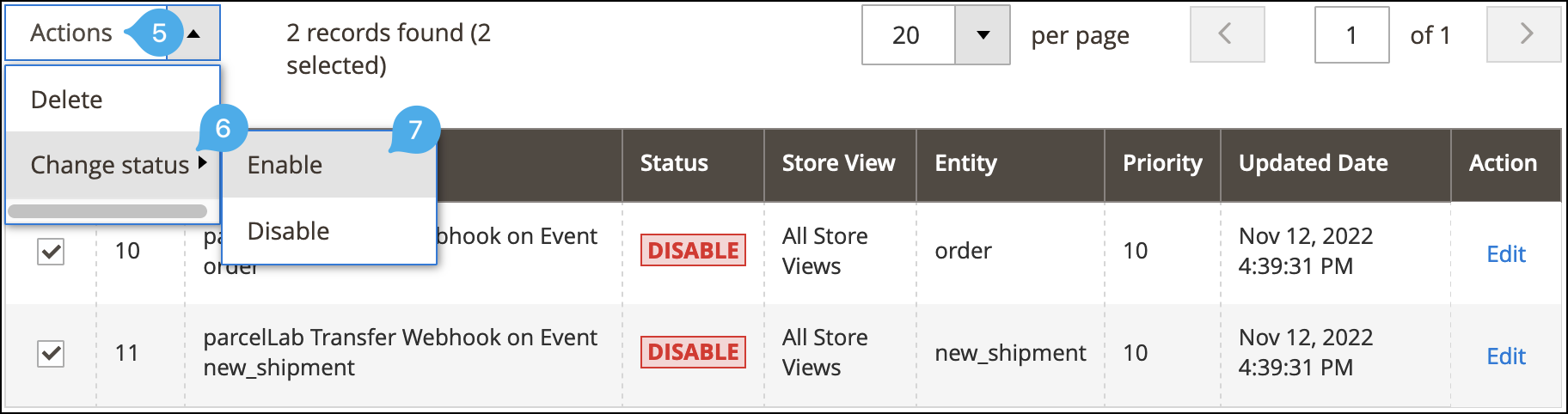
You will find the two required events already pre-configured.
6. If you have entered your parcelLab credentials earlier and set the plugin configuration to **Enabled = Yes**, activate the events.
7. After saving any configuration or event changes, flush the Magento cache and place a new test order to confirm the webhook is sent successfully.
🎉 **Your integration is complete!** 🎉
## FAQs
Can I add more events?
Due to the tailored use of this extension, the number of events is limited. For more flexible webhooks please use the fork source [Magento 2 Webhook by Mageplaza](https://www.mageplaza.com/magento-2-webhook/).
I received the error Mageplaza_Core has been already defined
You can resolve it by following the solution [here](https://github.com/mageplaza/module-core/issues/3).
My site is down, what should I do?
You can resolve it by following [this guide](https://www.mageplaza.com/blog/magento-site-down.html).
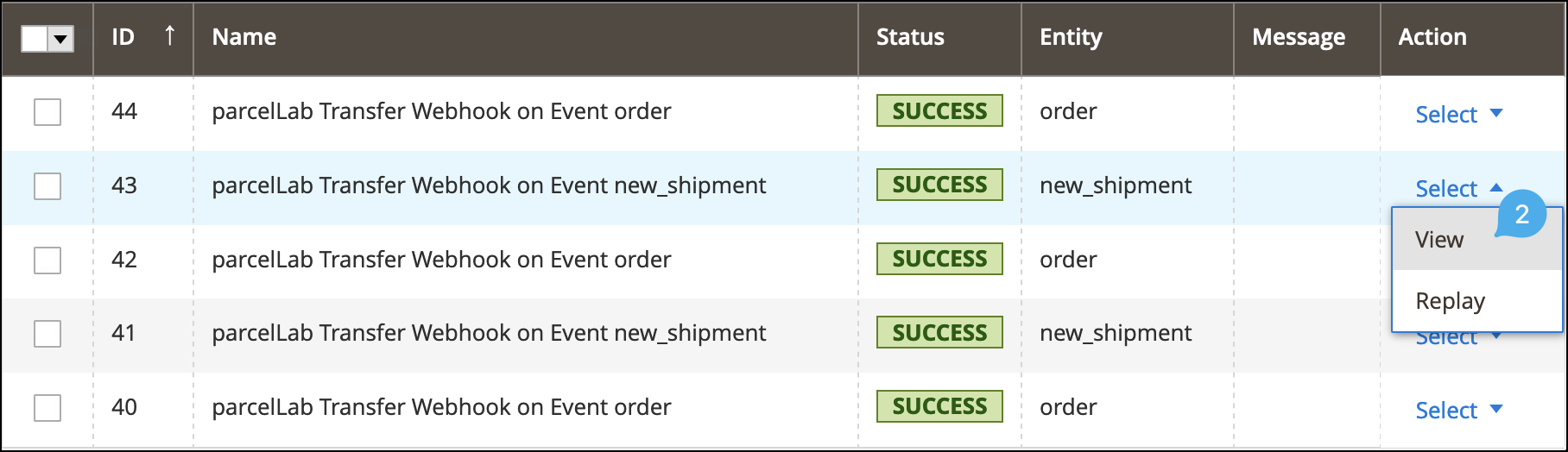
Where do I find transfer logs?
Navigate to `System > parcelLab Webhook > Transfer Logs.`

The transfer logs will display a list of recent transfers and you can view the details for each entry by selecting **View** in the **Action** column.
When requesting support, please share both the `Response` as well as the `Request Body`.

The events are enabled, but parcelLab is not receiving the webhook or the request body is blank
Check the following in Magento:
* In `System > parcelLab Webhook > Configuration`, set **Enabled** to **Yes**.
* Enter your **parcelLab User ID** and make sure it is not replaced with an email address.
* Use the plain **API token** value from parcelLab, not an encoded or encrypted token.
* Flush the Magento cache after saving configuration changes.
If `Enabled` is set to `No`, the events can still appear active in `Manage Events`, but the webhook payload will not be sent to parcelLab.
I am unsure whether I have Magento 2 Webhook by Mageplaza installed, how can I check?
Run `php bin/magento module:status` and check whether `Mageplaza_Webhook` is listed.
If it is listed, please do not install this extension and follow our [Setup Guide with Mageplaza Webhook](https://github.com/parcelLab/magento-2-webhook/blob/2.4.24/setup-guide-with-mageplaza.md) instead.
If I already have Magento 2 Webhook by Mageplaza installed, how can I integrate with parcelLab?
The easiest way is to follow our [Setup Guide with Mageplaza Webhook](https://github.com/parcelLab/magento-2-webhook/blob/2.4.24/setup-guide-with-mageplaza.md) for this extension, which will take you less than 15 minutes to complete.
## Credit
{% hint style="info" %}
This extension is a fork of the [Magento 2 Webhook by Mageplaza](https://www.mageplaza.com/magento-2-webhook/) published under MIT license [on Github](https://github.com/mageplaza/magento-2-webhook) (see fork source). This fork simplifies your setup for integration with parcelLab by providing appropriate defaults.
{% endhint %}
It also uses the following packages:
* [mageplaza/module-core](https://packagist.org/packages/mageplaza/module-core)
* [liquid/liquid](https://packagist.org/packages/liquid/liquid)
---
# Agent Instructions
This documentation is published with GitBook. GitBook is the documentation platform designed so that both humans and AI agents can read, navigate, and reason over technical content effectively. Learn more at gitbook.com.
## Querying This Documentation
If you need additional information that is not directly available in this page, you can query the documentation by asking a question.
Perform an HTTP GET request on the following URL with the `ask` and `goal` query parameters:
```
GET https://docs.parcellab.com/docs/platform/app-store/magento-2.md?ask=&goal=
```
`ask` is the immediate question: it should be specific, self-contained, and written in natural language.
`goal` is what the user is ultimately trying to achieve, the reason they need the answer. Sharing it helps GitBook give you a better, more relevant answer. A goal is most helpful when it describes the outcome the user wants rather than restating the question. For example, with `ask=how do I create an API token`, a goal like `automate deployments from our CI pipeline` lets GitBook tailor the answer to that use case.
The response will contain a direct answer to the question and relevant excerpts and sources from the documentation.
Use this mechanism when the answer is not explicitly present in the current page, you need clarification or additional context, or you want to retrieve related documentation sections.

 When requesting support, please share both the `Response` as well as the `Request Body`.

When requesting support, please share both the `Response` as well as the `Request Body`.
