# Insights

## Overview

Use our powerful analytics to track logistics performance, monitor customer engagement/satisfaction and more to gain valuable insights into how your business is performing.

## System Monitoring Dashboard

The System Monitoring dashboard provides a centralized reporting view of your parcelLab setup. Available from your profile, it brings together reports for outbound tracking performance, carrier reliability, communication coverage, and integration health. Used regularly, it enables you to quickly identify delays, detect carrier issues, validate customer communications, and ensure your systems are receiving data as expected.

<figure><img src="https://1156682959-files.gitbook.io/~/files/v0/b/gitbook-x-prod.appspot.com/o/spaces%2F-LPf1Lv1YUuLYva6LrXQ%2Fuploads%2FBLGtSMUD0jc0stz89Db3%2FSystemMonitoring.png?alt=media&#x26;token=d06c5823-1680-4885-b38a-01525642be13" alt="System Monitoring dashboard"><figcaption></figcaption></figure>

The reports available in the System Monitoring dashboard are described in the following table.

<table><thead><tr><th width="248">Report</th><th>Description</th></tr></thead><tbody><tr><td>Outbound Trackings Checkpoint Overview</td><td>Summary of shipment volume, total tracking checkpoints, and shipments without updates, along with trends over time to assess tracking data quality and visibility.</td></tr><tr><td>Checkpoint Latency</td><td>Metrics on how quickly tracking updates are received, including average delay, trends over time, and comparisons across carriers, countries, and shipment events.</td></tr><tr><td>Carrier Outage Outbound</td><td>Delay and disruption views that highlight affected shipments, compare delays against expected transit times, and show which carriers or flows are most impacted.</td></tr><tr><td>Communication Coverage</td><td>Overview of message delivery across shipments, showing which message types were sent to help validate your communication setup.</td></tr><tr><td>Webhook Coverage</td><td>Insights into webhook delivery across shipments, ensuring integrations receive expected data and highlighting any gaps in data flow.</td></tr></tbody></table>

{% hint style="info" icon="book" %}

#### Check out the parcelLab guides

For further information on using the dashboard, see our [user guide documentation](https://docs.parcellab.com/guides/admin-and-settings/system-monitoring).
{% endhint %}

## Analytics Reports

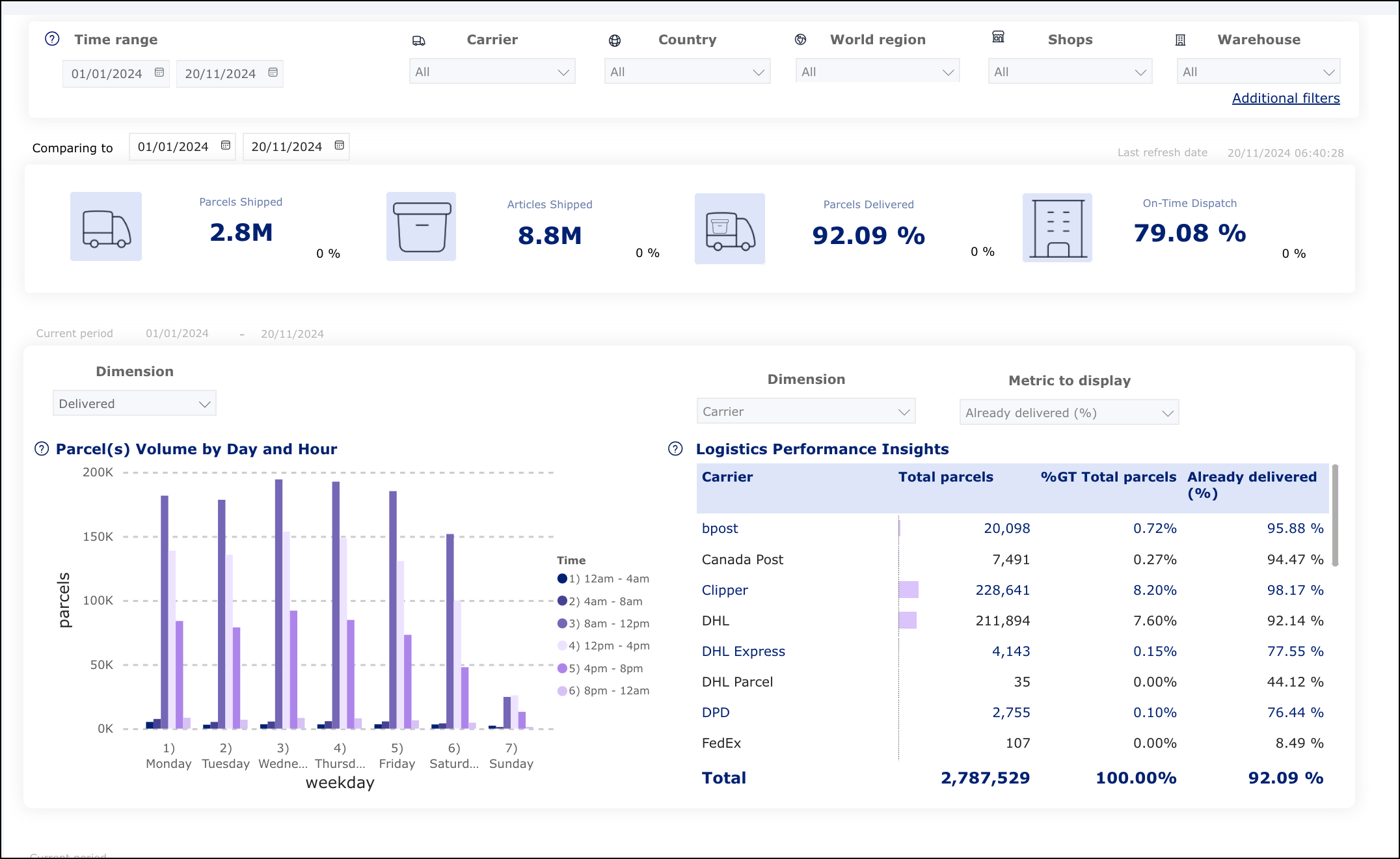
The main analytics reports come with a user-friendly design to to make the charts clear and easy to use to ensure you get the most from your data. The header on each report presents the core metrics showing the most relevant information about each page, and these will be compared to the previous period defined by the time range selected.

<figure><img src="https://1156682959-files.gitbook.io/~/files/v0/b/gitbook-x-prod.appspot.com/o/spaces%2F-LPf1Lv1YUuLYva6LrXQ%2Fuploads%2Fw4LG0Htxr5CQMtzQDWn8%2FAppReportingUI.png?alt=media&#x26;token=ab61817f-c705-41f2-8d1e-380f673d4ad5" alt="Analytics report"><figcaption></figcaption></figure>

### <code class="expression">space.vars.Product\_Analytics</code> Structure

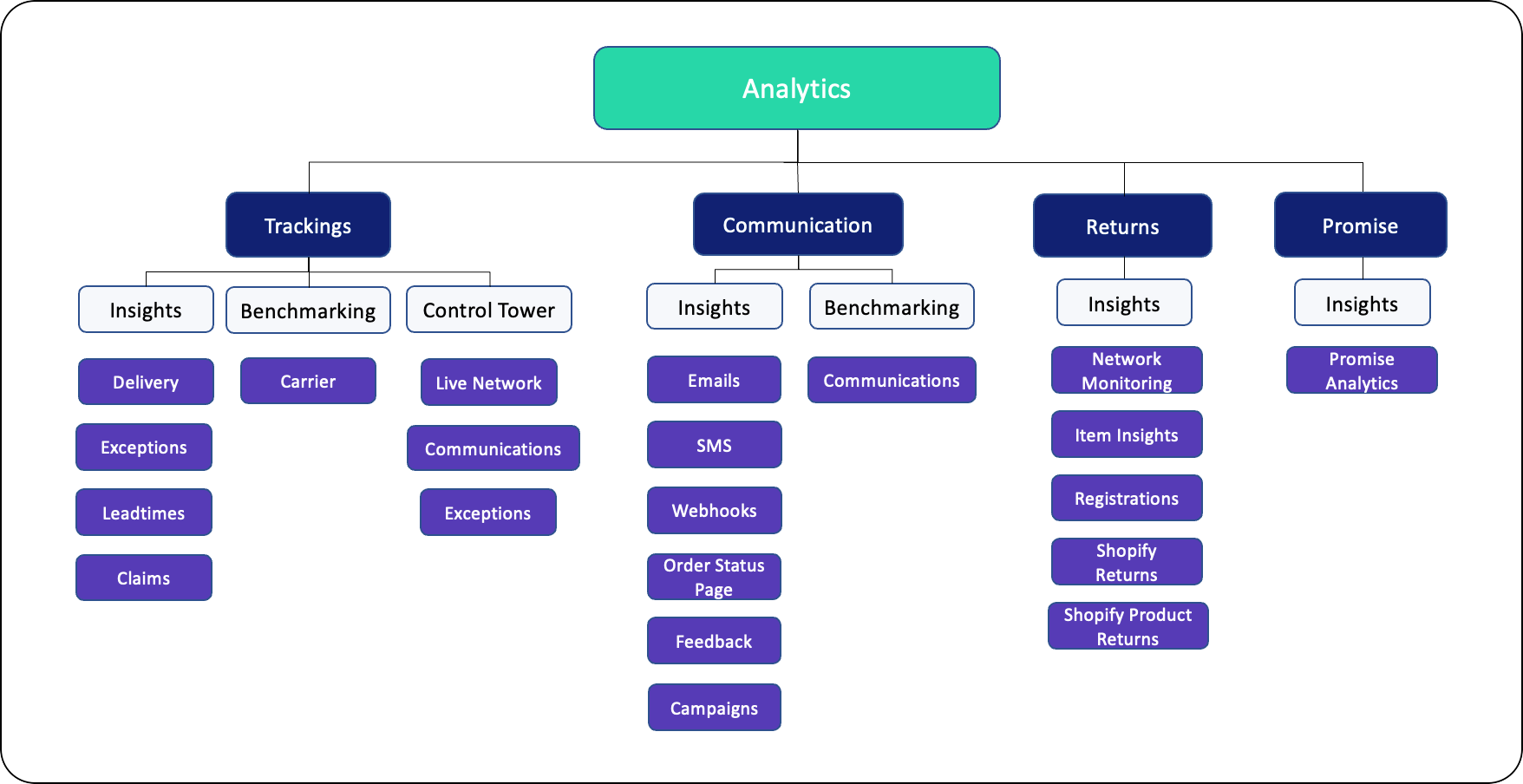
The structure of <code class="expression">space.vars.Product\_Analytics</code> in the <code class="expression">space.vars.Product\_pLApp</code> is shown in the following graphic.

<div align="left"><figure><img src="https://1156682959-files.gitbook.io/~/files/v0/b/gitbook-x-prod.appspot.com/o/spaces%2F-LPf1Lv1YUuLYva6LrXQ%2Fuploads%2FFjReJbH5x3fv6SiE7RiF%2FAnalyticsStructureShopify.png?alt=media&#x26;token=28da25df-b1e7-49c3-81c0-1800259cf1c3" alt="Analytics reporting structure"><figcaption></figcaption></figure></div>

### Reporting Dashboards

The reporting dashboards available for <code class="expression">space.vars.Product\_Analytics</code> are described in the following table.

<table><thead><tr><th width="248">Dashboard</th><th>Description</th></tr></thead><tbody><tr><td><a href="overview/trackings-insights">Trackings Insights</a></td><td><p>Displays data for up to two years for the following:</p><ul><li><a href="overview/trackings-insights/delivery-report"><strong>Delivery</strong></a> - shows general information regarding your logistics performance (for example: shipped parcels, amount of shipped items, and percentage of already delivered parcels)</li><li><a href="overview/trackings-insights/exceptions-report"><strong>Exceptions</strong></a> - shows all information regarding delivery issues and their reasons (for example: percentage of autoreturns and exceptions)</li><li><a href="overview/trackings-insights/leadtimes-report"><strong>Leadtimes</strong></a> - shows all information regarding orders already delivered (for example: leadtimes, SLA, distribution of time for order to arrive to customer, and delivery locations)</li><li><a href="overview/trackings-insights/claims-report"><strong>Claims</strong></a> – shows all information regarding delivery claims and their reasons (for example: claim rate, percentage of claims and returns that are claimed)</li></ul></td></tr><tr><td><a href="overview/communication-insights">Communication Insights</a></td><td><p>Displays data for up to two years for the following:</p><ul><li><a href="overview/communication-insights/emails-report"><strong>Emails</strong></a> - shows which type of emails customers tend to engage with more and the open rate, click rate, and bounce rate to monitor performance</li><li><a href="overview/communication-insights/order-status-page-report"><strong>Order Status Page</strong></a> - shows the traffic on your Order Status page and the satisfaction rate of your communications and carriers</li><li><a href="overview/communication-insights/sms-report"><strong>SMS</strong></a> - shows the number of SMS communications sent and the corresponding click rate</li><li><a href="overview/communication-insights/feedback-report"><strong>Feedback</strong></a> - shows customer satisfaction on the delivery process and communications received</li><li><a href="overview/communication-insights/webhooks-report"><strong>Webhooks</strong></a> - shows which type of webhooks have been sent along with their success and response performance</li><li><a href="overview/communication-insights/campaigns-report"><strong>Campaigns</strong></a> - displays data for all historic campaign events and shows the performance of your campaigns in emails and on the Order Status page.</li></ul></td></tr><tr><td><a href="overview/control-tower">Control Tower</a></td><td><p>Displays data for the current day compared to the average of the previous week for the following:</p><ul><li><a href="overview/control-tower/live-network-report"><strong>Live Network</strong></a> - shows hourly information regarding the status of all your open parcels and current delays at a regional level</li><li><a href="overview/control-tower/communications-report"><strong>Communications</strong></a> - shows the open rate, click rate, and bounce rate of emails today</li><li><a href="overview/control-tower/exceptions-report"><strong>Exceptions</strong></a> - shows information about the parcels still at the warehouse, parcels trending late, already late, and stuck at the same position for more than one day</li></ul></td></tr><tr><td><a href="../retain/returns-insights">Returns Insights</a></td><td><p>Displays data for up to one year (subject to change depending on data quality) for the following:</p><ul><li><a href="../retain/returns-insights/network-monitoring-report"><strong>Network Monitoring</strong></a> - shows information regarding the return rate, leadtimes for the return process, type of reasons given for returns, and percentage of orders being returned in full</li><li><a href="../retain/returns-insights/registrations-report"><strong>Registrations</strong></a> - shows the percentage of returns registered via the Returns Portal, which submissions are refundable, and the number of returns attempted outside of policy</li><li><a href="../retain/returns-insights/item-insights-report"><strong>Item Insights</strong></a> - shows products (top 20) that are returned most frequently</li><li><a href="../retain/returns-insights/shopify-returns-report"><strong>Shopify Returns</strong></a> - shows information regarding the return rate, refund methods, and revenue retention for Shopify retailers</li><li><a href="../retain/returns-insights/shopify-product-returns-report"><strong>Shopify Product Returns</strong></a> - shows article-level insights and product return trends for Shopify retailers</li></ul></td></tr><tr><td><a href="../convert/promise-insights">Promise Insights</a> </td><td>Displays data for up to two years and shows if parcels are arriving on time based on the delivery date communicated to your customers. This allows you to compare the performance of carriers (for example: percentage of orders arriving on time, reasons for orders arriving late, and a list of orders that arrived late during the last 15 days).</td></tr><tr><td><a href="overview/benchmarking">Benchmarking</a></td><td><p>Displays data for the last two years for the following:</p><ul><li><a href="overview/benchmarking/carrier-report"><strong>Carrier</strong></a> - shows information on the performance of your carriers against the industry</li><li><a href="overview/benchmarking/communication-report"><strong>Communication</strong></a> - shows information on the performance of your communication against the industry</li></ul></td></tr></tbody></table>

### Additional Resources

The supported regions in the <code class="expression">space.vars.Product\_Analytics</code> reports can be downloaded here.

{% file src="<https://1156682959-files.gitbook.io/~/files/v0/b/gitbook-x-prod.appspot.com/o/spaces%2F-LPf1Lv1YUuLYva6LrXQ%2Fuploads%2Fzv7miL8tjABllUyEXSMa%2FAnalytics%20Regions.xlsx?alt=media&token=a2a469c7-1632-474c-919d-996bfaf9a79f>" %}

## Learn More&#x20;

View the following topics for more information on gaining insights from your data:

<table data-view="cards"><thead><tr><th></th><th></th><th data-hidden data-card-target data-type="content-ref"></th></tr></thead><tbody><tr><td><i class="fa-truck-clock">:truck-clock:</i> <strong>Logistics Analysis</strong></td><td>Analyze your logistics data to evaluate carrier performance.</td><td><a href="overview/logistics-analysis">logistics-analysis</a></td></tr><tr><td><i class="fa-download">:download:</i> <strong>Data Exports</strong></td><td>Learn about the tracking and communication data exports.</td><td><a href="overview/data-exports">data-exports</a></td></tr><tr><td><i class="fa-display-chart-up-circle-dollar">:display-chart-up-circle-dollar:</i> <strong>Premium Analytics</strong></td><td>Build and customize dashboards tailored to your business needs.</td><td><a href="overview/premium-analytics">premium-analytics</a></td></tr></tbody></table>

## FAQs

To help you get started with using analytics to monitor your data, see our FAQs below.

{% hint style="info" %}
If you have any further questions relating to analytics and data exports, please contact your parcelLab representative.
{% endhint %}

<details>

<summary>How can I see which of my carriers tend to present more issues?</summary>

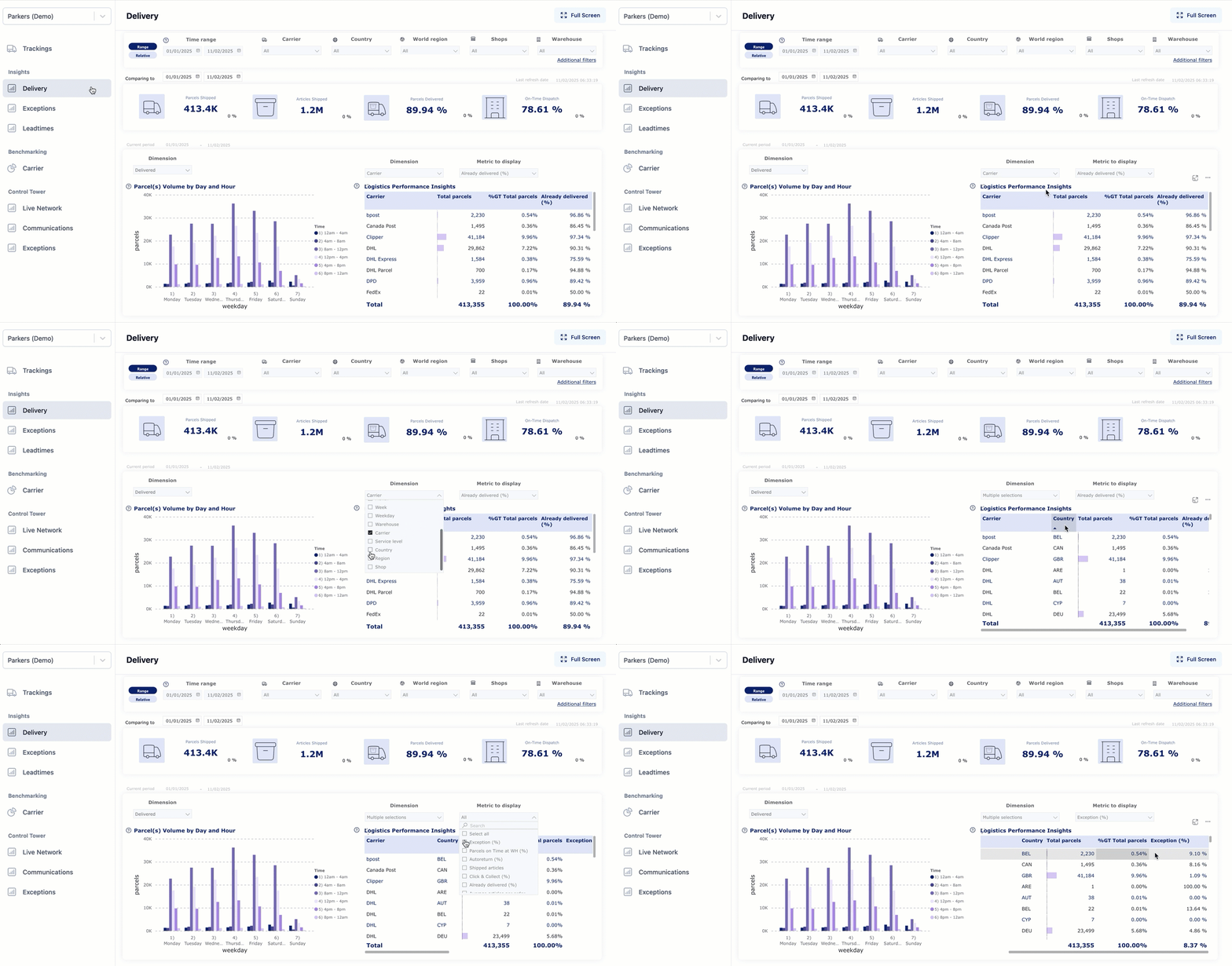
You can go to the “Logistics Performance Insights" table (Trackings module > Trackings Insights dashboard > Delivery report) and use the filter to visualize by issue type for different carriers and location.

For information on monitoring carrier performance, use the following resources:

* See our [logistics analysis documentation](https://docs.parcellab.com/docs/platform/overview/logistics-analysis).
* Watch the demo below.<br>

  <figure><img src="https://1156682959-files.gitbook.io/~/files/v0/b/gitbook-x-prod.appspot.com/o/spaces%2F-LPf1Lv1YUuLYva6LrXQ%2Fuploads%2FK7hj978VXveZm9Mzldp6%2FOverview_LogisticsPerformance.gif?alt=media&#x26;token=e0eca34b-6981-413b-ac8b-2f39f668ef40" alt="Logistics performance overview GIF"><figcaption></figcaption></figure>

</details>

<details>

<summary>How can I see which of my emails are getting the most engagement?</summary>

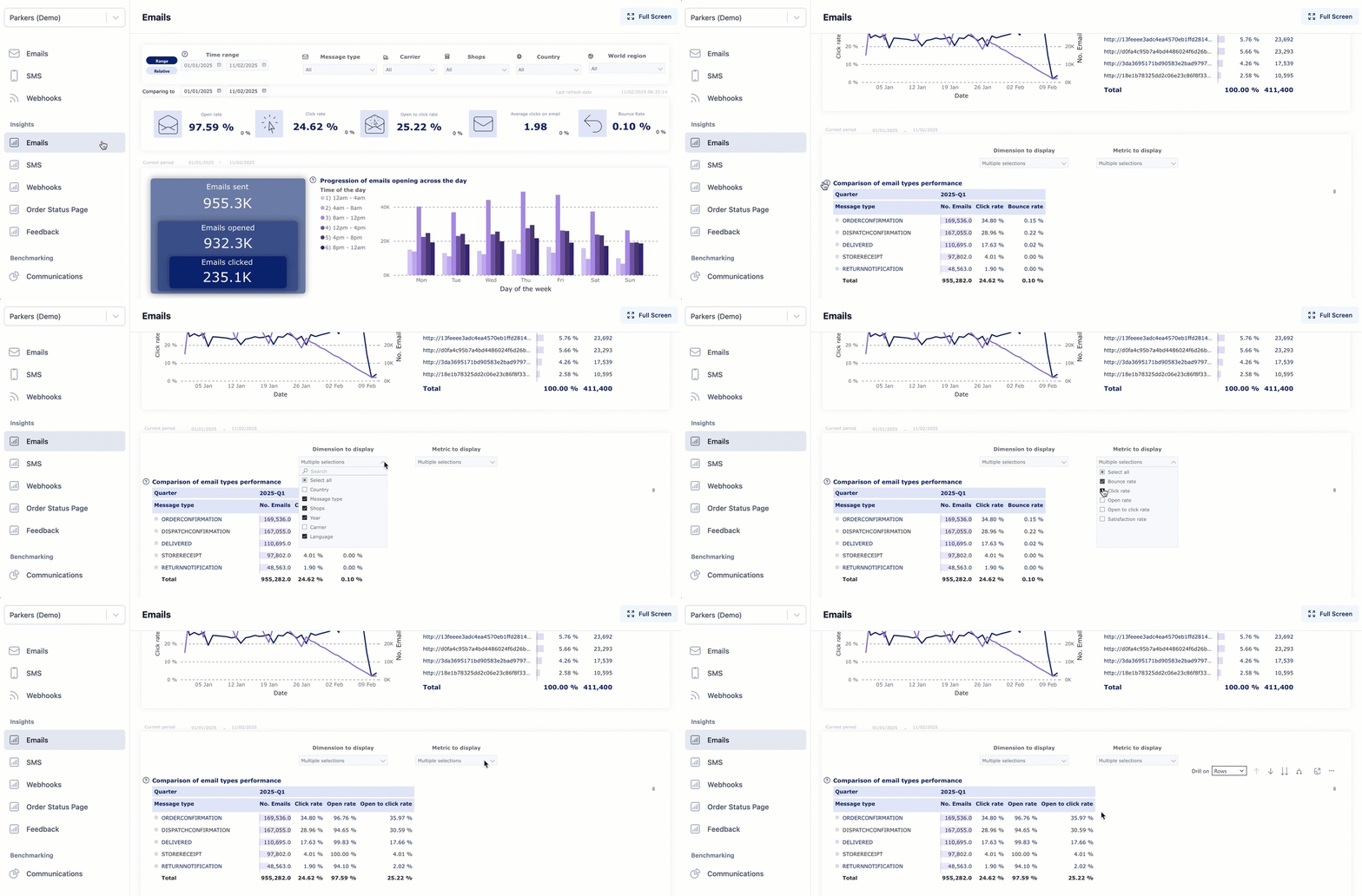
You can go to the “Comparison of email types performance” table (Communication module > Communication Insights dashboard > Emails report) and use the filter to check the open to click rate/click rate for each message type and how many emails this corresponds to, as well as view this by quarter to monitor if the click rate is consistent over time.

For information on monitoring communication performance, use the following resources:

* See our [analytics documentation](https://docs.parcellab.com/docs/platform/broken-reference).
* Watch the demo below.<br>

  <figure><img src="https://1156682959-files.gitbook.io/~/files/v0/b/gitbook-x-prod.appspot.com/o/spaces%2F-LPf1Lv1YUuLYva6LrXQ%2Fuploads%2F762naY9KZRMG3LwxVDZy%2FEmailsReport_ComparisonofEmailTypes.gif?alt=media&#x26;token=2b5c8a79-6758-4236-a2b6-0bb59b044ef0" alt="Email engagement GIF"><figcaption></figcaption></figure>

</details>

<details>

<summary>How can I see if my customers are satisfied with communications sent during the shipping process?</summary>

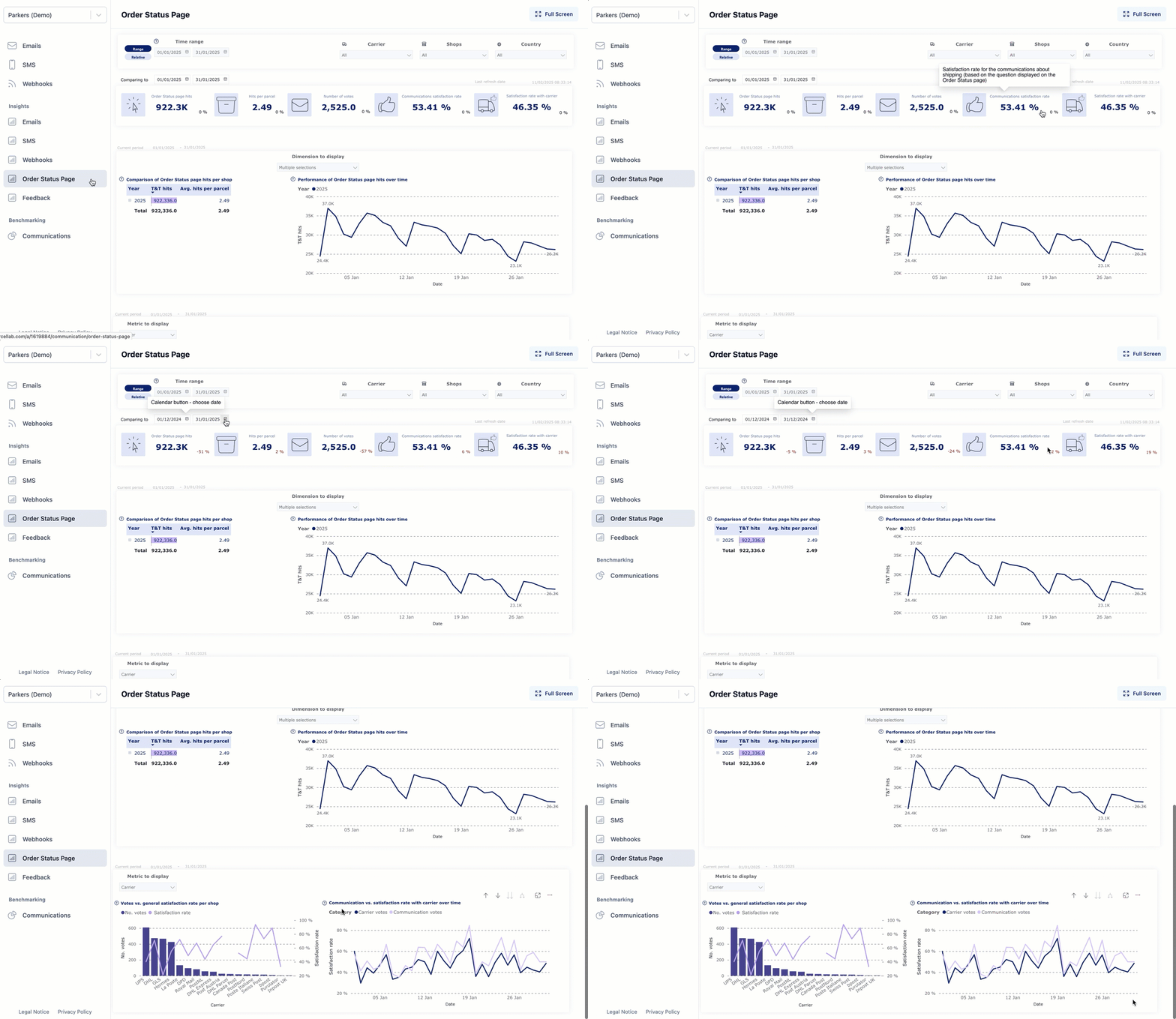
You can go to the “Communications satisfaction rate” metric (Communication module > Communication Insights dashboard > Order Status Page report) and you can change the time period you would like to compare in the date filter to see if the satisfaction rate increase or decreases over time.

You can also the “Communication vs. satisfaction rate with carrier over time” graph to see a progression of this metric.

For information on monitoring communication performance, use the following resources:

* See our [analytics documentation](https://docs.parcellab.com/docs/platform/broken-reference).
* Watch the demo below.<br>

  <figure><img src="https://1156682959-files.gitbook.io/~/files/v0/b/gitbook-x-prod.appspot.com/o/spaces%2F-LPf1Lv1YUuLYva6LrXQ%2Fuploads%2FznedOYSldeiitWwmcuXJ%2FOrderStatusPageReport_CommunicationSatisfaction.gif?alt=media&#x26;token=377d2b4d-c561-4fef-9907-00373dca9f20" alt="Order status page satisfaction GIF"><figcaption></figcaption></figure>

</details>

<details>

<summary>How can I track the current status of parcels that are delayed?</summary>

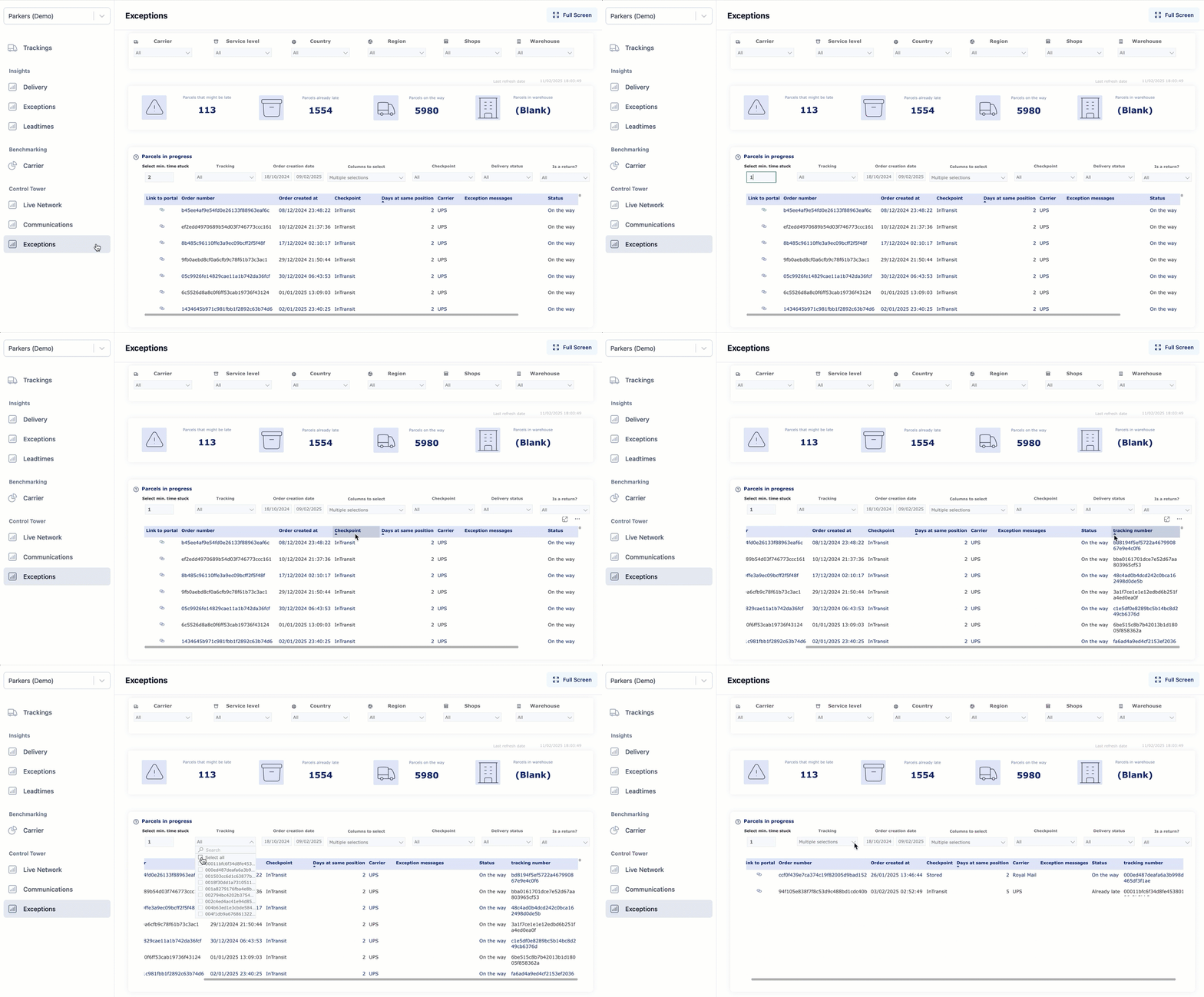
You can go to the “Parcels in progress” table (Trackings module > Control Tower dashboard > Exceptions report) and use the filter to set the minimum time stuck to one day to show you all orders that are still open (that is: created during the last 15 days). You can then check a particular order in the table and see its current status.

For information on monitoring current delivery performance, use the following resources:

* See our [analytics documentation](https://docs.parcellab.com/docs/platform/broken-reference).
* Watch the demo below.\
  &#x20;

  <figure><img src="https://1156682959-files.gitbook.io/~/files/v0/b/gitbook-x-prod.appspot.com/o/spaces%2F-LPf1Lv1YUuLYva6LrXQ%2Fuploads%2F6I4WxDfHQBRGGTrGUQdU%2FExceptionsReport_ParcelsinProgress.gif?alt=media&#x26;token=6da37436-d700-4536-99b6-2f4db679dc0b" alt="Delivery exceptions GIF"><figcaption></figcaption></figure>

</details>

<details>

<summary>What do the columns in the Trackings export mean?</summary>

The Trackings export provides information about all parcels being delivered and returned by the end-customers. It contains details such as lead-times, fulfillment of dispatch and announced delivery dates, among others.

**Note:** This report is different from the export of tracking data that you can download from the App.

For information on the columns in the Trackings export from the App, see our [Data Exports documentation](https://docs.parcellab.com/docs/platform/overview/data-exports).

</details>