> For the complete documentation index, see [llms.txt](https://docs.parcellab.com/docs/llms.txt). Markdown versions of documentation pages are available by appending `.md` to page URLs; this page is available as [Markdown](https://docs.parcellab.com/docs/platform/wismor-agent.md).

# WISMO/R Agent

Leverage AI-powered customer service assistants to automatically respond to "Where Is my Order/Return?" inquiries.

{% hint style="info" %}
We are running a pilot for this feature. For more information on the scope and requirements for using the WISMO/R agent, please contact your parcelLab representative.
{% endhint %}

## What’s New

Integrate the WISMO/R agent in your post-purchase emails, chatbot and customer support platforms to provide instant and accurate responses to customer queries about their order and delivery status in real-time.

<table data-card-size="large" data-view="cards"><thead><tr><th></th><th></th></tr></thead><tbody><tr><td><strong>Flexible channel integration</strong></td><td>Embed the WISMO/R agent into your chat interfaces or let it support customers who reply to your order status emails sent from parcelLab.</td></tr><tr><td><strong>Instant 24/7 order and delivery support</strong></td><td>Automate customer support for simple order inquiries using real-time order and tracking data, regardless of time zone or operating hours.</td></tr><tr><td><strong>Proactive expectation setting</strong></td><td>The WISMO/R agent uses context and real-time data to explain order and delivery issues, predict next steps, and provide actionable help.</td></tr><tr><td><strong>Smart response system</strong></td><td>The WISMO/R agent analyzes queries to provide real-time order status and tracking updates and escalates complex cases to your support team.</td></tr></tbody></table>

## Configuring the WISMO/R Agent

The following sections describe the configuration required for the WISMO/R agent.

### Customer Requirements

This section describes the requirements for integrating the WISMO/R agent for email and [via API](https://github.com/parcelLab/gitbook-documentation/tree/main/developers-v4/agents/agents.md) to use in your chatbots or customer service platforms.

#### WISMO/R Agent for Chat

For the feature to work, the following requirements must be met:

* Opt-in to OpenAI enabled for your parcelLab account
* API token with `read` and `write` permissions to use the [Agents API](https://github.com/parcelLab/gitbook-documentation/tree/main/developers-v4/agents/agents.md)
* Agent ID.\
  The agent ID for your WISMO/R agent will be provided by parcelLab after the agent is configured for your account.

#### WISMO/R Agent for Email

For the feature to work, the following requirements must be met:

* Opt-in to OpenAI enabled for your parcelLab account
* WISMO/R agent configured for your parcelLab account
* parcelLab Engage for email communications

{% hint style="info" %}
To integrate the WISMO/R agent for email, please contact your parcelLab representative.
{% endhint %}

#### Customizing the WISMO/R Agent

During setup, you can tailor your WISMO/R agent to your brand and support policies:

* Brand tone of voice and response style
* Links to help center articles for frequent support topics (for example: returns, warranty)
* Reference documents such as FAQs and Terms & Conditions
* Escalation conditions and human support routing
* Policy guidance for defined scenarios, including returns and refund-status inquiries

## Using the WISMO/R Agent

This section describes the process of using the WISMO/R agent to respond to order inquiries.

{% hint style="info" %}
The following visual examples are for reference only. The WISMO/R agent can be configured to respond according to your brand requirements (for example: tone of voice, links to FAQs).
{% endhint %}

{% tabs %}
{% tab title="WISMO/R Agent for Email" %}

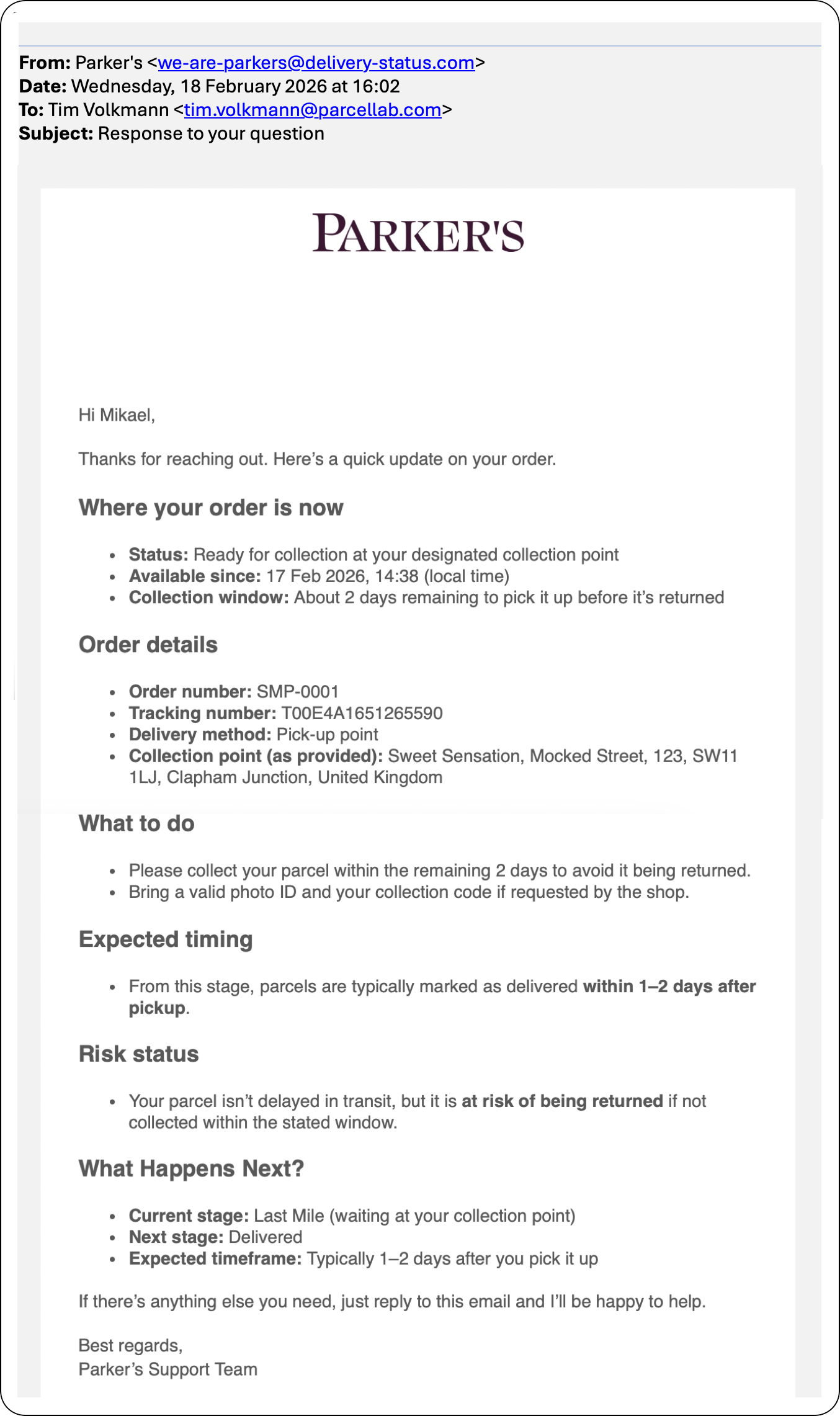
<div align="left"><figure><img src="https://1156682959-files.gitbook.io/~/files/v0/b/gitbook-x-prod.appspot.com/o/spaces%2F-LPf1Lv1YUuLYva6LrXQ%2Fuploads%2FzHjdKhw6hDGFkuVPw5ma%2FWISMOEmailResponse.png?alt=media&amp;token=1f5742be-ef59-474b-984f-aba239c7216a" alt="Example email response automated via the wismo agent" width="563"><figcaption></figcaption></figure></div>

When integrated in your email communications from parcelLab, the WISMO/R agent automatically responds to emails from customers who reply to your order and delivery email updates.

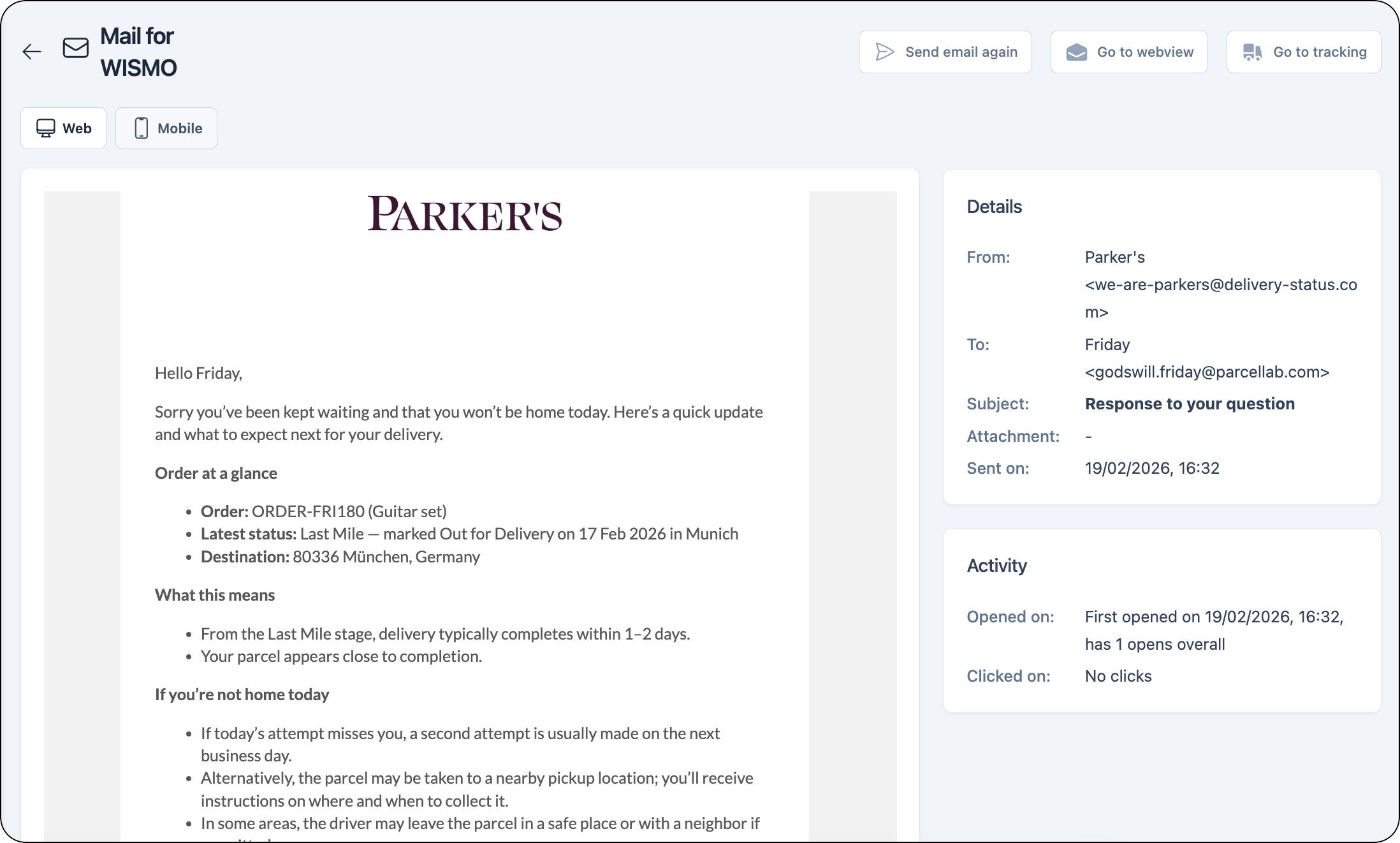
These messages can be viewed for each tracking in the parcelLab App on the tracking details page.

<figure><img src="https://1156682959-files.gitbook.io/~/files/v0/b/gitbook-x-prod.appspot.com/o/spaces%2F-LPf1Lv1YUuLYva6LrXQ%2Fuploads%2FdQ3tSZpykBuIjFpeCvIq%2FTrackingDetails_AgentEmailView.png?alt=media&amp;token=99508abb-96d5-4fa3-b769-52424507cec7" alt="Message record in the parcelLab App for the email sent by the wismo agent"><figcaption></figcaption></figure>

The WISMO/R agent can also be configured to forward the email thread to your support team in cases where the agent is unable to provide further assistance to the customer or you would like the customer service team to get involved. Possible scenarios include packages or goods that are damaged or were lost in transit.
{% endtab %}

{% tab title="WISMO/R Agent for Chat" %}

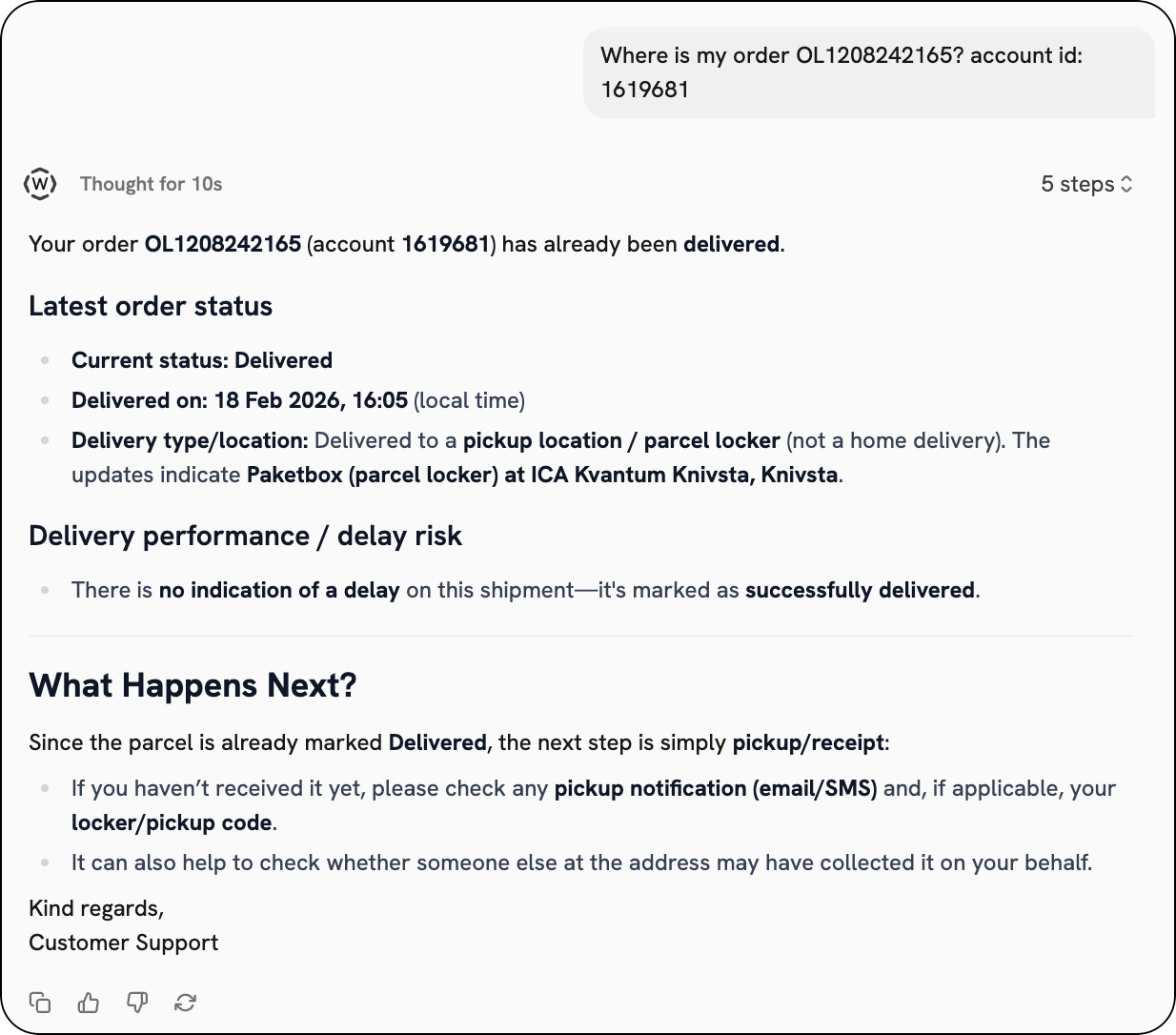
<div align="left"><figure><img src="https://1156682959-files.gitbook.io/~/files/v0/b/gitbook-x-prod.appspot.com/o/spaces%2F-LPf1Lv1YUuLYva6LrXQ%2Fuploads%2FPbEGV5cA65IuZlx40kDf%2FWISMOChatDelivered.png?alt=media&amp;token=6b2d8f4e-5d8d-4ad2-b531-35a0bc460d13" alt="Example chat with wismo agent"><figcaption></figcaption></figure></div>

When integrated in your chat interfaces or app, the WISMO/R agent can provide a detailed order status update at any time, and suggest helpful next steps to your customers based on the tracking information available.
{% endtab %}
{% endtabs %}

## Monitor WISMO/R Agent Activity

You can review WISMO/R agent activity from the AI Agents section in the parcelLab App, which you can access from the global navigation menu.

<figure><img src="https://1156682959-files.gitbook.io/~/files/v0/b/gitbook-x-prod.appspot.com/o/spaces%2F-LPf1Lv1YUuLYva6LrXQ%2Fuploads%2FWzhtfFJfADRWqlzOoYfB%2FAIAgentsOptionFullScreen.png?alt=media&amp;token=56457e22-73ea-44b6-b859-e825bcdd55f0" alt="AI Agents menu option"><figcaption></figcaption></figure>

The AI Agents section consists of the following pages that can be accessed from the AI Agents menu.

<details>

<summary>Dashboard</summary>

The Dashboard page provides a centralized overview of WISMO/R agent activity and other configured agents, including recent conversations for easy review and quick links to failed runs and running conversations.

<div align="left"><figure><img src="https://1156682959-files.gitbook.io/~/files/v0/b/gitbook-x-prod.appspot.com/o/spaces%2F-LPf1Lv1YUuLYva6LrXQ%2Fuploads%2F7ff2tyMJ6rcqJDLWaVqE%2FAIAgentsDashboard.png?alt=media&amp;token=11b8272b-96ee-4f50-bc66-d527d56fd818" alt="Dashboard page" width="563"><figcaption></figcaption></figure></div>

</details>

<details>

<summary>Agents</summary>

The Agents page displays configured agents for your account. You can review WIMSO/R agent settings, customer conversations and agent responses.

<div align="left"><figure><img src="https://1156682959-files.gitbook.io/~/files/v0/b/gitbook-x-prod.appspot.com/o/spaces%2F-LPf1Lv1YUuLYva6LrXQ%2Fuploads%2FuwJIVS0zoB3uA9XqVfVu%2FAIAgentsAgents.png?alt=media&amp;token=4f3c20b0-042d-4ffb-9ef2-5c8b6e773353" alt="Agents page" width="563"><figcaption></figcaption></figure></div>

</details>

<details>

<summary>Conversations</summary>

The Conversations page displays recent conversations for your account. You can filter these by status to review WISMO/R agent conversations and identify any that need follow-up.

<div align="left"><figure><img src="https://1156682959-files.gitbook.io/~/files/v0/b/gitbook-x-prod.appspot.com/o/spaces%2F-LPf1Lv1YUuLYva6LrXQ%2Fuploads%2Fv6k30HCKdCC5TZUxFONG%2FAIAgentsConversations.png?alt=media&amp;token=762df9c1-6332-4b55-81ee-ed4bef3b3a12" alt="Conversations page" width="563"><figcaption></figcaption></figure></div>

</details>

{% hint style="info" icon="book" %}

#### Check out the parcelLab guides

For further information on monitoring agents, see our [user guide documentation](https://docs.parcellab.com/guides/ai-agents/overview).
{% endhint %}


---

# Agent Instructions
This documentation is published with GitBook. GitBook is the documentation platform designed so that both humans and AI agents can read, navigate, and reason over technical content effectively. Learn more at gitbook.com.

## Querying This Documentation
If you need additional information that is not directly available in this page, you can query the documentation by asking a question.

Perform an HTTP GET request on the following URL with the `ask` and `goal` query parameters:

```
GET https://docs.parcellab.com/docs/platform/wismor-agent.md?ask=<question>&goal=<user_goal>
```

`ask` is the immediate question: it should be specific, self-contained, and written in natural language.
`goal` is what the user is ultimately trying to achieve, the reason they need the answer. Sharing it helps GitBook give you a better, more relevant answer. A goal is most helpful when it describes the outcome the user wants rather than restating the question. For example, with `ask=how do I create an API token`, a goal like `automate deployments from our CI pipeline` lets GitBook tailor the answer to that use case.

The response will contain a direct answer to the question and relevant excerpts and sources from the documentation.

Use this mechanism when the answer is not explicitly present in the current page, you need clarification or additional context, or you want to retrieve related documentation sections.