> For the complete documentation index, see [llms.txt](https://docs.parcellab.com/docs/llms.txt). Markdown versions of documentation pages are available by appending `.md` to page URLs; this page is available as [Markdown](https://docs.parcellab.com/docs/retain/returns-portal/features/customs-handling.md).
# Customs Handling
Facilitate straightforward customs clearance for cross-border returns by providing an additional customs invoice.
## Overview
If you accept returns across customs borders, parcelLab’s Customs Handling feature supports this process for your customers using the space.vars.Product\_ReturnsPortal to register their return. This is integrated into your space.vars.Product\_ReturnsPortal setup.
When your return carrier’s API is called to produce a label during the return registration process, parcelLab will also submit all the required information to facilitate the cross-border return. If there are additional documents required, such as a commercial invoice, these will be available for your customers to download in the space.vars.Product\_ReturnsPortal.
### Additional Customs Invoice
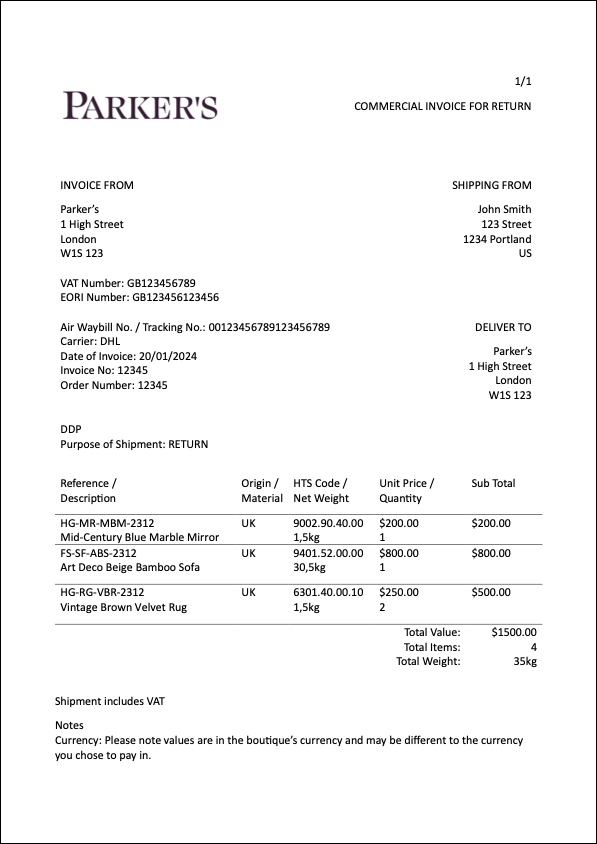
An additional invoice can be generated as a PDF file for cross-border return shipments. This additional invoice facilitates a smooth customs clearance by providing essential information required for processing (for example: VAT number, EORI number) that may not be present in your default invoices to customers.
## Configuring the Additional Customs Invoice
The following sections describe the configuration required for the Additional Customs Invoice.
### Customer Requirements
For the feature to work, you need to provide the following:
{% hint style="warning" %}
Additional information may be required based on carrier and/or country requirements.
{% endhint %}
* Your company's information:
* Registered address (that is: street, zip code, city and country)
* Value-added tax (VAT) number
* Economic Operators Registration and Identification (EORI) number
* Duty type (for example: DDP)
* Delivery address (if different from the registered address)
* Order-specific identification numbers for the original outbound shipment:
* Air waybill or tracking number
* Name of carrier
* Date of invoice
* Invoice number
* Order number
* Detailed article information:
* Item reference number (for example: SKU)
* Item description
* Country of origin
* HTS code for the country the item will be returned to
* Net weight
* Unit price
* Quantity
### Implementation Process
To activate this feature, please contact your parcelLab representative with the information specified under the [Customer Requirements](#customer-requirements) section.
---
# Agent Instructions
This documentation is published with GitBook. GitBook is the documentation platform designed so that both humans and AI agents can read, navigate, and reason over technical content effectively. Learn more at gitbook.com.
## Querying This Documentation
If you need additional information that is not directly available in this page, you can query the documentation by asking a question.
Perform an HTTP GET request on the following URL with the `ask` and `goal` query parameters:
```
GET https://docs.parcellab.com/docs/retain/returns-portal/features/customs-handling.md?ask=&goal=
```
`ask` is the immediate question: it should be specific, self-contained, and written in natural language.
`goal` is what the user is ultimately trying to achieve, the reason they need the answer. Sharing it helps GitBook give you a better, more relevant answer. A goal is most helpful when it describes the outcome the user wants rather than restating the question. For example, with `ask=how do I create an API token`, a goal like `automate deployments from our CI pipeline` lets GitBook tailor the answer to that use case.
The response will contain a direct answer to the question and relevant excerpts and sources from the documentation.
Use this mechanism when the answer is not explicitly present in the current page, you need clarification or additional context, or you want to retrieve related documentation sections.