# Gift Returns Portal

## Overview

{% hint style="warning" %}
The Gift Returns Portal is currently available for Shopify only.
{% endhint %}

The Gift Returns Portal is a <code class="expression">space.vars.Product\_ReturnsPortal</code> for end-users who are not the customer that made the original store purchase.&#x20;

The link to the Gift Returns Portal can be communicated via email during the delivery process or accessed from a link in your online shop.

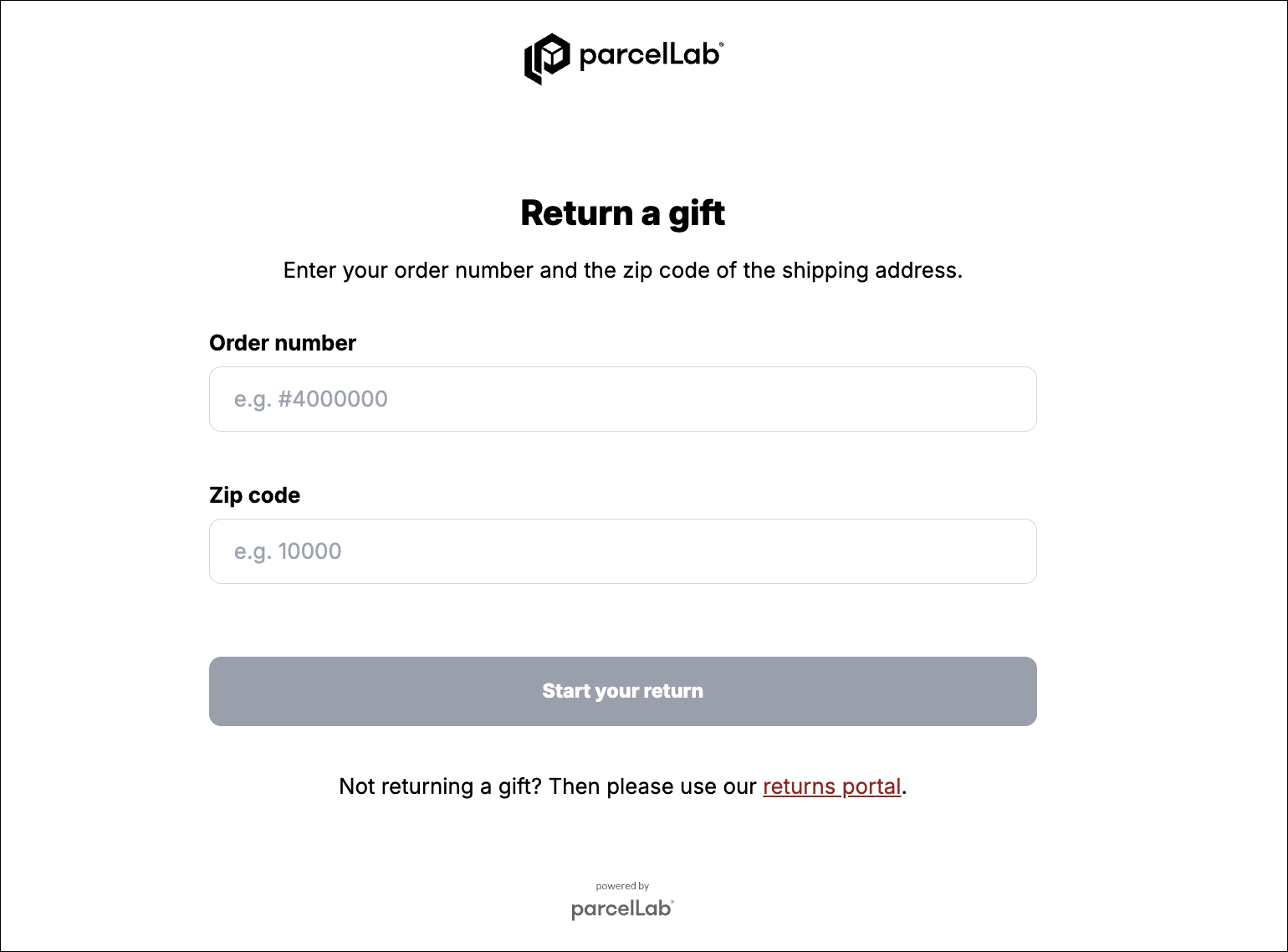
Gift receivers can login with the order number and the zip code of the delivery address and select between receiving a gift card for your store or exchanging the item for a different color or size.&#x20;

They can also update their contact information in the Gift Returns Portal to ensure they receive all communication about their gift return.&#x20;

#### Key Benefits

Enabling gift receivers to return or exchange gifts without contacting the gift giver can enhance the overall gifting experience. The Gift Returns Portal enables digital returns for gifts, extending the existing online shopping experience for gifts by accommodating various preferences and ensuring that recipients can genuinely enjoy and make the most of their gifts.

## Configuring the Gift Returns Portal Feature

The following sections describe the configuration required for the Gift Returns Portal feature.

### Customer Requirements

For the feature to work, you need to provide the following:

* The compensation methods available for gift returns (for example: exchange or gift card)

### Implementation Process

To activate this feature, please contact your parcelLab representative with the information specified under the [Customer Requirements](#customer-requirements) section.&#x20;

## Using the Gift Returns Portal

This section describes the process of registering a return using the Gift Returns Portal.

{% hint style="info" %}
The following visual examples are for reference only.&#x20;

The Gift Returns Portal can be styled according to your brand requirements (for example: following your existing <code class="expression">space.vars.Product\_ReturnsPortal</code>) and the displayed components depend on which features are activated.
{% endhint %}

{% tabs %}
{% tab title="Login" %}

<figure><img src="https://1156682959-files.gitbook.io/~/files/v0/b/gitbook-x-prod.appspot.com/o/spaces%2F-LPf1Lv1YUuLYva6LrXQ%2Fuploads%2FntPGD1zaoaslGwCcT7oR%2FparcelFashionRP_Gift%20Return%20Login%20Page.png?alt=media&#x26;token=841fde89-7f3c-49b2-9929-177d5db495da" alt="" width="563"><figcaption><p>Gift Returns Portal login page</p></figcaption></figure>

Users sign in with the order number and the zip code of the delivery address.
{% endtab %}

{% tab title="Item Selection" %}

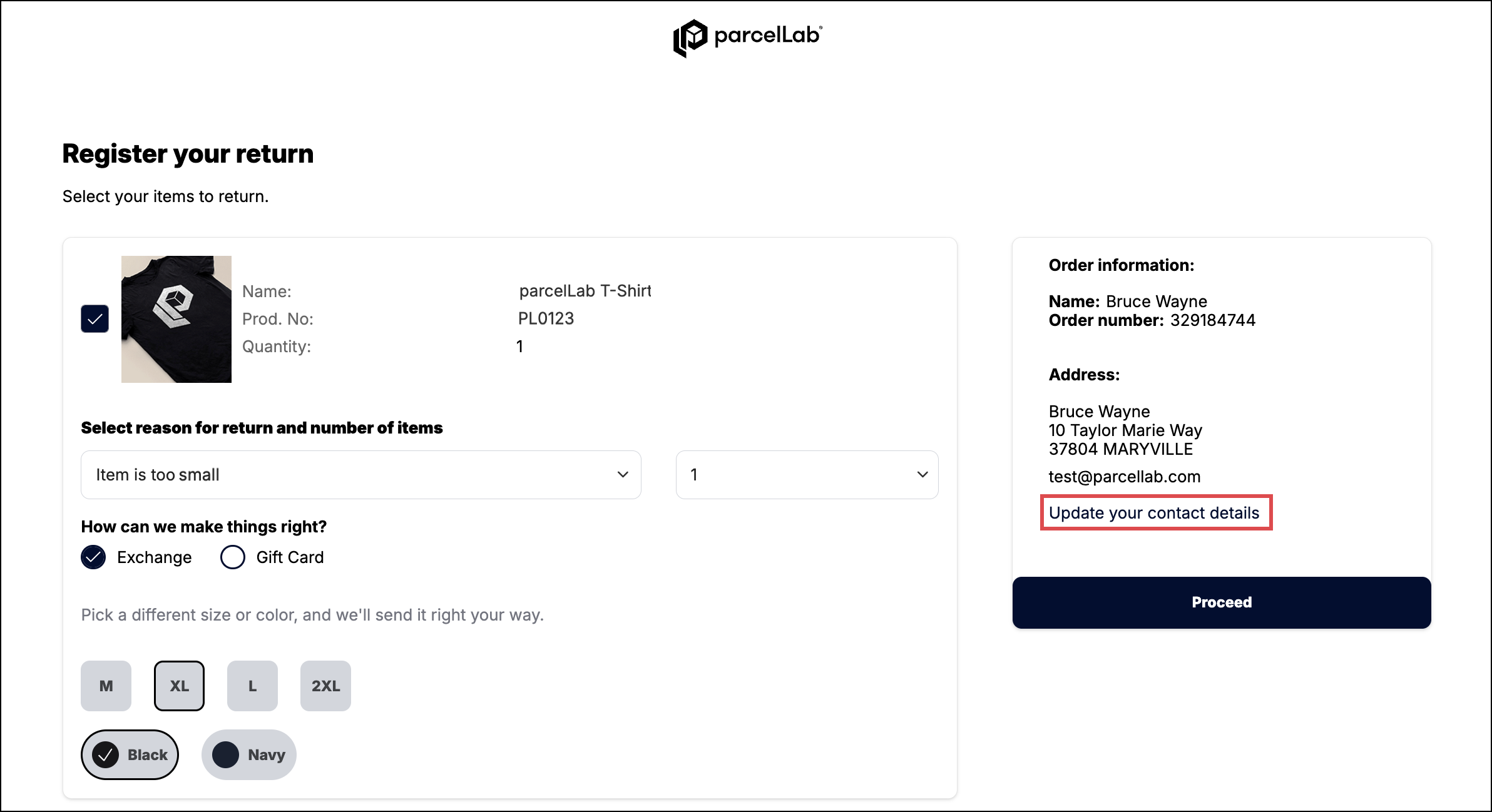
<figure><img src="https://1156682959-files.gitbook.io/~/files/v0/b/gitbook-x-prod.appspot.com/o/spaces%2F-LPf1Lv1YUuLYva6LrXQ%2Fuploads%2FAEN7mmAyEDWJ7fFGdQxM%2FparcelFashion%20Gift%20RP_Item%20Selection%20Page%20Update%20button%20highlighted.png?alt=media&#x26;token=35d2ee04-e752-4c01-ab4e-602fed7bd3a6" alt=""><figcaption><p>Gift return selection page with option to update contact information</p></figcaption></figure>

On the item selection page, users can select items to return, the quantity, and reason for return applicable for each item. On this page, users can also update their contact information to ensure that they receive all communications related to their return.&#x20;
{% endtab %}

{% tab title="Carrier Selection" %}

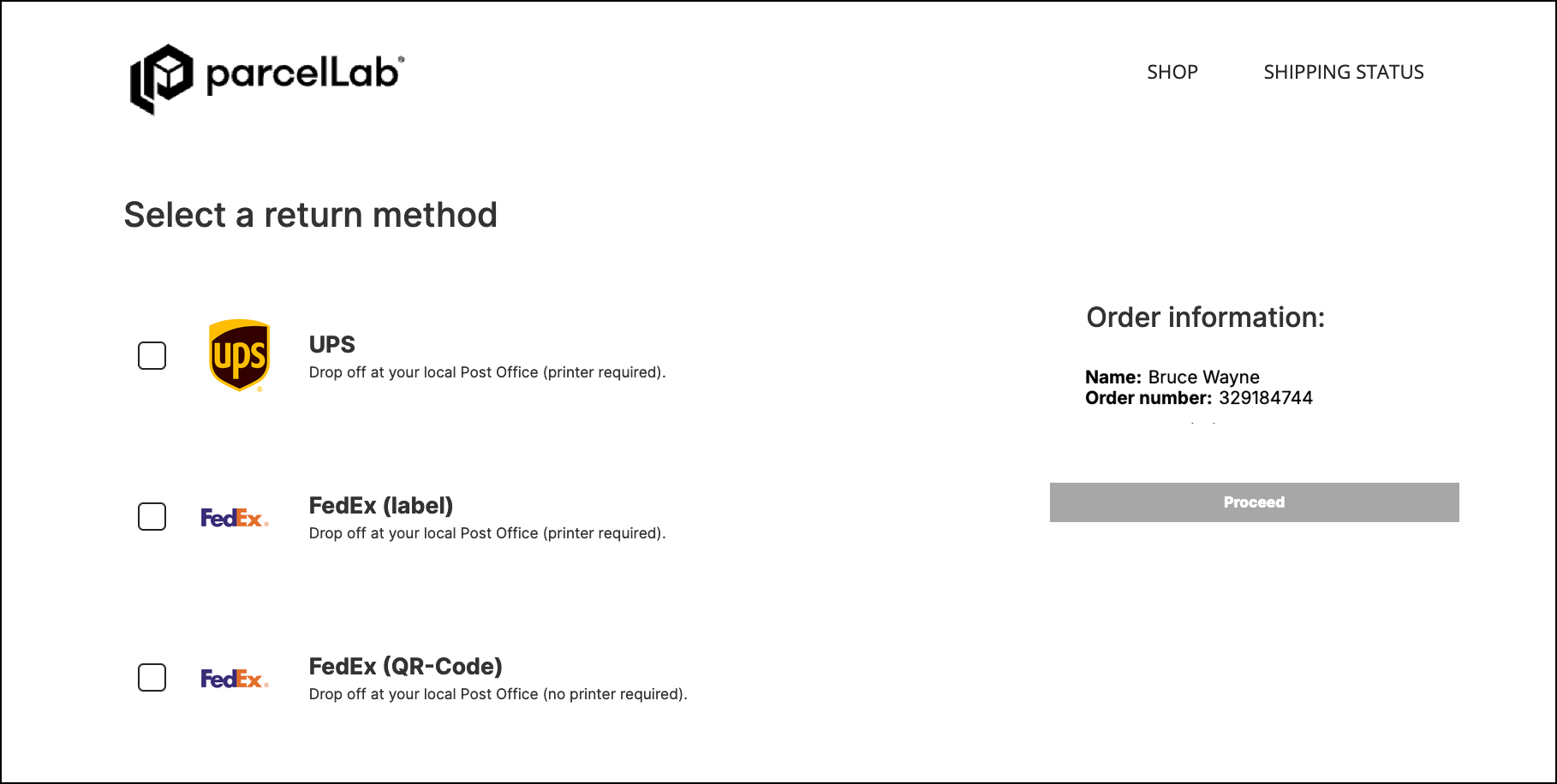
<figure><img src="https://1156682959-files.gitbook.io/~/files/v0/b/gitbook-x-prod.appspot.com/o/spaces%2F-LPf1Lv1YUuLYva6LrXQ%2Fuploads%2FDaO1Lc8HASfNeQaUQgjU%2FparcelFashion%20Gift%20RP_Gift%20Return%20Carrier%20Selection%20Page.png?alt=media&#x26;token=781608b5-1cf8-4667-8c2a-27813419b5ba" alt=""><figcaption></figcaption></figure>

After users have selected the items to return, they can be directed to a carrier selection page.

{% hint style="info" %}
This page is optional and can be skipped if you only have one carrier that can be used for returns.
{% endhint %}
{% endtab %}

{% tab title="Return Confirmation" %}

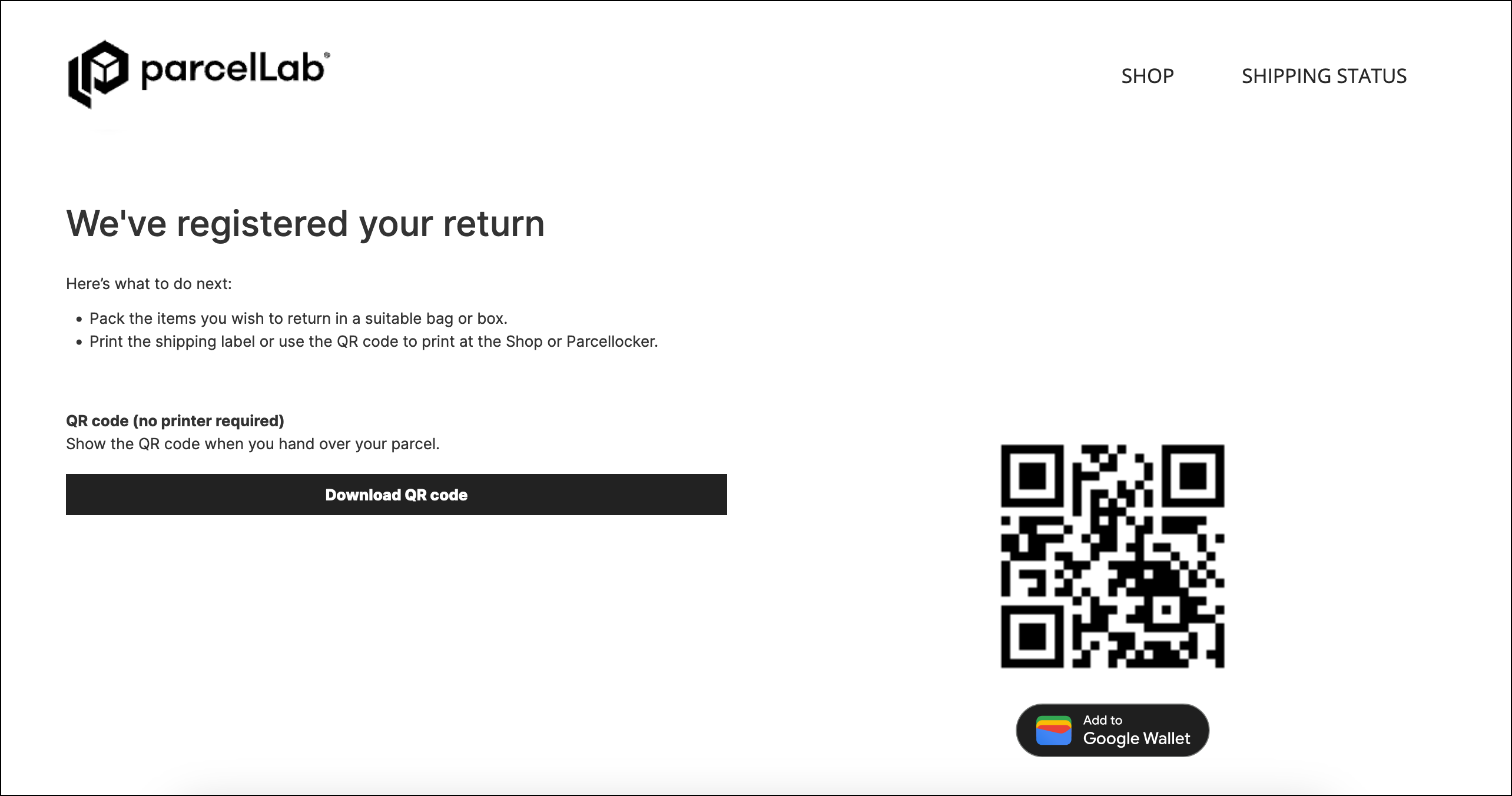
<figure><img src="https://1156682959-files.gitbook.io/~/files/v0/b/gitbook-x-prod.appspot.com/o/spaces%2F-LPf1Lv1YUuLYva6LrXQ%2Fuploads%2FpXMWbG6AcH6sFFZXFPCn%2FparcelFashion%20Gift%20RP_Return%20Confirmation%20Page.png?alt=media&#x26;token=ba70b958-fe9c-4722-b3d7-78a9c1ba5a7b" alt=""><figcaption></figcaption></figure>

On the confirmation page, users will receive confirmation that their return is registered. The information displayed can include return labels and QR codes, and a summary of the items that have been registered for return. &#x20;

The information available on the confirmation page is also sent to the user via email as confirmation of their return registration. &#x20;
{% endtab %}
{% endtabs %}


---

# Agent Instructions: Querying This Documentation

If you need additional information that is not directly available in this page, you can query the documentation dynamically by asking a question.

Perform an HTTP GET request on the current page URL with the `ask` query parameter:

```
GET https://docs.parcellab.com/docs/retain/returns-portal/features/gift-returns-portal.md?ask=<question>
```

The question should be specific, self-contained, and written in natural language.
The response will contain a direct answer to the question and relevant excerpts and sources from the documentation.

Use this mechanism when the answer is not explicitly present in the current page, you need clarification or additional context, or you want to retrieve related documentation sections.