> For the complete documentation index, see [llms.txt](https://docs.parcellab.com/docs/llms.txt). Markdown versions of documentation pages are available by appending `.md` to page URLs; this page is available as [Markdown](https://docs.parcellab.com/docs/retain/returns-portal/features/orderless-returns.md).
# Orderless Returns
Enable a seamless process for customers to return items purchased from third-party retailers or offline channels.
## Overview
{% hint style="warning" %}
The Orderless Returns feature is currently available for Shopify only.
{% endhint %}
Orderless Returns allows customers that purchased items through resellers, marketplaces or in-store to initiate a return through a branded returns portal, even without an online order or known purchase record.
Customers can search for the product via a product catalogue or manually enter product details. Once a match is found, a return can be generated, allowing customers to complete the return journey as if they had purchased directly from your brand.
### Key Benefits
Using Orderless Returns provides an alternative method for customers to return items not bought online or via third-party retailers (for example: honoring product warranties). This functionality expands return capabilities to ease fulfillment of product guarantees regardless of the platform used for the original purchase. In turn, it reduces friction for customers when returning items directly to a retailer, improving customer satisfaction and providing a consistent branded experience.
## Configuring the Orderless Returns Feature
The following sections describe the configuration required for the Orderless Returns feature.
### Customer Requirements
For the feature to work, you need to provide the following:
* Access to the product catalogue to allow customers to search for and select the item they want to return from your store
### Implementation Process
To activate this feature, please contact your parcelLab representative with the information specified under the [Customer Requirements](#customer-requirements) section.
## Using Orderless Returns
This section describes the process of registering a return using the Orderless Returns feature.
{% hint style="info" %}
The following visual examples are for reference only. The Orderless Returns feature can be styled according to your brand requirements (for example: following your existing Returns Portal).
{% endhint %}
{% tabs %}
{% tab title="Orderless Returns Access" %}
Providing access to Orderless Returns as part of your returns process is customizable. In this example, users can select **Product** to start the Orderless Returns flow. Whereas, clicking **Order** will open the standard returns process.
{% hint style="info" %}
For more information on the scope and requirements of this feature, please contact your parcelLab representative.
{% endhint %}
{% endtab %}
{% tab title="Product Catalogue" %}
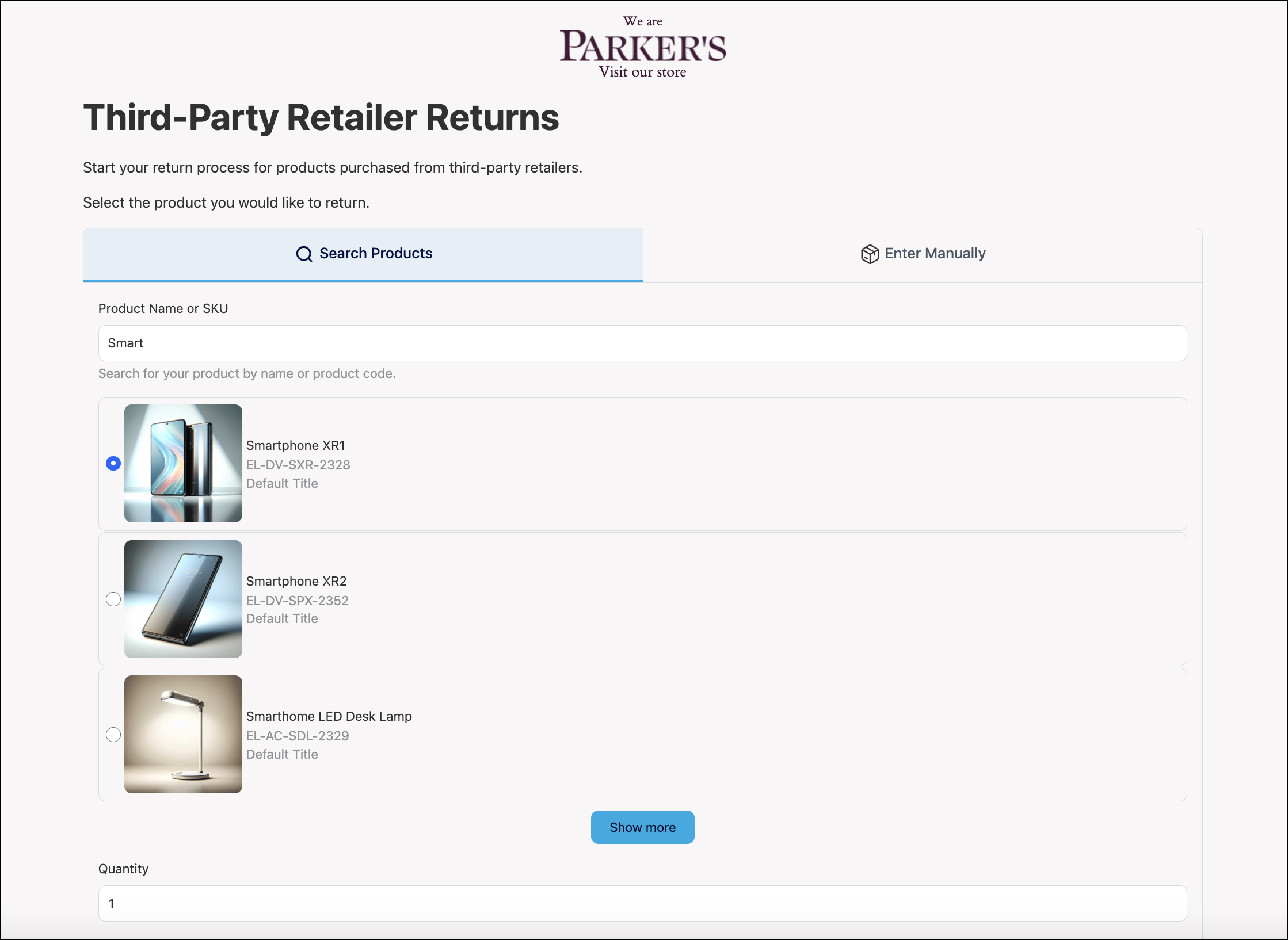
The initial screen displayed is the item search page where users can find the product they want to return by searching the product catalogue.
{% endtab %}
{% tab title="Manual Entry" %}
Alternatively, users can also manually enter the product name and category for the returning item.
{% endtab %}
{% tab title="Address Details" %}
After users have selected the item to return, they are directed to a page to provide relevant address information in order to receive all relevant communications related to their return.
{% endtab %}
{% tab title="Item Selection" %}
On the item selection page, users can confirm the item they want to return and reason for returning the item and then follow the standard returns process.
{% hint style="info" %}
If the item was selected using the product catalogue, the corresponding product image will display. No image is shown if the product details were entered manually.
{% endhint %}
On this page, users can also update their communication preferences and contact information to ensure that they receive return communications.
{% endtab %}
{% endtabs %}
---
# Agent Instructions
This documentation is published with GitBook. GitBook is the documentation platform designed so that both humans and AI agents can read, navigate, and reason over technical content effectively. Learn more at gitbook.com.
## Querying This Documentation
If you need additional information that is not directly available in this page, you can query the documentation by asking a question.
Perform an HTTP GET request on the following URL with the `ask` and `goal` query parameters:
```
GET https://docs.parcellab.com/docs/retain/returns-portal/features/orderless-returns.md?ask=&goal=
```
`ask` is the immediate question: it should be specific, self-contained, and written in natural language.
`goal` is what the user is ultimately trying to achieve, the reason they need the answer. Sharing it helps GitBook give you a better, more relevant answer. A goal is most helpful when it describes the outcome the user wants rather than restating the question. For example, with `ask=how do I create an API token`, a goal like `automate deployments from our CI pipeline` lets GitBook tailor the answer to that use case.
The response will contain a direct answer to the question and relevant excerpts and sources from the documentation.
Use this mechanism when the answer is not explicitly present in the current page, you need clarification or additional context, or you want to retrieve related documentation sections.