# Return Reasons

## Overview

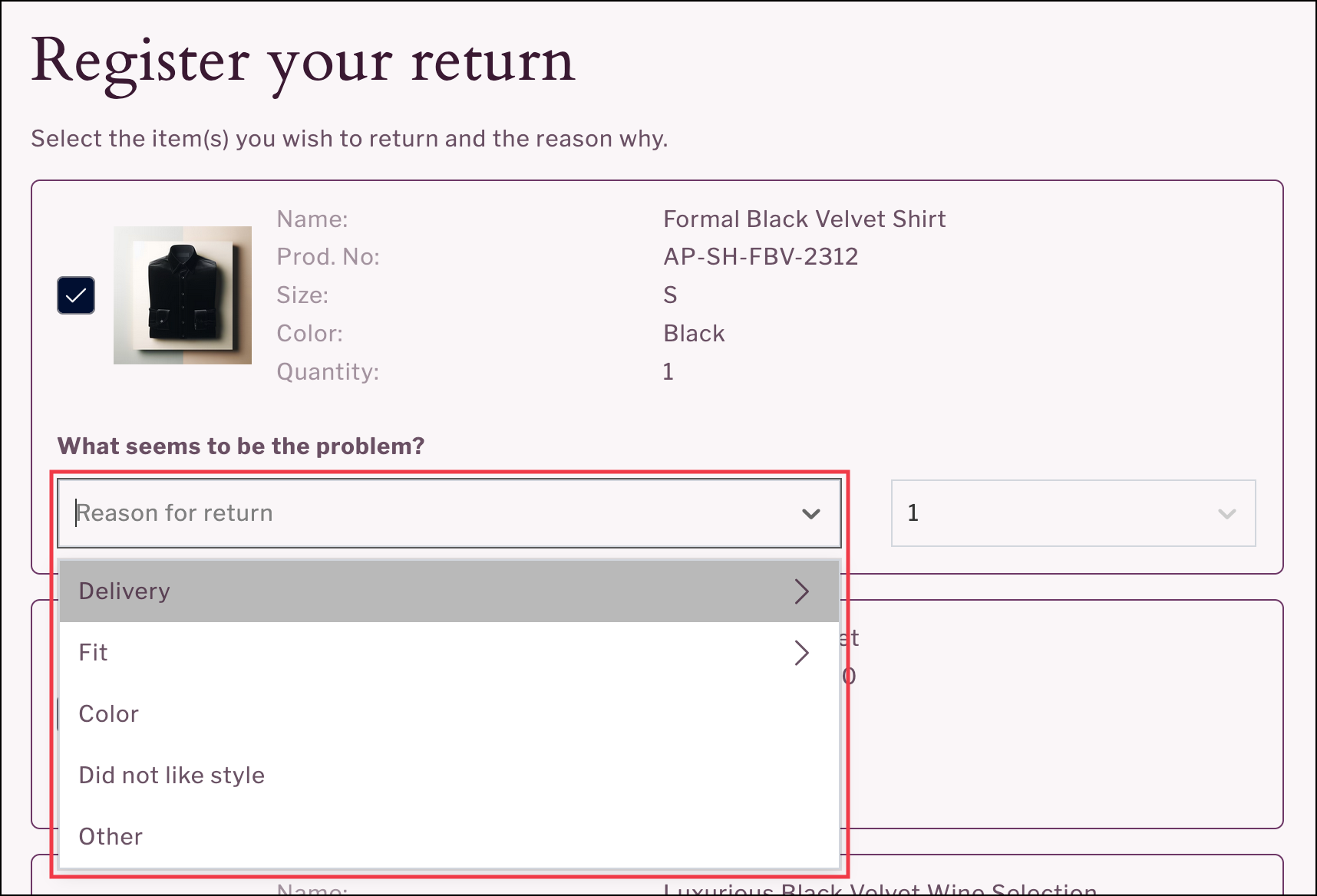
Return reasons are available as a drop-down list on the item selection page of the <code class="expression">space.vars.Product\_ReturnsPortal</code>. The list of return reasons displayed can be customized in the following ways:

* Define groups to categorize the return reasons displayed (for example: grouping them into preference-related reasons and delivery-related issues).
* Display different return reasons during trial or warranty periods.\
  This enables you to restrict the selection of return reasons during defined time periods.
* Display return reasons based on product categories.\
  This enables your customers to select return reasons tailored to specific product categories. For details on requirements, refer to the [Configuring Category-Based Return Reasons](#configuring-category-based-return-reasons) section.
* Define additional filters for the display of selectable return reasons (for example: based on order or product attributes).

<figure><img src="https://1156682959-files.gitbook.io/~/files/v0/b/gitbook-x-prod.appspot.com/o/spaces%2F-LPf1Lv1YUuLYva6LrXQ%2Fuploads%2F5p4NW5ojMxPBSZFkvOSy%2FReasonGroupFashion.png?alt=media&#x26;token=24327206-6c1f-43e2-878f-f4df87558e9e" alt="List of return reasons on item selection page "><figcaption></figcaption></figure>

Data on the return reasons for the most-returned items and problem descriptions can be viewed in the Item Insights report of the <code class="expression">space.vars.Report\_ReturnsInsights</code> dashboard within the <code class="expression">space.vars.Product\_pLApp</code>.

#### Key Benefits

Return reasons enable a data-oriented way to identify patterns in returns behavior or measure the traction of products. The flexible configuration of return reasons also allows your customers to select return reasons that are tailored to the product, providing a better customer experience and product feedback. Data collected from return reasons can be used to drive calculated decisions towards reducing returns and ultimately improving customer satisfaction.

## Configuring the Return Reasons Feature

This section describes the configuration required for return reasons.

Each return reason listed in your <code class="expression">space.vars.Product\_ReturnsPortal</code> is mapped to your internal code for the return reason for reporting purposes.

{% hint style="info" %}
If you use Shopify, the return reasons displayed will be mapped to Shopify's standard list of return reasons.&#x20;
{% endhint %}

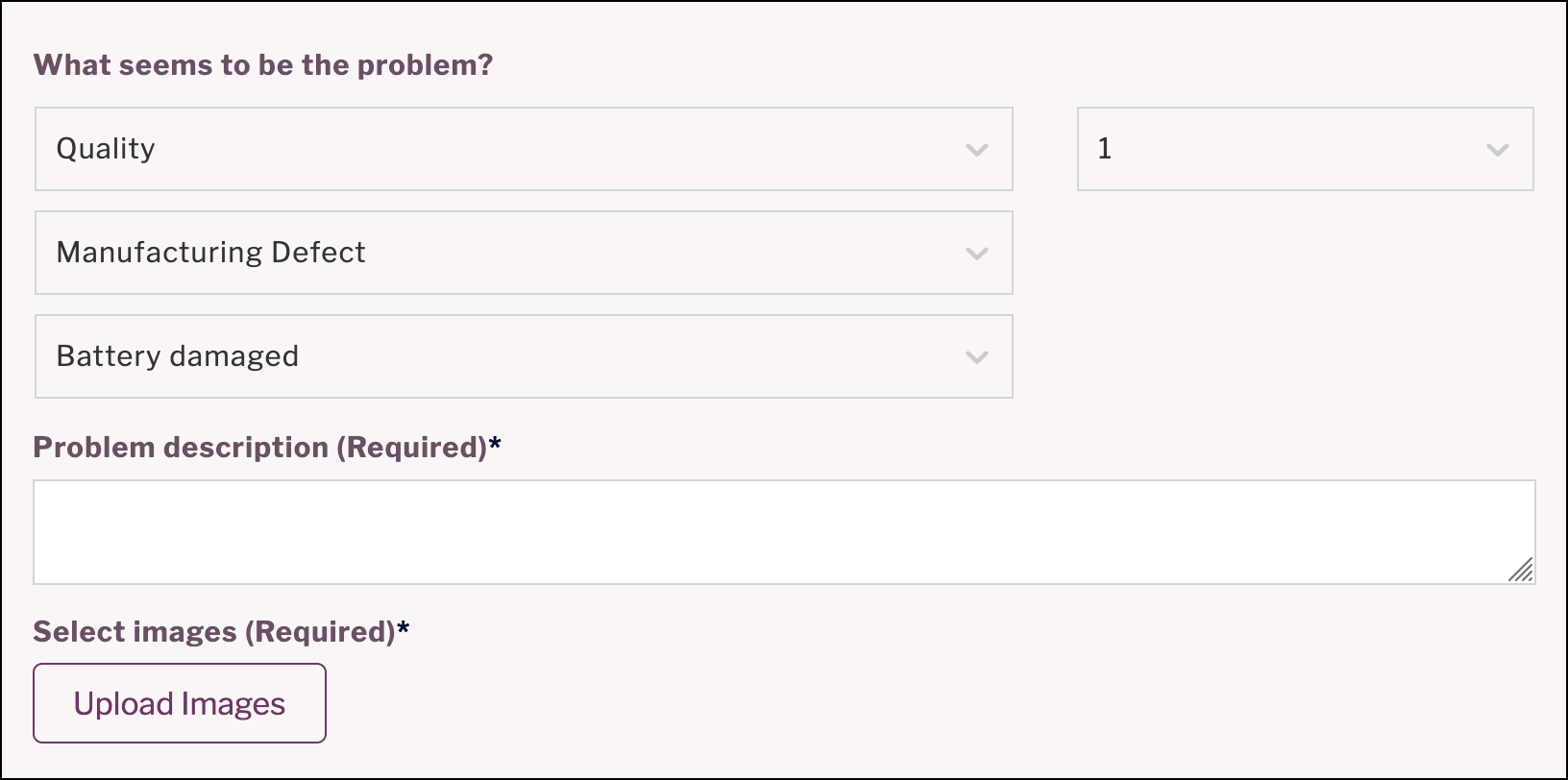
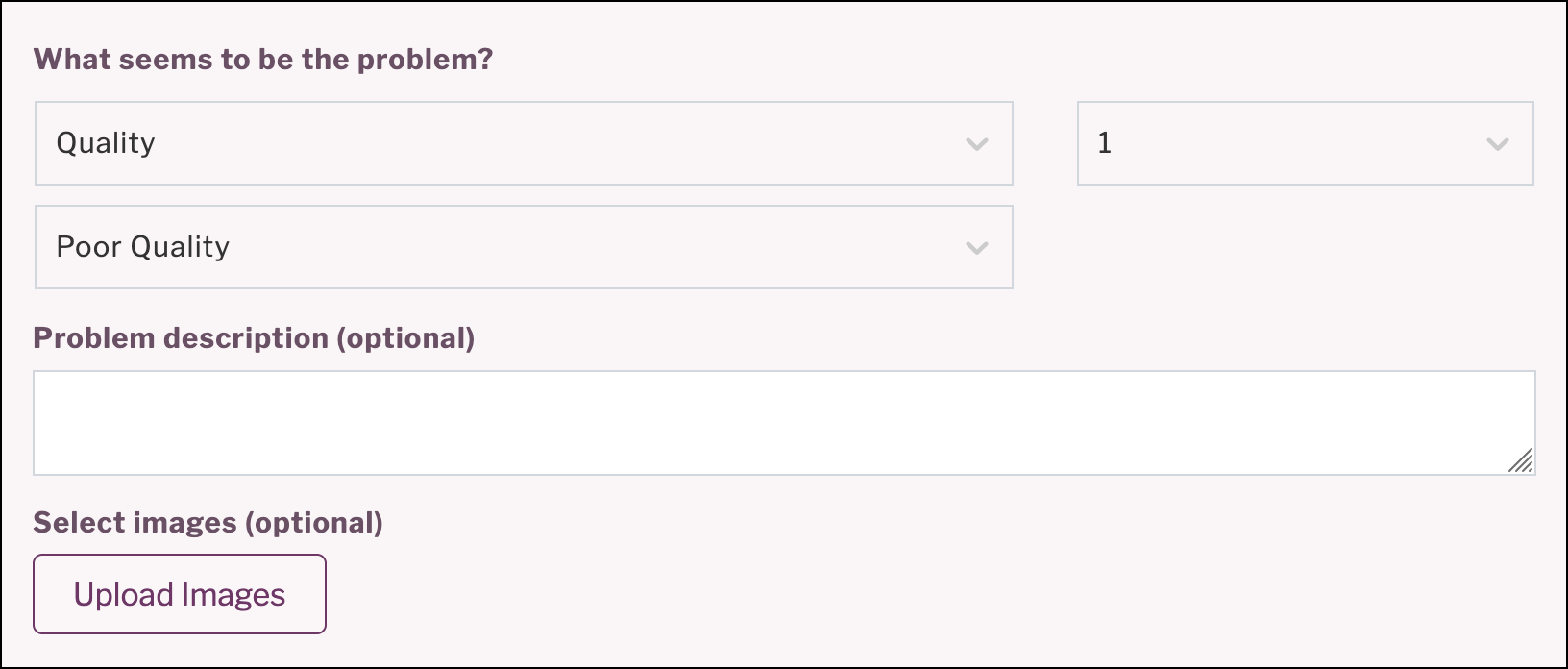
Return reasons can be configured to display additional feedback components when selected. These include an image upload section and a free text field for problem descriptions.&#x20;

The feedback components can be activated for any return reason and can be made mandatory or optional depending on the return reason selected.&#x20;

Including feedback components is useful in cases where customer support needs to review the return registration before it is approved (for example: in warranty cases or for defective products) or to provide your customers with the opportunity to provide more detailed feedback on their reason for return.&#x20;

<figure><img src="https://1156682959-files.gitbook.io/~/files/v0/b/gitbook-x-prod.appspot.com/o/spaces%2F-LPf1Lv1YUuLYva6LrXQ%2Fuploads%2FpMp5KDXewkUUBEb1OeT7%2FReasonsV2WithMandatoryFeedbackFields.png?alt=media&#x26;token=c5fc0580-dca9-46c4-a38a-b4b2c37f3080" alt="Selected return reason with prompt for mandatory feedback"><figcaption><p>Selected return reason displaying mandatory problem description and image upload.</p></figcaption></figure>

<figure><img src="https://1156682959-files.gitbook.io/~/files/v0/b/gitbook-x-prod.appspot.com/o/spaces%2F-LPf1Lv1YUuLYva6LrXQ%2Fuploads%2Fj18wn775W89cCV3bgBbJ%2FReasonsV2WithOptionalFeedbackFields.png?alt=media&#x26;token=0bd6aabb-5b7c-442a-a7b2-5c67006c5fca" alt="Selected return reason with prompt for optional feedback"><figcaption><p>Selected return reason displaying optional field for problem description.</p></figcaption></figure>

### Customer Requirements

For the feature to work, you need to provide the following:

* The list of return reasons to display
* Your corresponding internal return reason codes

If you wish to include image upload or additional free text components, you need to provide:

* The return reasons to activate the component for
* Whether the component should be mandatory or optional

### Implementation Process

When parcelLab has the required information, the setup process can begin. The configuration of return reasons will be tested in your <code class="expression">space.vars.Product\_ReturnsPortal</code> to ensure that any additional components for selected return reasons display correctly for your customers.

## Configuring Category-Based Return Reasons

This section describes the configuration required for category-based return reasons.

The following examples illustrate different return reasons based on the product selected for return.

{% tabs %}
{% tab title="Return reasons for fashion" %}
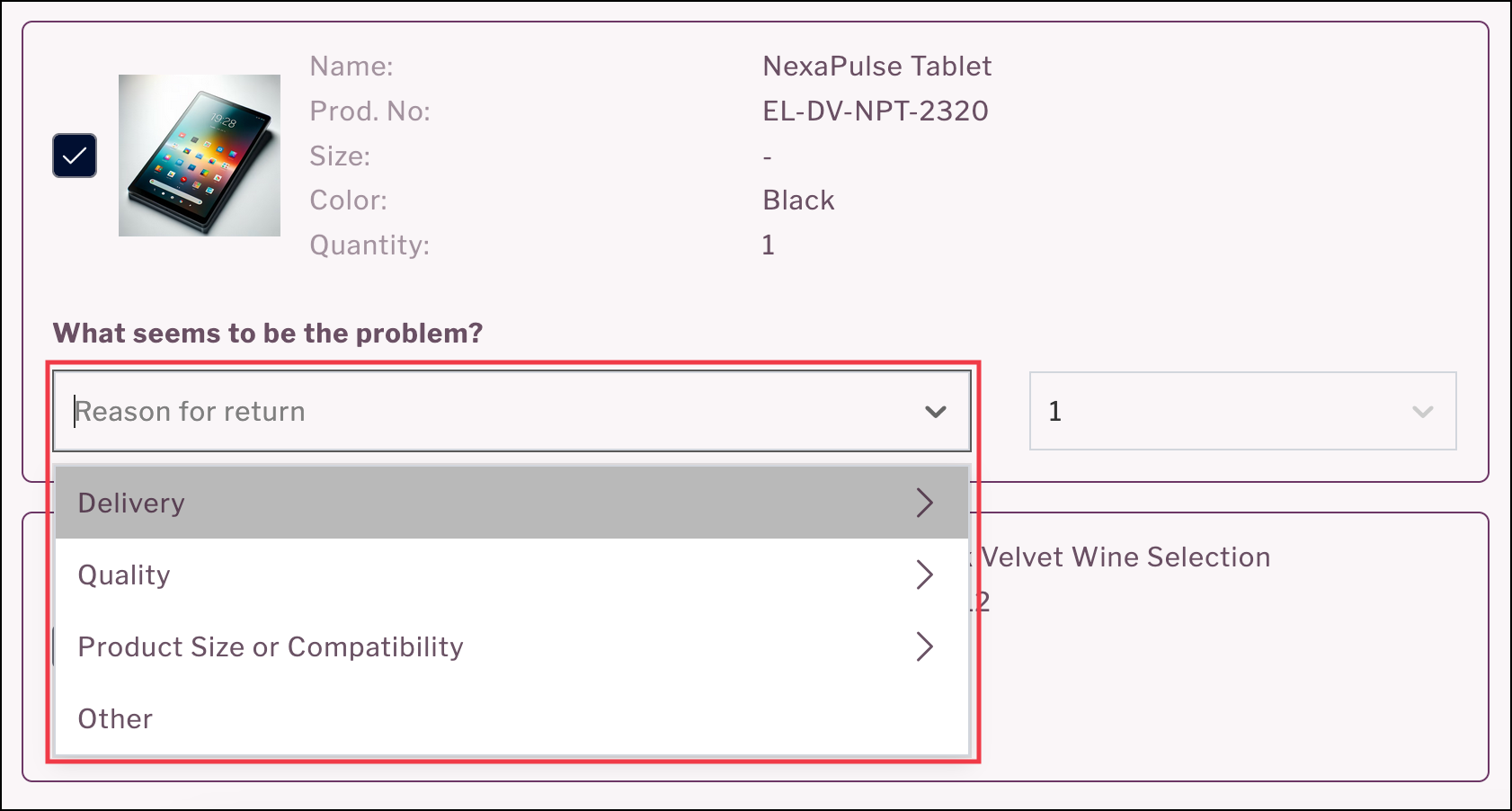
<figure><img src="https://1156682959-files.gitbook.io/~/files/v0/b/gitbook-x-prod.appspot.com/o/spaces%2F-LPf1Lv1YUuLYva6LrXQ%2Fuploads%2F5p4NW5ojMxPBSZFkvOSy%2FReasonGroupFashion.png?alt=media&#x26;token=24327206-6c1f-43e2-878f-f4df87558e9e" alt="Return reasons for fashion products"><figcaption></figcaption></figure>
{% endtab %}

{% tab title="Return reasons for electronics" %}

<figure><img src="https://1156682959-files.gitbook.io/~/files/v0/b/gitbook-x-prod.appspot.com/o/spaces%2F-LPf1Lv1YUuLYva6LrXQ%2Fuploads%2F8Y8ZyJymvhYPRtunJgDd%2FReasonGroupElectronics.png?alt=media&#x26;token=582615b4-c35a-4405-8823-27b95e6962d9" alt="Return reasons for electronic products"><figcaption></figcaption></figure>
{% endtab %}
{% endtabs %}

### Customer Requirements

For the feature to work, you need to provide the following:

* Define which return reasons need to be active for which product categories.
* Include a `productCategory` field in order data sent to parcelLab.

### Implementation Process

To activate this feature, please contact your parcelLab representative with the information specified under the [Customer Requirements](#configuring-category-based-return-reasons) section.


---

# Agent Instructions: Querying This Documentation

If you need additional information that is not directly available in this page, you can query the documentation dynamically by asking a question.

Perform an HTTP GET request on the current page URL with the `ask` query parameter:

```
GET https://docs.parcellab.com/docs/retain/returns-portal/features/return-reasons.md?ask=<question>
```

The question should be specific, self-contained, and written in natural language.
The response will contain a direct answer to the question and relevant excerpts and sources from the documentation.

Use this mechanism when the answer is not explicitly present in the current page, you need clarification or additional context, or you want to retrieve related documentation sections.