> For the complete documentation index, see [llms.txt](https://docs.parcellab.com/docs/llms.txt). Markdown versions of documentation pages are available by appending `.md` to page URLs; this page is available as [Markdown](https://docs.parcellab.com/docs/whats-new/2023.md).
# Product Updates 2023
See our roundup of selected parcelLab features, enhancements, fixes, and carrier integrations launched in 2023.
{% updates format="full" %}
{% update date="2023-12-29" tags="insights,campaigns,return-registrations" %}
## New webhooks performance report and create email banners using HTML
This release introduces a new report to measure your webhooks performance and new features that allow you to create email banners using HTML, and display refund payment providers in the Returns Portal.
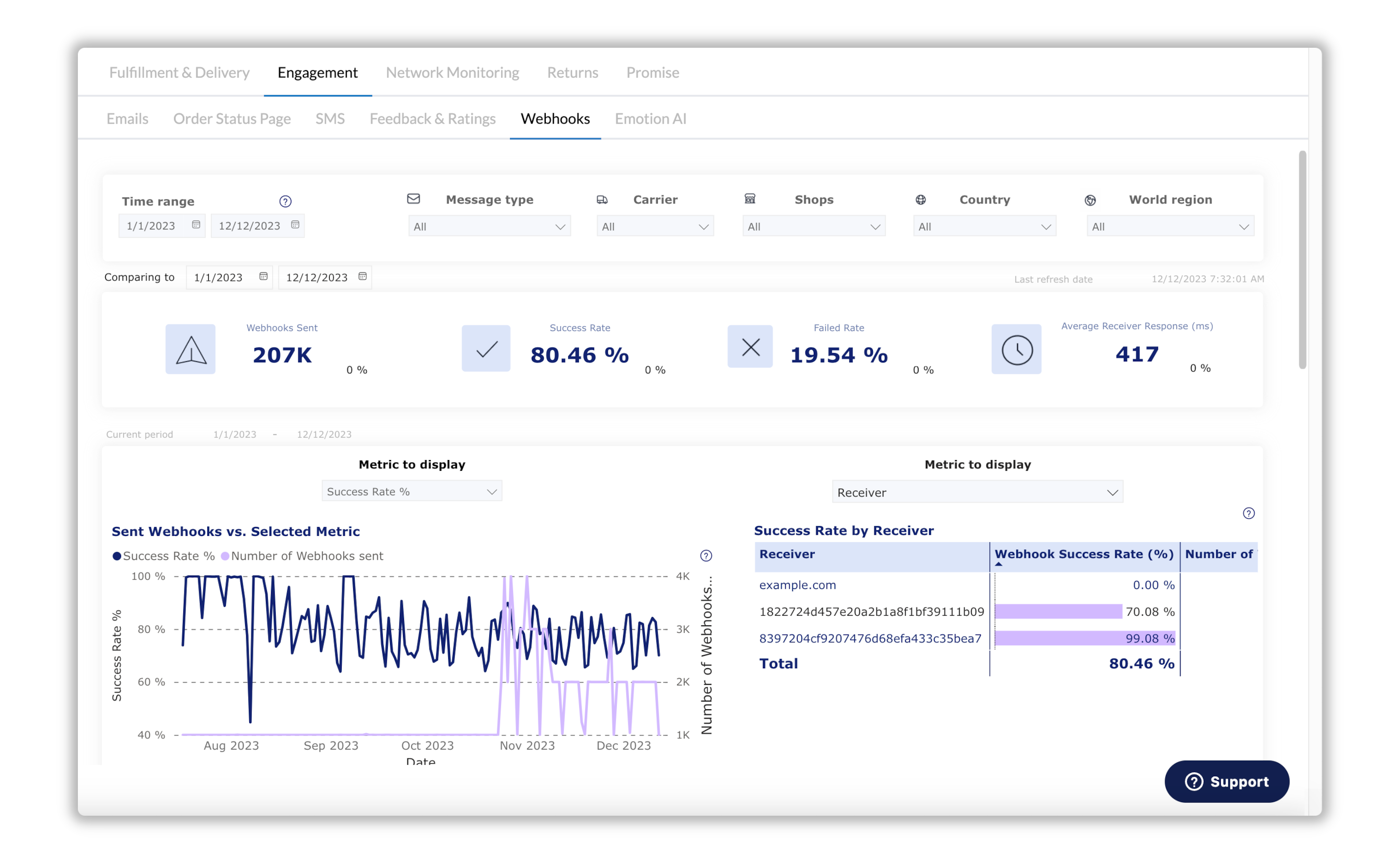
#### :chart-simple: Webhooks Performance Report
We’ve added a new Webhooks report to the Engagement dashboard in Analytics, allowing you to view which type of webhooks have been sent along with their success and response performance.
Learn more
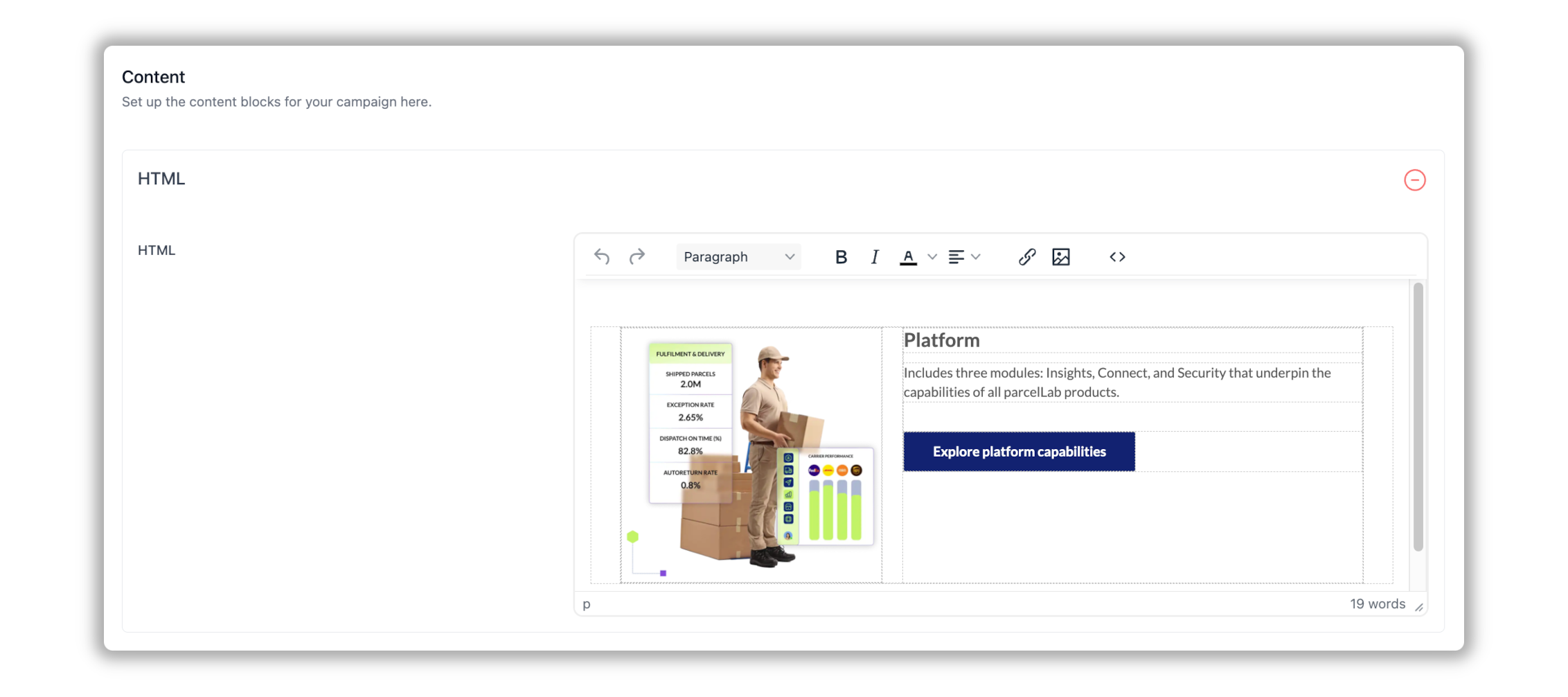
#### :calendar: HTML Content Type for Email Campaigns
You can now create your campaign banners using HTML through a new HTML editor, with the content directly rendered into emails.
{% hint style="success" %}
You can include your HTML email banners in conjunction with your standard email banners, allowing you to display multiple banners in an email.
{% endhint %}
Learn more
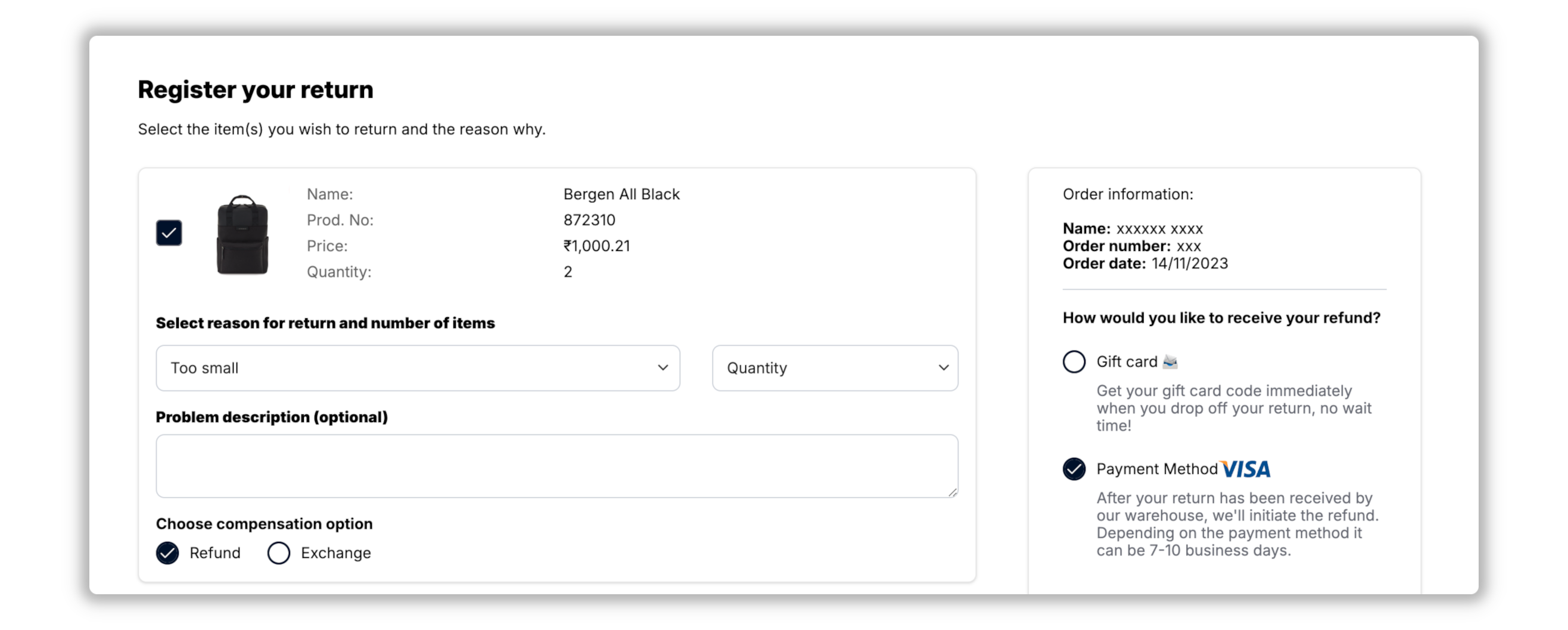
#### :box-dollar: Display Refund Payment Provider
You can display refund payment providers in the Returns Portal to your customers who choose to be compensated through a refund. The original method of payment is displayed on the item selection page and can include information on the refund processing time.
This feature provides your customers with greater transparency around the refund process, which reduces anxiety and increases trust. To activate the feature for your Returns Portal, please contact your parcelLab representative.
Learn more
***
#### :box-open-full: Latest Product & Carrier Updates
{% tabs %}
{% tab title="Improvements" icon="bolt" %}
{% hint style="info" icon="layer-group" %}
#### Platform
:grid-2: **App**
* Links to parcelLab's privacy policy and legal notice have been added to the login page and footer in the App.
{% endhint %}
{% hint style="warning" icon="comment" %}
#### Engage
:calendar: **Campaigns**
* Your user-specific list of defined languages is now available by default when selecting a language for campaigns. If you do not have a language list defined, a standard list of languages will be used.
* The message type is now used to preview email campaigns instead of the tracking number.
:box: **Order Status Page**
* A warning message is now displayed when the limit for zip code attempts is exceeded on the Order Status page and no further attempts are allowed for 30 minutes.
{% endhint %}
{% hint style="danger" icon="arrow-u-turn-up-left" %}
#### Retain
:desktop: **Returns Portal Configuration**
* For direct login to the Returns Portal using additional URL query parameters, you can now use the `ref` option to pre-fill the order number in the login form, so that customers' email addresses are not referenced in their personalized login URL.
{% endhint %}
{% endtab %}
{% tab title="Fixes" icon="screwdriver-wrench" %}
{% hint style="warning" icon="comment" %}
#### Engage
:calendar: **Campaigns**
* Fixed a bug that prevented Campaigns loading correctly for some users.
* Fixed an issue with the calendar showing the incorrect days for the corresponding dates when viewing in some languages in Campaigns.
:box: **Order Status Page**
* Fixed an issue with the display of the TikTok social media icon on the Order Status page and replaced the old Twitter icon with the new Twitter X icon.
{% endhint %}
{% hint style="danger" icon="arrow-u-turn-up-left" %}
#### Retain
:desktop: **Returns Portal Configuration**
* Fixed an issue with scheduling carrier pickups using customer service Returns Portals.
{% endhint %}
{% endtab %}
{% tab title="New Carriers" icon="truck" %}
{% hint style="info" icon="truck-arrow-right" %}
#### Outbound
* Team Global Express
* Meteor Space
* IGS Logistics
{% endhint %}
{% endtab %}
{% endtabs %}
{% endupdate %}
{% update date="2023-11-30" tags="promise,customer-service,campaigns,app-store,return-registrations" %}
## Promise self-service configuration and Claims Manager feature
We've made configuring and publishing your Promise setup straightforward and added new features that provide help with the claims process, and more personalization when setting up email campaigns.
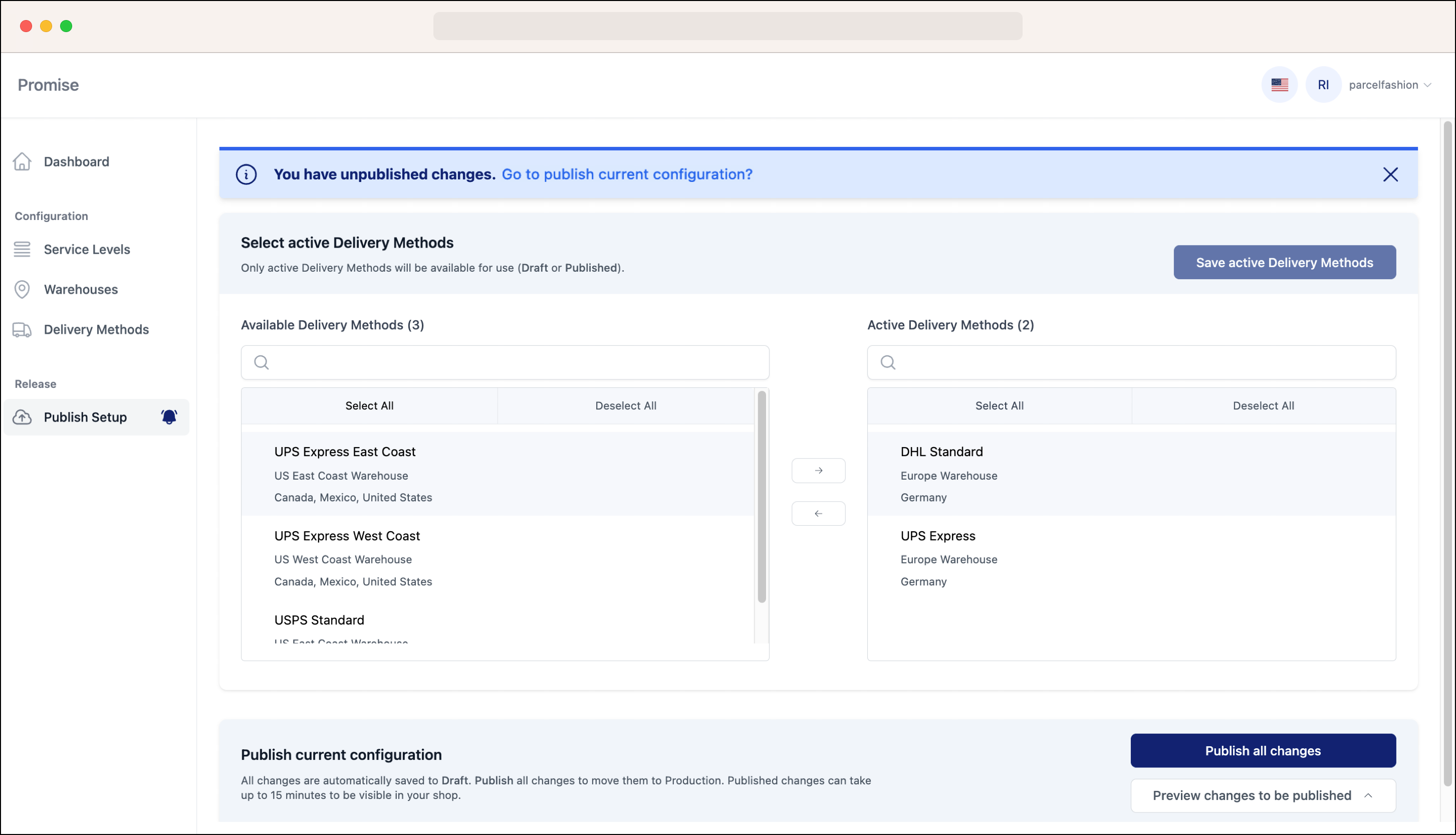
#### :clock-three: Promise Self-Service Configuration
We’ve introduced a dedicated UI in the Portal to manage your Promise configuration of carrier service levels, warehouses, and delivery methods. You can then seamlessly publish the setup and display promise dates in your web shop.
Learn more
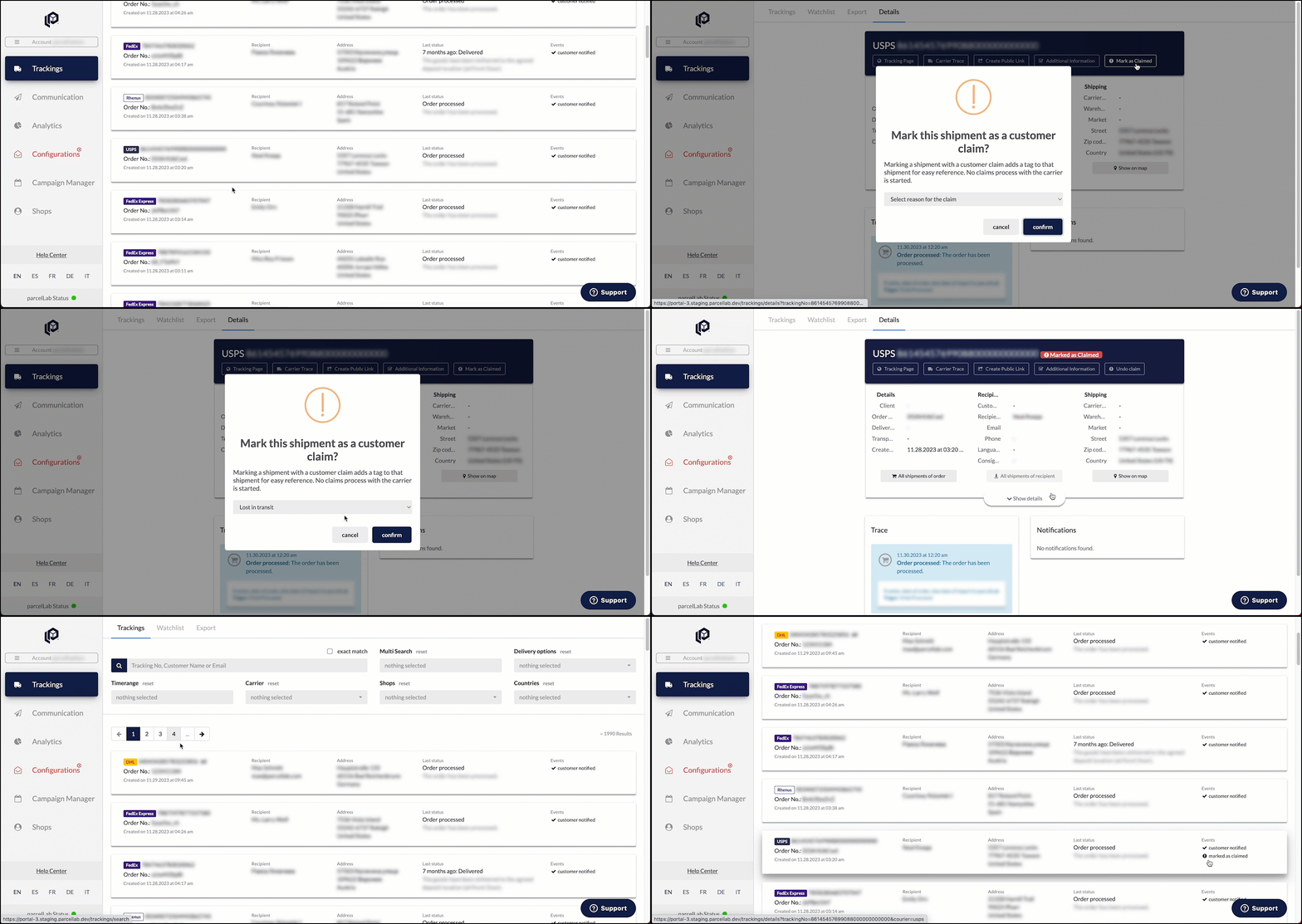
#### :file-exclamation: Claims Management
Our customer service portal has been updated with a new option to mark tracking records as claimed. This saves a timestamp and claims reason that can later be exported in order to assist with the claims process (for example: claiming lost/damaged shipments with the carrier).
Learn more
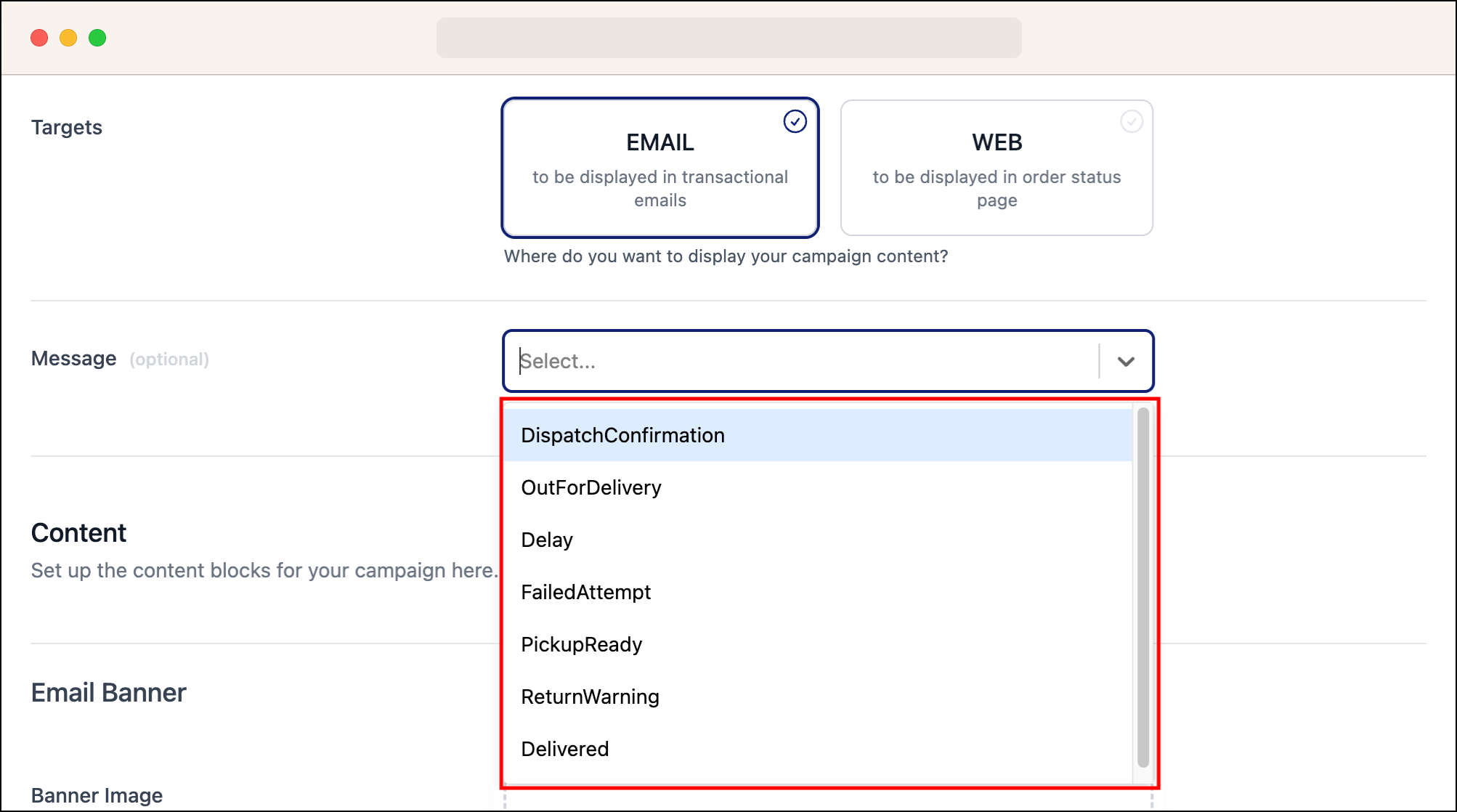
#### :calendar: Message Type Selection
Campaigns users can now define the specific email messages (for example: Delivered) that campaign banners are displayed in, providing more control when setting up email campaigns.
Learn more
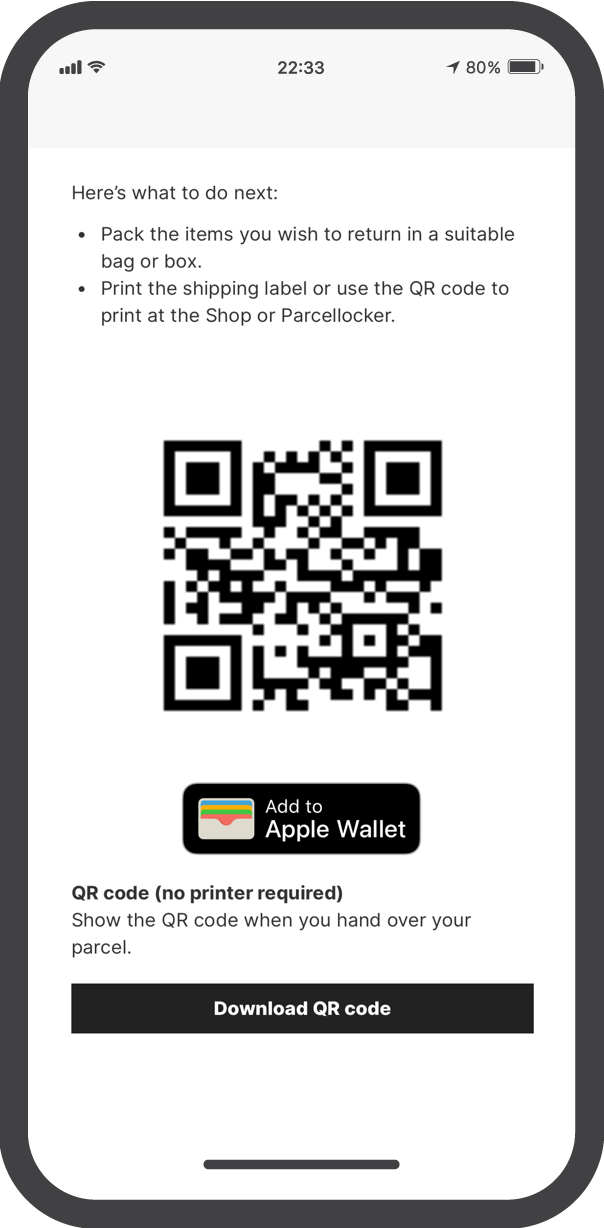
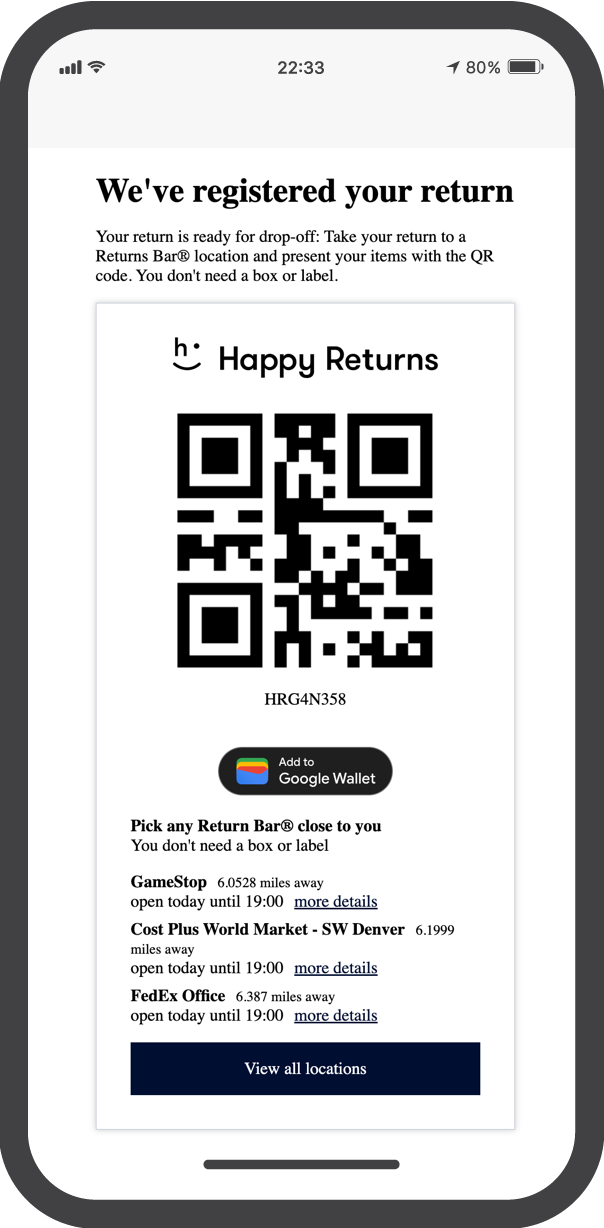
#### :wallet: Apple Wallet and Google Wallet Integration
iOS and Android users can now store and manage their return QR codes natively if the carrier provides a QR code return option.
Learn more
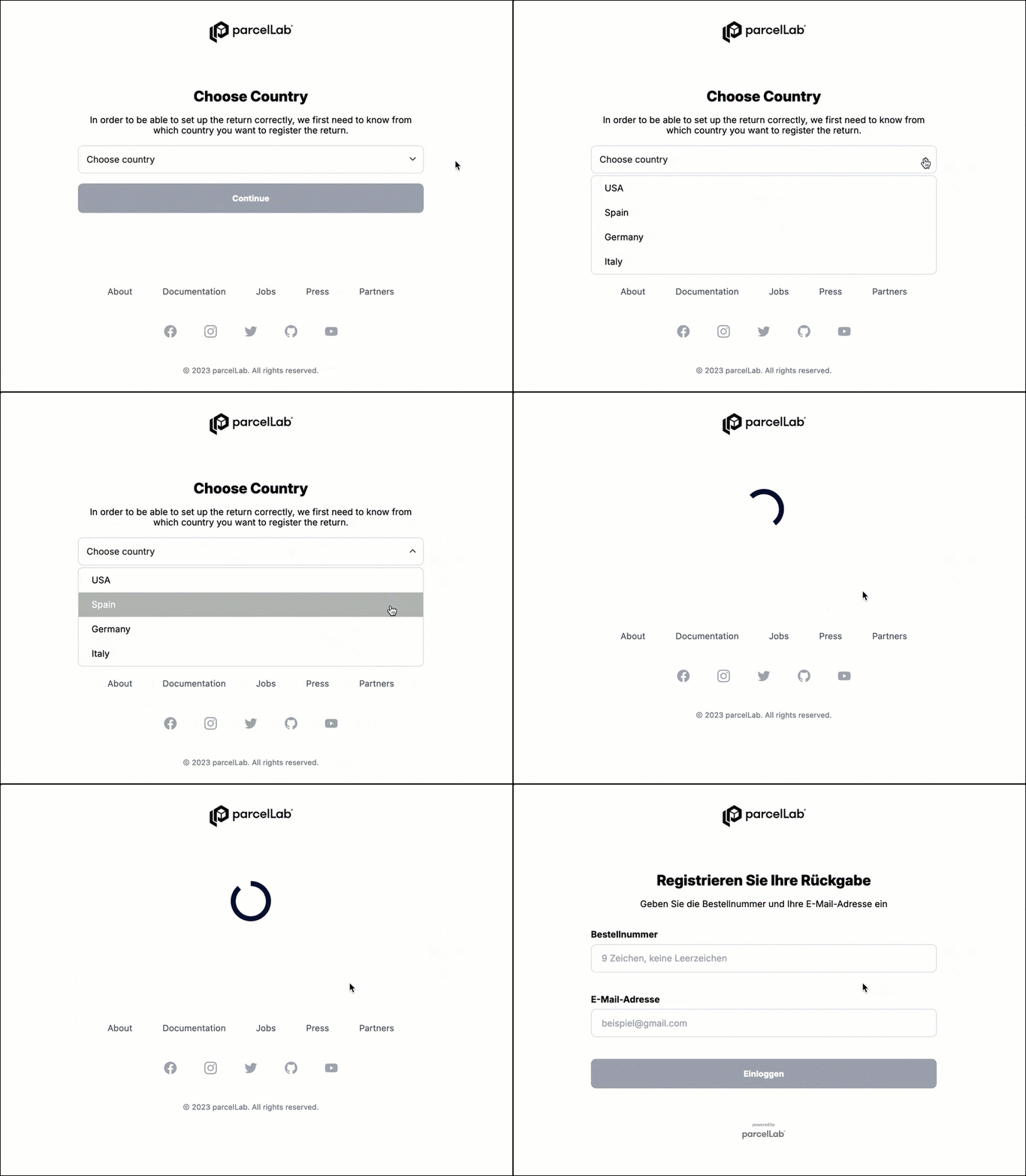
#### :globe: Global Returns Portal Selection
Retailers with multiple Returns Portals catering to different languages or countries can now configure a global login page for smoother user experience.
Learn more
***
#### :box-open-full: Latest Product & Carrier Updates
{% tabs %}
{% tab title="Improvements" icon="bolt" %}
{% hint style="info" icon="layer-group" %}
#### Platform
:grid-2: **App**
* Numbers are now an accepted format in message names when configuring messages in the App.
:circle-check: **System**
* Improvements made to performance and monitoring of queues.
{% endhint %}
{% hint style="warning" icon="comment" %}
#### Engage
:calendar: **Campaigns**
* Campaigns users can now define the specific email messages (for example: Delivered) that campaign banners are displayed in, providing more control when setting up email campaigns.
{% endhint %}
{% hint style="danger" icon="arrow-u-turn-up-left" %}
#### Retain
:desktop: **Returns Portal Configuration**
* A return fee can now be set per carrier which is deducted automatically in Shopify and shown to your end-customers when they select a carrier.
* Retailers using Shopify can offer gift cards as an alternative to refunds made to the original payment method.
* The distance to the next drop-off location can be displayed on the carrier selection page for retailers using Happy Returns.
* If a parcel locker requires a code for dropping off return parcels, this information can be displayed on the return confirmation page.
{% endhint %}
{% endtab %}
{% tab title="Fixes" icon="screwdriver-wrench" %}
{% hint style="warning" icon="comment" %}
#### Engage
:rectangles-mixed: **Email Templates**
* Fixed an issue that caused the email editor and preview sections in Email Templates not to occupy the full width of the screen.
{% endhint %}
{% hint style="danger" icon="arrow-u-turn-up-left" %}
#### Retain
:desktop: **Returns Portal Configuration**
* Fixed an address validation issue when scheduling carrier pickups in the Returns Portal.
{% endhint %}
{% endtab %}
{% tab title="New Carriers" icon="truck" %}
{% hint style="info" icon="truck-arrow-right" %}
#### Outbound
* euShipments
* Hub Group
* Janio
* MDJ Italy
* Taskrabbit
{% endhint %}
{% endtab %}
{% endtabs %}
{% endupdate %}
{% endupdates %}
### Explore More
View more features added to the parcelLab platform here.
{% content-ref url="/pages/BTQTZyEzdSCWjsl8H7Vd" %}
[Previous Releases](/docs/whats-new/archive/previous-releases.md)
{% endcontent-ref %}
---
# Agent Instructions
This documentation is published with GitBook. GitBook is the documentation platform designed so that both humans and AI agents can read, navigate, and reason over technical content effectively. Learn more at gitbook.com.
## Querying This Documentation
If you need additional information that is not directly available in this page, you can query the documentation by asking a question.
Perform an HTTP GET request on the following URL with the `ask` and `goal` query parameters:
```
GET https://docs.parcellab.com/docs/whats-new/2023.md?ask=&goal=
```
`ask` is the immediate question: it should be specific, self-contained, and written in natural language.
`goal` is what the user is ultimately trying to achieve, the reason they need the answer. Sharing it helps GitBook give you a better, more relevant answer. A goal is most helpful when it describes the outcome the user wants rather than restating the question. For example, with `ask=how do I create an API token`, a goal like `automate deployments from our CI pipeline` lets GitBook tailor the answer to that use case.
The response will contain a direct answer to the question and relevant excerpts and sources from the documentation.
Use this mechanism when the answer is not explicitly present in the current page, you need clarification or additional context, or you want to retrieve related documentation sections.