> For the complete documentation index, see [llms.txt](https://docs.parcellab.com/docs/llms.txt). Markdown versions of documentation pages are available by appending `.md` to page URLs; this page is available as [Markdown](https://docs.parcellab.com/docs/developers/v2/data-elements/carrier-integration/live-geo-tracking.md).
# Live Geo Tracking
During the last mile of the delivery, the recipient can be provided with a real-time update of the current progress of their delivery through parcelLab's live geo tracking.
## Overview
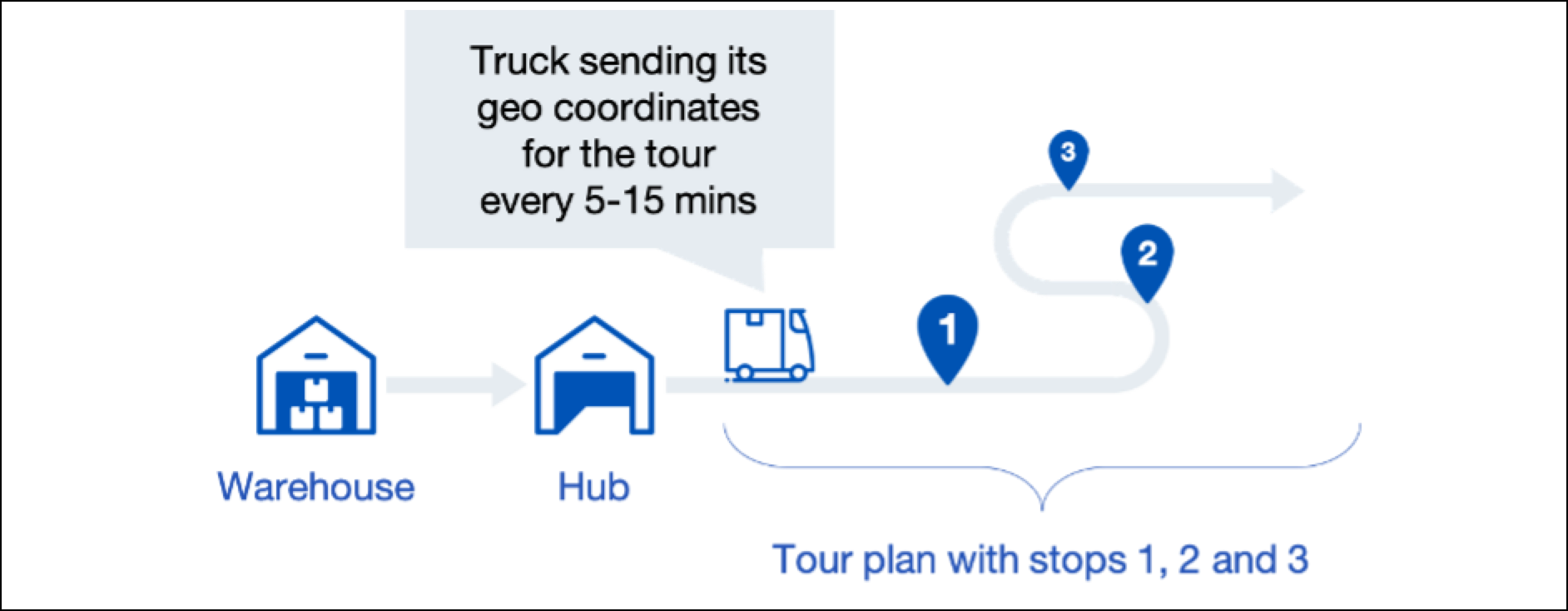
Our live geo tracking aims to provide the recipient with a detailed status update of their delivery during the last mile (that is: when goods have been loaded onto the delivery truck and are on their way to the recipient).
The information contained in a status update is described in the following table.
| Information | Values |
| ----------------------------------- | --------------------------------------------------------------------------------------------------------- |
| Current location of delivery truck | Geo coordinates as `Latitude` and `Longitude`. |
| Progress of tour in number of stops | How many stops/deliveries will be done by the delivery truck before arriving at the recipient's location. |
| Estimated time of delivery | If available, the current estimated time or time window of delivery. |
For parcelLab to provide this information to the recipient, you need to provide the following independent sets of data to us:
* Tour plan — which order will be served by which delivery truck or tour.
{% hint style="info" %}
These will be referenced from now on as a `tour` (that is: the delivery tour of a specific delivery truck on a given day). The `tour plan` associates individual deliveries within a given order with a `tour`.
{% endhint %}
* Geo coordinates — the geo coordinates describe the current location of a `tour`.
## Tour Plan and Progress
A `tour` references an individual delivery tour performed by a truck on a given day. These individual stops are defined in the `tour plan`.
The information contained in a `tour plan` is described in the following table.
| Key | Value |
| -------- | ------------------------------------------------------------------------------------------------------------------------------------------------------------------------------------------------------------------------------------------------------------------------------------------------------------------------------------------------------------------------------------------------------------------------------------------------------------------------------------------------------------------------------------------------------------------------------------------------------------------------------------------------------------------------------------- |
| `TourID` |
A unique identifier of the tour. This can be any alphanumeric value. If the carrier's systems do not explicitly hold that value, it could be the current date and license plate of the truck. Note: This value will not be exposed to the recipient and is only for internal reference.
|
| `Stops` |
The list of stops of the tour, each stop holds the following values:
Shipment - the shipment identifier (for example: barcode, order number, tracking number of this specific stop) (String, required).
TourOrder - the number of the stop on the tour (Number, required).
EstimatedDeliveryTime - the estimated time of arrival (HH:mm, optional).
Status - the status of the stop on the tour, which can be either Open (not yet fulfilled) or Closed (already fulfilled, or cancelled/skipped).
|
You can transfer the tour plan to parcelLab in one of the following ways:
* Implicitly - you will not explicitly send us the tour plan, but rather associate the individual orders with a tour by extending the scans and status events sent.
* Explicitly - you send (and consequently) update the tour plan.
{% hint style="info" %}
Choose the transfer method that works better with your system. Both versions are covered in this documentation.
{% endhint %}
## Send Status with Tour Information
Details of how the `webhook/{courier}/` endpoint can be used to update the status of an individual delivery while also providing information about the tour and thus implicitly sending us the `tour plan` are described below.
POST Send Status with Tour Information
You can update the status of a delivery while providing information about the tour and therefore implicitly send us the tour plan using the `webhook/{courier}/` endpoint (that is: this endpoint would be called on a specific status or scan event).
This endpoint allows you to update the status of an individual delivery while also providing information about the tour and thus implicitly send us the `tour plan` (that is: this endpoint would be called on a specific status or scan event).
The details of the Send Status with Tour Information API are described in this section.
#### API Details
`POST` `https://webhooks-api.parcellab.com/webhook/{courier}/`
#### Header
| Name | Type | Description |
| ------------ | ------ | ------------------ |
| content-type | string | 'application/json' |
#### Request Body
| Name | Type | Description |
| ------ | ----- | ------------------------- |
| Events | array | `JSON` as described below |
#### Responses
* 202 - accepted
* 400 - if data is ill formatted, the response will describe the issue with the payload (for example: `Invalid events, every "Event" needs a key "Shipment"`)
* 401 - if no or an invalid token is provided
A status update with tour information can be transmitted as shown below in the .json example. The payload can alternatively be sent as a file via SFTP.
{% hint style="info" %}
For further details on file transfers, see how you can [send files to parcelLab](/docs/developers/v2/data-elements/carrier-integration/data-transmission.md).
{% endhint %}
It extends every event with the following keys:
* `TourId` - the unique identifier of the tour.
* `TourOrder` - the numerical ordering position of this specific order on this tour (for example: a `1` for the first stop on the tour).
{% tabs %}
{% tab title="events-with-tour-info.json" %}
```json
{
"Events": [
{
"Shipment": "1000002",
"Timestamp": "2020-01-01 12:30:00.000+01:00",
"Location": "Berlin",
"StatusCode": "OutForDelivery",
"TourId": "TOUR-X1D7CU89",
"TourOrder": 1
},
{
"Shipment": "DTRAXZYYY3",
"Timestamp": "2020-01-01 10:00:00.000+01:00",
"Location": "Depot Berlin",
"StatusCode": "Scheduled",
"Details": {
"EstimatedDeliveryDate": "2020-01-08",
"EstimatedDeliveryTimeFrom": "11:00",
"EstimatedDeliveryTimeTo": "14:00"
},
"TourId": "TOUR-X1D7CU89",
"TourOrder": 2
}
]
}
```
{% endtab %}
{% endtabs %}
## Send a Tour Plan
Details of how the `webhook/{courier}/tour_plans` endpoint can be used to send a tour plan are described below.
POST Send a Tour Plan
You can explicitly send us the tour plan (that is: the stops for a planned tour) using the `webhook/{courier}/tour_plans` endpoint.
The details of the Send a Tour Plan API are described in this section.
#### API Details
`POST` `https://webhooks-api.parcellab.com/webhook/{courier}/tour_plans`
#### Header
| Name | Type | Description |
| ------------ | ------ | ------------------ |
| content-type | string | 'application/json' |
#### Request Body
| Name | Type | Description |
| --------- | ----- | ------------------------------------- |
| TourPlans | array | List of tour plans as described below |
#### Responses
* 202 - accepted
* 400 - an error description for incorrectly formatted payloads (for example: `Invalid stops on tour plan XYZ, some keys not allowed`)
* 401 - if no or an invalid token is provided
A tour plan requires a `TourId` and a list of `Stops`.
The stops can have the keys described in the following table.
| Keys of a Stop | Value | Required? |
| ----------------------- | ------------------------------------------------------------------------------------------------------------------------------------------------- | --------- |
| `Shipment` | The unique identifier of the `Shipment`, as given in status updates. | Required |
| `TourOrder` | The numerical ordering of this stop on the whole tour. | Required |
| `EstimatedDeliveryTime` | A current estimate of the time of arrival at this stop. | Optional |
| `Status` | The current status of this stop (that is: `Open` as long as not reached yet, and `Closed` after stop has been delivered or cancelled or skipped). | Required |
A tour plan can be transmitted as shown below in the .json example.
{% tabs %}
{% tab title="send-tour-plan-as-json.sh" %}
```json
curl -X POST \
https://webhooks-api.parcellab.com/webhook/{courier}/tour_plans \
-H 'Content-Type: application/json' \
-d '{
"TourPlans": [
{
"TourId": "TOUR-X1D7CU89",
"Stops": [
{
"Shipment": "1000002",
"TourOrder": 1,
"EstimatedDeliveryTime": "13:30",
"Status": "Closed"
},
{
"Shipment": "DTRAXZYYY3",
"TourOrder": 2,
"Status": "Open"
}
]
}
]
}'
```
{% endtab %}
{% endtabs %}
A tour plan can alternatively be sent as a .xml file via SFTP.
{% hint style="info" %}
For further details on file transfers, see how you can [send files to parcelLab](/docs/developers/v2/data-elements/carrier-integration/data-transmission.md).
{% endhint %}
{% code title="sample-tour-plan.xml" %}
```markup
TOUR-X1D7CU891000002113:30ClosedDTRAXZYYY32Open
```
{% endcode %}
## Geo Coordinates
After the `tour plan` has been transferred to parcelLab, you can send us the geo coordinates.
The data model for geo coordinates holds the keys described in the following table.
| Key | Value | Type |
| ----------- | ----------------------------------------------------------------------------- | -------- |
| `TourId` | The unique identifier of the delivery tour as given with the `tour plan`. | String |
| `Timestamp` | The timestamp of the location data formatted as `YYYY-MM-DD HH:mm:ss+-HH:mm`. | Datetime |
| `Latitude` | The GPS position's latitude given as float (for example: `48.1365628`). | Number |
| `Longitude` | The GPS position's longitude given as float (for example: `11.5588959`). | Number |
{% hint style="info" %}
Geo coordinates can be transferred in any accuracy, as they will be automatically obfuscated in accordance with local data privacy laws when showing them to the recipient.
{% endhint %}
## Send Geo Coordinates
Details of how the `webhook/{courier}/coordinates` endpoint can be used to send the geo coordinates of a tour are described below.
POST Send Geo Coordinates
You can send us the geo coordinates of a tour using the `webhook/{courier}/coordinates` endpoint.
The details of the Send Geo Coordinates API are described in this section.
#### API Details
`POST` `https://webhooks-api.parcellab.com/webhook/{courier}/coordinates`
#### Header
| Name | Type | Description |
| ------------ | ------ | ------------------ |
| content-type | string | 'application/json' |
#### Request Body
| Name | Type | Description |
| -------------- | ----- | ------------------------- |
| geoCoordinates | array | `JSON` as described below |
#### Responses
* 202 - accepted
* 400 - an error description for incorrectly formatted payloads (for example: `Invalid stops on tour plan XYZ, some keys not allowed`)
* 401 - if no or an invalid token is provided
Geo coordinates can be transmitted using this API call via cURL as shown below in the .json example.
{% tabs %}
{% tab title="send-geo-coordinates-json.sh" %}
```json
curl -X POST \
https://webhooks-api.parcellab.com/webhook/{courier}/coordinates \
-H 'Content-Type: application/json' \
-d '{
"GeoCoordinates": [
{
"TourId": "TOUR-X1D7CU89",
"Timestamp": "2020-01-01 16:12:00.000+01:00",
"Latitude": 48.1365628,
"Longitude": 11.5588959
}
]
}'
```
{% endtab %}
{% endtabs %}
Geo coordinates can alternatively be sent as a .xml file via SFTP.
{% hint style="info" %}
For further details on file transfers, see how you can [send files to parcelLab](/docs/developers/v2/data-elements/carrier-integration/data-transmission.md).
{% endhint %}
{% code title="geo-coordinates.xml" %}
```markup
TOUR-X1D7CU892020-01-01 16:12:00.000+01:0048.136562811.5588959
```
{% endcode %}
---
# Agent Instructions
This documentation is published with GitBook. GitBook is the documentation platform designed so that both humans and AI agents can read, navigate, and reason over technical content effectively. Learn more at gitbook.com.
## Querying This Documentation
If you need additional information that is not directly available in this page, you can query the documentation by asking a question.
Perform an HTTP GET request on the following URL with the `ask` and `goal` query parameters:
```
GET https://docs.parcellab.com/docs/developers/v2/data-elements/carrier-integration/live-geo-tracking.md?ask=&goal=
```
`ask` is the immediate question: it should be specific, self-contained, and written in natural language.
`goal` is what the user is ultimately trying to achieve, the reason they need the answer. Sharing it helps GitBook give you a better, more relevant answer. A goal is most helpful when it describes the outcome the user wants rather than restating the question. For example, with `ask=how do I create an API token`, a goal like `automate deployments from our CI pipeline` lets GitBook tailor the answer to that use case.
The response will contain a direct answer to the question and relevant excerpts and sources from the documentation.
Use this mechanism when the answer is not explicitly present in the current page, you need clarification or additional context, or you want to retrieve related documentation sections.