> For the complete documentation index, see [llms.txt](https://docs.parcellab.com/docs/llms.txt). Markdown versions of documentation pages are available by appending `.md` to page URLs; this page is available as [Markdown](https://docs.parcellab.com/docs/whats-new/2026.md).
# Product Updates 2026
Discover the latest parcelLab releases and product enhancements delivered throughout 2026.
{% updates format="full" %}
{% update date="2026-10-15" tags="copilot" %}
## Copilot is now available to troubleshoot deliveries, create journeys and configure returns
Now Copilot can turn your questions into changes. Ask it to create a seasonal campaign, extend a return window, or find out why an email failed to send. Copilot prepares a draft for you to review, and nothing goes live until you approve it.
A new Copilot workspace lets you start and manage conversations in one place, while an on-page panel shows Copilot’s latest response wherever you’re working in the App. Copilot’s voice dictation converts your speech into text, helping you to create detailed requests faster.
Learn more:magnifying-glass: Investigate
Identify delivery problems, missing tracking events, integration failures, or changes in returns performance.
{% embed url="" %}
:wand-magic-sparkles: Create
Build messages and journeys, manage translations, and configure campaigns and audiences.
{% embed url="" %}
:message-pen: Configure
Work with carrier mappings, reports, exports and update other post-purchase settings.
{% embed url="" %}
:chart-line-up: Improve
Audit existing configurations and recommend where to focus improvements.
{% embed url="" %}
:screwdriver-wrench: Troubleshoot
Diagnose issues, identify the cause, and prepare the changes needed to fix them.
{% embed url="" %}
***
#### :box-open-full: Latest Product Updates
{% tabs %}
{% tab title="Improvements" icon="bolt" %}
{% hint style="info" icon="layer-group" %}
### Platform
:user-robot: **Agents**
* The AI Agents dashboard now provides conversation summaries, topics, and activity counts to help you understand customer interactions, alongside expanded agent settings showing instructions and configuration details.
:grid-2-plus: **App Store**
* When installing or requesting a third-party app, you'll now need to acknowledge the data sharing requirements and responsibilities before proceeding.
:memo-circle-info: **Documentation**
* The parcelLab documentation is now embedded in the Resources panel on the App landing page, with links available in the Help menu for easier access to updates and guidance.
{% endhint %}
{% hint style="success" icon="cart-circle-check" %}
### Convert
:calendar: **Promise Configuration**
* Delivery predictions now support a fallback country when a shopper's IP location cannot be automatically determined or has no matching delivery methods, helping maintain prediction availability.
{% endhint %}
{% hint style="danger" icon="arrow-u-turn-up-left" %}
### Retain
:box-open: **Return Registrations**
* When creating additional return labels for returns, customer service agents can now generate another label without manually re-entering the original label details.
:desktop: **Returns Portal Configuration**
* You can now manage the domains allowed to embed your Returns Portals in the Integrations section of the Returns module, making it easier to maintain domain settings across multiple stores.
:shopify: **Shopify Returns**
* Improved instant exchange settlement so that orders are correctly updated when a return is completed. Return credits are applied before payment is collected, preventing “Payment pending” orders and ensuring accurate charges or refunds.
:shield-check: **Fraud & Abuse Protection**
* Fraud risk panels in tracking and return registration records now include the number of days for order history used to calculate the fraud score (for example: 180 days of order history).
{% endhint %}
{% endtab %}
{% tab title="Fixes" icon="screwdriver-wrench" %}
{% hint style="info" icon="layer-group" %}
### Platform
:gear: **Admin**
* Fixed an issue that could assign newly created API tokens to the wrong account after switching accounts.
:grid-2-plus: **App Store & Integrations**
* Improved the Klaviyo integration to prevent inaccurate profile history, safely handle events without a recipient, and restore matching for language-based Klaviyo flows.
* Fixed an issue in the Salesforce Service Cloud app where the parcelLab widget could fail when opening a case or display products without their names and item numbers.
{% endhint %}
{% hint style="success" icon="cart-circle-check" %}
### Convert
:calendar: **Promise Configuration**
* Fixed an issue where delivery predictions could not automatically estimate a shopper's IP location to provide estimates before they entered a postal code.
* Improved visibility of inherited Promise configuration settings (that is: warehouses, service levels and delivery methods) and disabled.
{% endhint %}
{% hint style="warning" icon="comment" %}
### Engage
:truck-fast: **Trackings**
* Fixed a bug where the article list failed to display for return trackings without a carrier.
:comment-exclamation: **On-Demand Messages**
* Fixed a bug that prevented users from saving an on-demand message after switching from SMS or webhook to email and uploading a new .csv file.
{% endhint %}
{% hint style="danger" icon="arrow-u-turn-up-left" %}
### Retain
:box-open: **Return Registrations**
* Fixed an issue that prevented users from adding another return label or manually adding a tracking number in v2 Returns Portals.
* Fixed an issue that could prevent FedEx return labels from being created for orderless returns.
:desktop: **Returns Portal Configuration**
* Resolved an issue where some errors could not be edited inline using the preview editor.
* Fixed a bug where edited translations could not be saved in configurations that set non-returnable flag translations.
:shopify: **Shopify Returns**
* Fixed a bug where the item selection page did not render when a Shopify product validation for exchange variants failed.
:shield-check: **Fraud & Abuse Protection**
* Fixed an issue where customer risk indicators could show inconsistent risk levels. Risk levels now align with the fraud score across the indicator and detailed view, making it easier to assess potential fraud accurately.
{% endhint %}
{% endtab %}
{% endtabs %}
{% endupdate %}
{% update date="2026-09-30" tags="admin,copilot,agents" %}
## Manage data exports, share Copilot conversations, and monitor AI agents
This release introduces self-service data exports, shared Copilot chats for easier collaboration and a new AI Agents dashboard to monitor agent activity and customer conversations.
Take a tour of the latest updates in our interactive demo!
{% embed url="" %}
#### :arrow-down-to-bracket: Set up your own data exports
Take control of data exports with a new dedicated page in the parcelLab App, where you can set up and run your exports. Simply choose the data you need, apply filters, and schedule recurring exports or download on demand.
Learn more
***
#### :box-open-full: Latest Product & Carrier Updates
{% tabs %}
{% tab title="Improvements" icon="bolt" %}
{% hint style="info" icon="layer-group" %}
### Platform
:sparkles: **Copilot**
* Copilot conversations can now be shared with other account users to view or edit, making it easier for teams to collaborate on the same topics.
:user-robot: **Agents**
* A new AI Agents dashboard is now available to provide a central place to monitor agents, review customer conversations that need follow-up, and check agent settings and email activity.
:circle-user: **Profile**
* The theme control has been moved to the profile menu, making it easier to manage display preferences alongside your other profile settings.
:user-group: **User Management**
* Password resets now enforce a minimum password length of 10 characters, improving account security for App users.
{% endhint %}
{% hint style="warning" icon="comment" %}
### Engage
:truck-fast: **Trackings**
* Tracking details actions have been reorganised into clearer menus, making it easier to access tracking pages, return options, and shipment actions.
:envelope-open: **Email Templates**
* Shop codes are now shown alongside names in the email template selector, helping you identify and assign the correct shop.
:message-lines: **Messages**
* Email content-policy warnings now show how many elements are affected and let you navigate to the flagged content to fix issues faster.
* WhatsApp templates can now be imported into the message editor when a supported integration is available, reducing manual setup and ensuring placeholders are correctly mapped to the template.
:messages: **Journeys**
* Journey triggers are now grouped by publish status, so you can quickly distinguish between live triggers, drafts, and unpublished changes.
{% endhint %}
{% hint style="danger" icon="arrow-u-turn-up-left" %}
### Retain
:box-open: **Return Registrations**
* Return registrations and tracking details now include all items in a bundle, providing a complete record of the return for reference.
* Selected outbound tracking custom fields can now be imported into return registrations, making relevant information available in the Returns Portal.
* Returns Portal file uploads can now be restricted by file type and size, with additional validation to provide a more secure upload process.
* Selected drop-off locations are now saved and shown on the return confirmation page, helping shoppers review where to hand in their return.
:desktop: **Returns Portal Configuration**
* Shopify customer tags can now be imported for return policy filters, allowing return rules to be tailored to specific customer groups.
* Shopify returns can now support conditional original shipping refunds, helping refund calculations better match retailer policies.
:shield-check: **Fraud & Abuse Protection**
* Fraud & Abuse Protection has been streamlined to bring risk insights, recommended actions, and analytics together in the overview and dashboard.
{% endhint %}
{% endtab %}
{% tab title="Fixes" icon="screwdriver-wrench" %}
{% hint style="warning" icon="comment" %}
### Engage
:message-lines: **Messages**
* Fixed a bug where notifications for published but inactive messages suggested republishing a draft. Users now get guidance to activate and publish the message, or exclude it from the trigger.
* Fixed an issue where the Apps dropdown in the message editor appeared empty when no apps were installed, with a clear message and link to browse the App Store now shown instead.
:clipboard-list: **Surveys**
* Fixed an issue where previously saved survey answers could be lost when respondents returned to an earlier question.
:paper-plane-top: **On-Demand Messages**
* Fixed an issue where on-demand message previews could restart when returning to the page, preventing tracking results from being displayed.
:box: **Order Status Page**
* Fixed a bug where the Order Status page could fail to load when estimated delivery information was missing from a checkpoint.
* Fixed an issue where customers could not search for an order by order number on the Order Status page.
{% endhint %}
{% hint style="danger" icon="arrow-u-turn-up-left" %}
### Retain
:box-open: **Return Registrations**
* Fixed a bug where missing images could prevent packing slip PDFs from being generated.
* Fixed an issue where shipment-level additional attributes from the v4 Order API were not available in returns, preventing article filters from correctly identifying non-returnable items.
* Fixed an issue where shoppers could see an invalid exchange choice after selecting a return reason.
* Fixed an issue where Shopify refunds could fail for orders with payments captured across multiple transactions.
* Fixed an issue where Shopify draft exchanges could charge replacement items at list price instead of applying the returned item's credit.
{% endhint %}
{% endtab %}
{% tab title="New Carriers" icon="truck" %}
{% hint style="info" icon="truck-arrow-right" %}
### Outbound
* Freja
* Furdeco
* Omniva
* Redur
{% endhint %}
{% hint style="danger" icon="arrows-rotate-reverse" %}
### Returns
* Omniva
{% endhint %}
{% endtab %}
{% endtabs %}
{% endupdate %}
{% update date="2026-09-14" tags="journeys,fraud-and-abuse" %}
## Check message availability by language and Fraud & Abuse Protection enhancements
Gain visibility into language coverage for messages across your shops with the Message Overview page, alongside new Fraud & Abuse Protection capabilities, including parcelLab fraud scoring.
Take a tour of the latest updates in our interactive demo!
{% embed url="" %}
***
#### :box-open-full: Latest Product Updates
{% tabs %}
{% tab title="Improvements" icon="bolt" %}
{% hint style="info" icon="layer-group" %}
### Platform
:bell-ring: **Notifications**
* Subscription management is now also available from the Admin overview page and navigation menu, making it easier for administrative users to find and manage notification subscriptions.
* Notification counts are now visible in the notification list, helping you assess the scale and severity of an issue without expanding each notification ([read the docs](https://docs.parcellab.com/guides/admin-and-settings/notifications)).
:building: **Accounts**
* The account switcher now clearly labels non-live environments, helping you quickly identify which account you’re working in.
{% endhint %}
{% hint style="success" icon="cart-circle-check" %}
### Convert
:clock-three: **Promise Configuration**
* Promise list pages now show last modified dates, provide consistent sorting, and retain your list settings when returning from a details page, helping you review and manage configurations more efficiently.
{% endhint %}
{% hint style="warning" icon="comment" %}
### Engage
:truck-fast: **Trackings**
* Trackings can now be filtered to identify return registrations where carrier pickup was the selected return method.
:user-group-simple: **Audiences**
* You can now preview sample trackings that match an audience filter to validate your audience setup.
:message: **Messages**
* You can now view language coverage for email and SMS messages, helping you quickly identify missing translations across shops ([read the docs](https://docs.parcellab.com/guides/experience-design/setup/messages#view-message-language-coverage)).
:messages: **Journeys**
* Additional journey actions are now consolidated into a simplified menu, while Add Trigger and Publish remain directly accessible for easier journey management.
* When you move a trigger between journeys, you are now prompted to publish both journeys in one action, keeping source and destination configurations in sync.
{% endhint %}
{% hint style="danger" icon="arrow-u-turn-up-left" %}
### Retain
:desktop: **Returns Portal Configuration**
* Return configuration lists now support saved filters, sorting, status visibility, and restored list state so you can return to the same view and find records faster.
* Retention offers are supported on API v4, so that headless Returns Portal configurations can present offer-based alternatives as part of return registration.
* You can now link Shopify Returns Order APIs to an existing Shopify OMS integration instead of pasting an access token manually.
* Refund-method changes on the returns confirmation page now display a preview of fees, bonuses, and totals before confirmation.
:shield-check: **Fraud & Abuse Protection**
* The following updates have been made to the Fraud & Abuse Protection feature:
* The Fraud & Abuse dashboard overview now includes parcelLab fraud scoring.
* Proprietary fraud data in the trust panel of tracking records, also available to use when building filters for targeting conditions.
* Broader shipment flagging for fraud and abuse, expanding the Claims Manager to support Fraud and Abuse reasons ([read the docs](https://github.com/parcelLab/gitbook-documentation/tree/main/how-parcellab-works/engage/customer-service/claims-manager.md)).
{% endhint %}
{% endtab %}
{% tab title="Fixes" icon="screwdriver-wrench" %}
{% hint style="info" icon="layer-group" %}
### Platform
:grid-2: **App**
* Fixed an issue where clearing a tag field using the keyboard did not enable Save, causing the previous value to reappear after reloading the page.
{% endhint %}
{% hint style="warning" icon="comment" %}
### Engage
:truck-fast: **Trackings**
* Fixed an issue where some monetary values in tracking details were not formatted correctly.
:store: **Shops**
* Fixed a bug where saving shop settings could incorrectly overwrite the returns tracking page URL when it used a different host from the outbound tracking URL.
:user-group-simple: **Audiences**
* Fixed an issue where filter fields beyond the first 100 were not loaded in audiences and other query builders.
:message: **Messages**
* Fixed a bug where return label downloads did not start when clicked from the email preview.
* Fixed an issue where conditional placeholders inside HTML tables were incorrectly moved to the top of emails in the editor and preview.
* Fixed a bug where AI translation was incorrectly available for webhook messages, which do not support translation.
:clipboard-list: **Surveys**
* Fixed an issue where submitted NPS responses were not displayed in survey reporting.
{% endhint %}
{% hint style="danger" icon="arrow-u-turn-up-left" %}
### Retain
:box-open: **Return Registrations**
* Fixed an issue where Shopify exchange orders could miss optional custom tags.
* Fixed a bug where duplicate Shopify native exchange refunds could be created.
:arrows-rotate-reverse: **Returns Portal**
* Fixed an issue where pickup safe-place values were not persisted correctly, enabling safe-place instructions to be displayed in communications.
* Fixed an issue where embedded Returns Portal modals and page changes could scroll incorrectly.
:desktop: **Returns Portal Configuration**
* Fixed an issue where custom Returns Portal theme asset content could be overwritten or invalid.
* Fixed an issue where unavailable return statuses were not theme-editable, allowing you to keep return status messaging aligned with your Returns Portal theme.
* Fixed an issue where invalid courier configuration could be published to a Returns Portal.
{% endhint %}
{% endtab %}
{% endtabs %}
{% endupdate %}
{% update date="2026-09-02" tags="copilot" %}
## Copilot: From answers to action
Coming soon, Copilot can work directly with your live parcelLab setup to investigate issues, create and update configurations, and recommend improvements. Describe what you need, review the proposed changes, and approve them when you’re ready.
Learn more
Copilot can help you:
:arrows-rotate-reverse: Configure returns
Update return windows and reasons, or create and clone Returns Portals.
:messages: Create communications
Build messages and journeys, manage translations, and configure campaigns and audiences.
:magnifying-glass: Investigate issues
Identify delivery problems, missing tracking events, integration failures, or changes in returns performance.
:chart-line-up: Improve your setup
Audit existing configurations and recommend where to focus improvements.
:screwdriver-wrench: Manage operational configuration
Work with carrier mappings, reports, exports, and other post-purchase settings.
{% endupdate %}
{% update date="2026-08-31" tags="copilot,return-registrations" %}
## New App dashboard and workflow improvements for Returns Portal configuration
This release introduces a new App dashboard, alongside workflow improvements for editing Returns Portal configurations.
Take a tour of the latest updates in our interactive demo!
{% embed url="" %}
#### :grid-2: Meet your new App dashboard
The new App dashboard brings the right tools and insights together with personalized guidance and task-based shortcuts that launch Copilot conversations. Content adapts to permissions and product access, so customer service teams and configuration users see the tasks and workflows most relevant to them.
Explore new dashboard
***
#### :box-open-full: Latest Product & Carrier Updates
{% tabs %}
{% tab title="Improvements" icon="bolt" %}
{% hint style="warning" icon="comment" %}
### Engage
:envelope: **Communication**
* Webhook request and response details now show request headers below the body and collapse long payloads, making details easier to review while keeping full payloads available to copy.
:messages: **Journeys**
* Configured dynamic recipients are now displayed in journey overviews, including the recipient count and names.
{% endhint %}
{% hint style="danger" icon="arrow-u-turn-up-left" %}
### Retain
:desktop: **Returns Portal Configuration**
* Returns Portal records in the list view now show your setup at a glance, including how many required and recommended items are configured for each portal and links to the relevant setup sections.
* The Returns Portal configuration editor is now a single page. Setup status, publish status, and links to **Basic Settings**, **Integrations**, **Advanced Settings**, and **Snippet** are available together for easier navigation between sections.
* The status bar at the top of the portal details page now shows publish status, production status, and last modified timestamp.
* A new setup checklist separates required steps from recommended ones, shows overall completion progress, and links directly to set or edit the relevant fields.
* The configuration overview option summarizes required and recommended setups for the Returns Portal, the configuration status, and provides links to the relevant setup section.
* Extended return windows now use an order date range and fixed creation deadline so users can configure deadlines more clearly.
* Return window advanced settings are now shown inline on each that users can easily review grace periods and targeting rules for each return window.
* Orderless return article search now indicates when an item is already selected so shoppers can avoid adding the same item twice.
* Translations for v1 Returns Portal have been improved with new and corrected localized messaging for order API availability errors, country defaults, and sign-in verification across supported languages.
{% endhint %}
{% endtab %}
{% tab title="Fixes" icon="screwdriver-wrench" %}
{% hint style="info" icon="layer-group" %}
### Platform
:sparkles: **Copilot**
* Fixed a bug where UI elements could be incorrectly obscured by the Copilot floating window.
{% endhint %}
{% hint style="warning" icon="comment" %}
### Engage
:envelope: **Communication**
* Fixed a bug where additional email recipients were not clearly shown in communication details.
:message: **Messages**
* Fixed a display issue where the message HTML editor could differ from the email preview and saved output.
:messages: **Journeys**
* Fixed a bug where numeric trigger filter values were added to the journey query builder as a string instead of an integer.
:clipboard-list: **Surveys**
* Fixed a bug where importing a survey theme could fail to apply the selected theme settings correctly.
{% endhint %}
{% hint style="danger" icon="arrow-u-turn-up-left" %}
### Retain
:box-open: **Return Registrations**
* Fixed an issue where Returns Portal image uploads could fail.
* Fixed a bug where return reason selectors could become unresponsive after updating article selections in the Returns Portal
* Fixed a bug where shoppers with orders outside the return period were unable to proceed.
* Fixed a bug where unsupported Shopify exchange sources could cause returns to fail at confirmation instead of offering a refund.
* Fixed a bug where completing a Shopify exchange for one item could make other items in the order unavailable for exchange.
:desktop: **Returns Portal Configuration**
* Fixed an issue where return operation history displayed outdated retry timestamps alongside the latest retry failure.
{% endhint %}
{% endtab %}
{% tab title="New Carriers" icon="truck" %}
{% hint style="info" icon="truck-arrow-right" %}
### Outbound
* Integrados
* Nachtdistributie
* Segmail Mexico
{% endhint %}
{% hint style="danger" icon="arrows-rotate-reverse" %}
### Returns
* Correos Brazil
{% endhint %}
{% endtab %}
{% endtabs %}
{% endupdate %}
{% update date="2026-08-14" tags="communication,return-registrations" %}
## New survey theme editor and returns translation improvements
This release introduces the survey theme editor for creating branded surveys, alongside enhancements to returns translation management and Promise configuration.
Take a tour of the latest updates in our interactive demo!
{% embed url="" %}
#### :clipboard-list: Manage survey themes
Deliver a consistent brand experience across your surveys with the new survey theme editor. Customize your survey design with flexible styling options, advanced settings, and custom CSS for greater control over the look and feel of your surveys.
Learn more
***
#### :box-open-full: Latest Product & Carrier Updates
{% tabs %}
{% tab title="Improvements" icon="bolt" %}
{% hint style="info" icon="layer-group" %}
### Platform
:gear: **Admin**
* The Admin section now has a dedicated overview page with quick links to manage your account setup, integrations, and operational data.
:bell-ring: **Notifications**
* Setup notifications now provide clearer guidance and direct links to the relevant page to help you quickly understand and resolve issues.
:sparkles: **Copilot**
* Copilot now supports additional file uploads, including images, JSON, HTML, Excel, and PowerPoint, giving you more ways to provide context and get relevant answers.
:grid-2: **App**
* Required form fields are now marked with an asterisk and optional field labels have been removed, making mandatory fields easier to identify at a glance.
{% endhint %}
{% hint style="success" icon="cart-circle-check" %}
### Convert
:clock-three: **Promise Configuration**
* Promise delivery methods can now be duplicated to speed up creation of similar delivery method configurations.
* Promise configuration changes are now easier to review before publishing, with a clearer summary of the differences between published and draft versions.
{% endhint %}
{% hint style="warning" icon="comment" %}
### Engage
:square-code: **Snippets**
* You can now see which messages and templates use a snippet before making changes, helping teams manage shared content and access these configurations directly.
:messages: **Journeys**
* Journey filters can now exclude trackings where surveys are already completed, preventing customers from receiving unnecessary reminder messages.
{% endhint %}
{% hint style="danger" icon="arrow-u-turn-up-left" %}
### Retain
:box-open: **Return Registrations**
* Return registrations can be filtered by portal code and whether carrier pickup was selected for the return method.
:desktop: **Returns Portal Configuration**
* The following updates have been made to improve return translations management in the App:
* The translations list view can now be filtered by language and portal version.
* Unused translations can now be deleted.
* V2 translations support markdown for adding lists and clickable links in the copy.
* Translations for carrier options can now be edited by language alongside the configuration for each returns carrier API connection in the App.
* Improved multi-brand Returns Portal setups by enabling the use of different brand themes with a single portal configuration.
* Return rules can now be filtered using returned-article reason codes and weight.
* A confirmation step can now be enabled for v2 Returns Portals, so that your customers are prompted to confirm before submitting a return.
* Returns that have been issued a gift card now display the amount in Shopify admin.
* The shipping method title on Shopify exchange draft orders can now be customized or removed, improving compatibility with fulfillment systems.
{% endhint %}
{% endtab %}
{% tab title="Fixes" icon="screwdriver-wrench" %}
{% hint style="info" icon="layer-group" %}
### Platform
:bell-ring: **Notifications**
* Fixed an issue where opening an unread notification caused the list to refresh, close the notification, and move it to the top after being marked as read.
:sparkles: **Copilot**
* Fixed a bug where detailed Copilot approval requests with prevented scrolling in the panel and made the approve and reject actions inaccessible.
{% endhint %}
{% hint style="warning" icon="comment" %}
### Engage
:envelope: **Communication**
* Fixed a bug where the Emails list incorrectly showed an attachments badge for emails without attachments.
:bolt: **Experience Design**
* Fixed several issues with the filter builder to make creating and editing filters more reliable:
* AI-generated filters can now be added and edited correctly in the visual builder.
* Added clearer warnings when regular expressions are entered incorrectly as string comparisons.
* Fixed an issue in On-Demand Messages where adding rules or groups could unexpectedly disable the visual builder and resetting filters required multiple attempts.
:message: **Messages**
* Fixed a bug where AI translations could not be regenerated for a language if its previous message was archived.
* Fixed an issue where message type deletion errors didn’t display the reason for the failure.
:messages: **Journeys**
* Fixed a bug where deleting a journey trigger left the deleted trigger page open instead of returning to the journey record.
:calendar: **Campaigns**
* Fixed campaign preview issues to provide a more reliable experience and clearer error messages, such as when layouts are missing required placeholders.
* Fixed a bug where some form field labels in the campaign editor did not display the correct wording.
{% endhint %}
{% hint style="danger" icon="arrow-u-turn-up-left" %}
### Retain
:desktop: **Returns Portal Configuration**
* Fixed a bug where Returns Portals did not display couriers inherited from parent accounts.
* Fixed a permissions issue where users with view-only access could incorrectly access the Returns Portal creation flow.
* Fixed a bug where relative timestamps displayed words in the wrong order for some languages.
* Fixed a bug where replaced Shopify products could display missing product information by using matching SKU data when the original product was no longer available.
* Fixed a bug where certain email address formats could cause issues when initiating a return from the App.
* Fixed a bug where unsupported journey trigger events were shown when configuring return settlement mappings.
:shopify: **Shopify Returns**
* Shopify returns now represent parcelLab’s per-label return fees natively as a return shipping fee so you can view accurate refund fee breakdowns in Shopify.
{% endhint %}
{% endtab %}
{% tab title="New Carriers" icon="truck" %}
{% hint style="info" icon="truck-arrow-right" %}
### Outbound
* Starken
* TIPSA
* Zippd
{% endhint %}
{% hint style="danger" icon="arrows-rotate-reverse" %}
### Returns
* Western Post
{% endhint %}
{% endtab %}
{% endtabs %}
{% endupdate %}
{% update date="2026-07-30" tags="journeys,return-registrations" %}
## Experience design improvements and more App updates
In this release we've improved various workflows across the App including survey, journey and message configuration.
Check out some of the latest updates in our interactive demo!
{% embed url="" %}
***
#### :box-open-full: Latest Product Updates
{% tabs %}
{% tab title="Improvements" icon="bolt" %}
{% hint style="info" icon="layer-group" %}
#### Platform
:bag-shopping: **App Store**
* Apps and recipes in the App Store now show their installation or request status directly in the app listings, reducing the need to open item details.
* Recipe installation notifications now provide clearer messages and direct links to help you review successful and failed installations.
:user-group: **User Management**
* Password login attempts are now rate-limited so user accounts have stronger protection against repeated failed sign-in attempts.
{% endhint %}
{% hint style="warning" icon="comment" %}
#### Engage
:store: **Shops**
* Brand logos can now be managed directly in shop settings, providing more control over branding updates.
:bolt: **Experience Design**
* Placeholders can now be managed in the Assets section, making it easier to manage placeholders and their default values by their message type.
:messages: **Journeys**
* Improved journey status indicators to clearly distinguish live, draft, and unpublished changes.
* Improved configuration errors to display a warning if any messages are missing templates, in order to prevent messages from being published but not sent due to an incomplete configuration.
:clipboard-list: **Surveys**
* Redesigned the survey editor to make creating, publishing, and distributing surveys more intuitive with clearer next steps and actions.
{% endhint %}
{% hint style="danger" icon="arrow-u-turn-up-left" %}
#### Retain
:box-open: **Return Registrations**
* Eligible returns can now be cancelled directly from the return registration details page to provide greater control over return requests.
:desktop: **Returns Portal Configuration**
* The Returns Portal now highlights the originally selected product option during variant exchanges to make it easier to choose the correct replacement.
* Carrier pickup forms now support translations for a more localized customer experience.
* Eligible items can now be exchanged again after a cancelled return registration.
{% endhint %}
{% endtab %}
{% tab title="Fixes" icon="screwdriver-wrench" %}
{% hint style="info" icon="layer-group" %}
#### Platform
:sparkles: **Copilot**
* Fixed a bug where starting a new Copilot conversation from the Help menu cleared the active chat instead of starting a new one.
:square-terminal: **APIs**
* Fixed an issue where tracking updates could overwrite existing article `additional_attributes` and `tags` instead of merging them.
{% endhint %}
{% hint style="warning" icon="comment" %}
#### Engage
:truck-fast: **Trackings**
* Fixed a bug that prevented Shopify orders from retaining their external order reference.
:message: **Messages**
* Fixed an issue where message type deletion errors failed to display the specific reason for failed deletions.
* Snippet codes are now clearly displayed and can be copied, so that users can reference the correct snippet in messages.
{% endhint %}
{% hint style="danger" icon="arrow-u-turn-up-left" %}
#### Retain
:box-open: **Return Registrations**
* Fixed an issue limiting the maximum number of items that can be registed in a return flow to 20. This has been increased to 200, supporting larger return scenarios.
:desktop: **Returns Portal Configuration**
* Fixed a bug where return pickup labels without a tracking number could not be processed.
* Resolved an issue where return eligibility could ignore the configured grace period when a delivery date was available.
* Fixed an issue where prices were displayed using the incorrect currency format for some markets.
{% endhint %}
{% endtab %}
{% endtabs %}
{% endupdate %}
{% update date="2026-07-15" tags="copilot,journeys,return-registrations" %}
## AI email template assistant and App enhancements
This release introduces the AI assistant for email templates and adds improvements across Copilot, tracking visibility, message testing, and Returns Portal workflows.
Take a tour of the latest updates in our interactive demo!
{% embed url="" %}
#### :wand-sparkles: **Build email templates with AI**
The AI email template assistant is now available, helping teams generate responsive email templates faster. Simply describe the content, styling, and language you want, then preview and refine the template directly in the email template builder.
Learn more
{% embed url="" %}
***
#### :box-open-full: Latest Product Updates
{% tabs %}
{% tab title="Improvements" icon="bolt" %}
{% hint style="info" icon="layer-group" %}
#### Platform
:bell-ring: **Notifications**
* Notifications now include integrated Copilot support to help troubleshoot issues and recommend next steps.
:sparkles: **Copilot**
* Copilot conversations now support document uploads to provide additional context for your requests.
* Copilot usability has been enhanced with per-user chat history, a floating window, and reasoning progress logs.
{% endhint %}
{% hint style="success" icon="cart-circle-check" %}
#### Convert
:clock-three: **Promise Configuration**
* Promise delivery method configuration has been simplified, allowing day-specific cutoff and handling times to be configured independently of carrier working days.
{% endhint %}
{% hint style="warning" icon="comment" %}
#### Engage
:truck-fast: **Trackings**
* Trackings can now be filtered to identify orders with multiple shipments more easily.
* The tracking quick view now displays exceptions, delivery alerts, and latest customer notifications at a glance.
* Carrier information and return tags are now displayed in the all shipments of order dropdown to make shipments easier to identify.
* Incorrect carrier status matchings can now be reported directly from tracking details.
* Installed app logs are now shown in tracking notification details for improved diagnostics.
:envelope: **Communication**
* WhatsApp Business template messages are now supported, with sent notifications viewable in the SMS section of Communication ([read the docs](https://github.com/parcelLab/gitbook-documentation/tree/main/how-parcellab-works/engage/messages-and-journeys/overview/whatsapp.md)).
:message: **Messages**
* Test email and preview settings now support tracking number or tracking ID input.
* Test emails now use your account's sender identity by default, with an option to use the parcelLab demo sender available in the settings.
:messages: **Journeys**
* Journey overview tables now show last updated dates for improved visibility of recent changes.
:comment-exclamation: **On-Demand Messages**
* On-demand messages can now be sent via SMS as well as email and webhook, with channel-specific message selection now available ([read the docs](https://github.com/parcelLab/gitbook-documentation/tree/main/how-parcellab-works/engage/on-demand-messaging.md#sending-on-demand-messages)).
{% endhint %}
{% hint style="danger" icon="arrow-u-turn-up-left" %}
#### Retain
:box-open: **Return Registrations**
* Returns initiated from tracking records using the embedded Returns Portal now include a direct link to the created return registration for faster processing.
:desktop: **Returns Portal Configuration**
* Returned articles can now be marked for restock during receive and close workflows.
* Returns can now support inline same-product variant exchanges.
* Returns Portal compensation and refund selection now supports an optional pill layout.
* Returns translation management has been enhanced with inline automatic translation for additional portal translations and clickable links in translation content.
* Returns Portal confirmation pages now adapt to the return status, displaying return progress and relevant next steps while hiding label downloads once a return is in progress or complete.
* Previously submitted returns are now displayed in the Returns Portal, making it easier to review existing return details and labels during return registration.
* Shopify returns now support changing the selected refund method after submission, with updated refund amounts applied when the return is closed.
{% endhint %}
{% endtab %}
{% tab title="Fixes" icon="screwdriver-wrench" %}
{% hint style="info" icon="layer-group" %}
#### Platform
:download: **Data Exports**
* Fixed an issue where exports could incorrectly default to a seven-day date range instead of using the selected filters.
{% endhint %}
{% hint style="warning" icon="comment" %}
#### Engage
:store: **Shops**
* Fixed a bug where the shop website URL required for email template links was not available to configure in shop settings.
:envelope: **Communication**
* Fixed a display issue where recipient and subject details could be hidden or incorrectly displayed in communication cards.
:message: **Messages**
* Resolved responsive layout issue affecting the message editor and preview on smaller screens.
:messages: **Journeys**
* Fixed a bug where journey triggers with incomplete setup were not displayed in the journeys list.
* Fixed an issue where the journey publish review displayed an incorrect or incomplete summary of configuration changes.
{% endhint %}
{% hint style="danger" icon="arrow-u-turn-up-left" %}
#### Retain
:box-open: **Return Registrations**
* Fixed a bug where communication links in return registrations did not open the associated communication details.
:desktop: **Returns Portal Configuration**
* Fixed a bug where Returns Portal links in return integrations and translations lists incorrectly opened the item details page.
* Fixed an issue where disabled return carrier reasons were not shown when no carrier options were available.
* Fixed a bug where returns custom fields did not include group-code data.
* Fixed a bug where configured broker courier group codes were not available in tracking event additional fields.
* Fixed a bug where exchange options displayed in the wrong order.
{% endhint %}
{% endtab %}
{% endtabs %}
{% endupdate %}
{% update date="2026-06-30" tags="profile,email-templates,snippets,surveys,return-portals-config,order-status-page,campaigns" %}
## Extend the Order Status page with custom apps and much more
This release brings custom app content to the Order Status page via campaigns, AI message translations for multiple languages, and language-specific campaign images for localized experiences.
Take a tour of the latest updates in our interactive demo!
{% embed url="" %}
#### :grid-2-plus: Embed app content on the Order Status Page
Enhance your Order Status page with custom apps that deliver engaging content through targeted campaigns alongside tracking updates.
Head over to our App Store and choose from apps, including:
:cloud-sun: [Weather Forecast](https://app.parcellab.com/app-store/apps/9597) - provide local weather conditions and delivery recommendations.
:stopwatch: [Trending Late](https://app.parcellab.com/app-store/apps/9598) - highlight shipments at risk of delay and guide customers with the latest delivery information when the Trending Late feature is enabled.
Learn more
***
#### :box-open-full: Latest Product & Carrier Updates
{% tabs %}
{% tab title="Improvements" icon="bolt" %}
{% hint style="info" icon="layer-group" %}
#### Platform
:users: **User Management**
* Initiate Returns is now available as a dedicated role and automatically included with the Customer Service Agent role to improve management of returns permissions.
:bell-ring: **Notifications**
* Notifications can now be filtered by updated date to make it easier to review recently changed notifications.
* Added notifications to alert account administrators before trial features expire.
:user-robot: **Agents**
* Forwarded WISMO emails now retain original customer images and attachments to ensure support teams have the relevant information to resolve issues efficiently.
:plug: **Integrations**
* Support agents can now mark shipments as claimed in the Zendesk app to streamline support workflows ([read the docs](https://github.com/parcelLab/gitbook-documentation/tree/main/how-parcellab-works/platform/app-store/parcellab-zendesk-app.md#marking-a-shipment-as-claimed)).
{% endhint %}
{% hint style="success" icon="cart-circle-check" %}
#### Convert
:clock-three: **Promise Configuration**
* Delivery methods name search is no longer case sensitive to help users find Promise configuration records quicker.
{% endhint %}
{% hint style="warning" icon="comment" %}
#### Engage
:truck-fast: **Trackings**
* Tracking details now display upcoming scheduled messages to provide better visibility into planned communications.
:bolt: **Experience Design**
* Redesigned version history with visual previews, code differences, and visibility into who made each change across messages, email templates, and snippets.
* Improved message and snippet previews by highlighting unsupported content that will be removed before sending to ensure previews more accurately reflect delivered emails.
* Webhook messages now support snippets to make it easier to reuse content across payloads.
:message: **Messages**
* AI translations can now be generated for multiple languages at once for quick and efficient management of messages ([read the docs](https://docs.parcellab.com/guides/experience-design/setup/messages#translate-messages-in-bulk-with-ai)).
* Message type details now show associated triggers with quick links for direct navigation.
* Enhanced email and webhook editing with resizable editor and preview panel for a more customizable layout.
* The email message preview placeholder toggle setting is now persisted across messages and sessions to preview content more efficiently.
:messages: **Journeys**
* The journey publishing workflow has been improved, including:
* Unpublished journey changes are now highlighted by a red indicator and tooltip next to Journeys in the navigation pane.
* Improved distinction between draft and modified journeys with clear "Draft" and "Changed" statuses.
* Publish actions are now available directly from the journey overview.
* Publishing from either the overview or journey record now always opens the change review page before publishing.
:calendar: **Campaigns**
* Campaign images now support language-specific variants to help teams localize campaign visuals ([read the docs](https://docs.parcellab.com/guides/experience-design/automation/campaigns#add-language-specific-campaign-images)).
:clipboard-list: **Surveys**
* Surveys can now be duplicated from the survey list to speed up creation of similar surveys ([read the docs](https://docs.parcellab.com/guides/experience-design/automation/surveys/create#duplicate-a-survey)).
:comment-exclamation: **On Demand Messages**
* On-demand messaging now supports CSV uploads of order and tracking numbers up to 365 days old to make it easier to test and target specific shipments.
{% endhint %}
{% hint style="danger" icon="arrow-u-turn-up-left" %}
#### Retain
:box-open: **Return Registrations**
* Return registration lists now reflect accurate subtotals for the return's value, making partial returns easier to review.
* Refund artifacts are now shown on return registration details so support teams can inspect issued gift cards and related refund instruments.
* Return registration lists now support searchable filters, so that filters can be searched for by the filter's name or value.
:desktop: **Returns Portal Configuration**
* Returns Portals can be configured to support online right-of withdrawal requests ([read the docs](https://github.com/parcelLab/gitbook-documentation/tree/main/how-parcellab-works/retain/returns-portal/features/right-of-withdrawal.md)).
* The Publish Setup page now includes a dedicated review page that displays changes by section (for example: translations, return reasons), making it easier to review configuration changes before they are published.
* v2 Returns Portals support configurable article selection fields so that you can collect structured shopper input, including file uploads, during return article selection.
* The Returns Portal Configuration page now includes a Copilot Configuration Overview button, so you can access AI-assisted configuration context faster.
* Returns v2 pickup date rules can now exclude holidays, helping merchants prevent invalid pickup selections.
* Return Portals can be configured to display quantities and measurements in the unit systems expected by your customers (for example: metric or imperial), so that you can deliver a local experience without editing stored data (for example: article weight).
* Carrier rate optimization for v2 Returns Portals can be configured to display the most cheapest carrier options first.
* Error messages for v2 Returns Portals can now be customized and translated inline.
* If you have multiple root return reason groups displayed in your Returns Portal, the order in which they are displayed can now be changed for more control over the display of reason lists on the item selection page.
* Shopify retailers can opt to enable customer notifications from Shopify when parcelLab processes refunds to the original payment method.
* Refund estimates for uneven Shopify exchanges now use a unified calculation, helping users review exchange costs more consistently.
* Highlighted Shopify collections can now be configured on the uneven exchange entry screen so you can promote selected exchange options.
* The headless returns API now supports pickup availability, applying pickup options, and creating pickup orders during return registration.
{% endhint %}
{% endtab %}
{% tab title="Fixes" icon="screwdriver-wrench" %}
{% hint style="info" icon="layer-group" %}
#### Platform
:grid-2: **App**
* Resolved an issue where App updates could fail to complete when multiple browser tabs were open.
:bell-ring: **Notifications**
* Fixed an issue where notification subscription emails could incorrectly display a higher notification count of new issues than existed.
:sparkles: **Copilot**
* Fixed a bug where resizing the screen could clear an unsent Copilot prompt.
{% endhint %}
{% hint style="success" icon="cart-circle-check" %}
#### Convert
:clock-three: **Promise Configuration**
* Fixed an issue where the Carrier filter in Delivery Methods displayed carriers that were not relevant to the current account.
{% endhint %}
{% hint style="warning" icon="comment" %}
#### Engage
:envelope: **Communication**
* Fixed a bug where long communication titles could affect the display of webhook records.
:store: **Shops**
* Fixed a bug that incorrectly required a sender name when configuring shops.
:message: **Messages**
* Fixed an issue that prevented duplication of messages when shared placeholders present.
* Fixed a bug where language tabs could become inaccessible when working with messages containing many language variants.
* Fixed a bug where the message editor preview did not refresh after changing the template.
:messages: **Journeys**
* Fixed an issue that allowed triggers to be saved without a trigger event.
* Fixed a bug where the journey trigger table behaved inconsistently between list and detail pages.
:spell-check: **A/B Tests**
* Fixed an issue where A/B test winner variants were recommended based on total clicks rather than click rate.
:calendar: **Campaigns**
* Fixed an issue where removing a mobile banner image could prevent campaigns being saved.
* Fixed a bug where images selected from the Media Library could prevent changes being saved.
:clipboard-list: **Surveys**
* Fixed a bug where editing the survey side panel navigated back to the main page after making a change.
{% endhint %}
{% hint style="danger" icon="arrow-u-turn-up-left" %}
#### Retain
:box-open: **Return Registrations**
* Fixed a bug where return registration exchange settlement details did not reconcile correctly.
:desktop: **Returns Portal Configuration**
* Fixed a bug where the Shopify retention offer refund preview displayed incorrectly.
* Fixed an issue where Shopify return refunds applied the full refund to the first transaction rather than across suggested parent transactions.
* Fixed a bug where uneven exchange credits could be incorrectly applied to variant exchanges.
* Fixed an issue where return quantities could be displayed inconsistently after partial returns.
{% endhint %}
{% endtab %}
{% tab title="New Carriers" icon="truck" %}
{% hint style="info" icon="truck-arrow-right" %}
#### Outbound
* Olza
* Ramonda
* STERNE
{% endhint %}
{% hint style="danger" icon="arrows-rotate-reverse" %}
#### Returns
* Virago
{% endhint %}
{% endtab %}
{% endtabs %}
{% endupdate %}
{% update date="2026-05-29" tags="fraud-and-abuse,profile,email-templates,snippets,surveys,return-portals-config" %}
## Fraud & Abuse Protection dashboard and App enhancements
This release includes a new Fraud & Abuse dashboard in Returns, providing a dedicated view for fraud signals and recommend setups, with further usability and workflow updates across the App.
Take a tour of the latest updates in our interactive demo!
{% embed url="" %}
#### :shield-check: Fraud & Abuse Protection Dashboard
The Fraud & Abuse Protection feature has been enhanced with a new dashboard in the parcelLab App to help you manage and optimize fraud prevention workflows. Located in Returns, you can access recommended configurations, quickly navigate to related operational areas, and use the Copilot to refine your setup.
Learn moreRequest access
{% embed url="" %}
***
#### :box-open-full: Latest Product & Carrier Updates
{% tabs %}
{% tab title="Improvements" icon="bolt" %}
{% hint style="info" icon="layer-group" %}
#### Platform
:bell-ring: **Notifications**
* Subscription management is now available in the Notifications Center to provide control over notification visibility and recipients.
:circle-user: **Profile**
* The display mode in the parcelLab App can now be changed from the global navigation pane to allow you to choose from light or dark themes, or sync with your system settings.
:bag-shopping: **App Store**
* Installed apps now display extended status and deployment information in the list view to help you monitor app health and runtime activity without leaving the page.
:user-robot: **Agents**
* The WISMO/R agent can now forward an email conversation to your support team to provide context for escalated customer cases.
{% endhint %}
{% hint style="warning" icon="comment" %}
#### Engage
:truck-fast: **Trackings**
* Detailed tracking records have an improved information layout, including:
* Key tracking details on the top row (that is: Customer name, order number, current tracking status and last notification sent)
* Risk indicator including the display of key risk signals and additional customer segmentation data to enable smarter decisions for customer cases with high risk signals
* New Book Event option on tracking records allows you to send a custom event to be displayed in the order status history, which can be used for testing and triggering notifications.
* You can now request an update for carrier events that are not yet matched in the parcelLab system.
:envelope: **Communication**
* Communications can now be filtered by language, bounced status, and A/B test emails to make it easier to find and review message activity.
* Communication filters are now searchable to allow you to quickly find and select relevant filter options.
:bolt: **Experience Design**
* Added clearer draft and publish actions for email templates, snippets, and messages to reduce ambiguity over unpublished changes and allow you to save and publish in a single step.
:message: **Messages**
* Translations can now be applied across multiple message types at once for quick and efficient management of messages.
* Guidance for publishing inactive messages has been improved with clearer labeling when setting the Active status toggle in message configuration, explanatory tooltip on the disabled Publish button, and link to activate inactive messages on the warning banner.
:messages: **Journeys**
* The type of recipient is now displayed for journeys to make it easier to identify who communications are being sent to, including customers, test recipients, and internal teams.
* Error messages displayed when publishing journeys now show and link to the related webhook, message, or trigger to help you identify and resolve issues quicker.
:calendar: **Campaigns**
* Campaign filters have been redesigned with searchable dynamic filters, saved views, and lifecycle statuses to improve campaign discovery and align with standard filters in the App.
:clipboard-list: **Surveys**
* Published surveys now display next-step guidance with links to Campaigns and Messages to help you embed surveys in communications quicker.
* Surveys can now be triggered to open automatically on the Order Status page for customers to complete with the `&fullSurvey=true` URL parameter.
{% endhint %}
{% hint style="danger" icon="arrow-u-turn-up-left" %}
#### Retain
:box-open: **Return Registrations**
* Return registration records now include the following details if the data is available:
* Accepted and rejected quantities for each article line item
* Status of receipt in the warehouse
* Tracking numbers for return labels in the RMA Information section
* Return event logs in the Operations section
:desktop: **Returns Portal Configuration**
* Improved translation workflow for v2 Returns Portals, including a button to edit translations within the draft preview.
* Surveys can now be embedded in the return confirmation page of Returns Portals using the dedicated Survey block in Campaigns.
* Bonus and fee amounts can now be configured for your compensation methods in the Refund Adjustments section in your Return Policies.
* The direct URL for signing in to your Returns Portal now supports using a hashed email address for protecting customer privacy.
{% endhint %}
{% endtab %}
{% tab title="Fixes" icon="screwdriver-wrench" %}
{% hint style="info" icon="layer-group" %}
#### Platform
:chart-simple: **Insights**
* Fixed a bug where some views did not display in Premium Analytics.
{% endhint %}
{% hint style="warning" icon="comment" %}
#### Engage
:store: **Shops**
* Fixed issues in shop configuration that incorrectly required a test email to be entered and prevented multiple alert email addresses being saved.
:square-code: **Snippets**
* Fixed an issue where the Custom snippets filter could incorrectly display default global snippets instead of only snippets created within the current account.
:message: **Messages**
* Fixed a layout issue in webhook testing where Preview and Send actions could cause the content window to expand beyond the screen.
:messages: **Journeys**
* Fixed an issue where special characters in trigger names were incorrectly displayed as HTML entities in the trigger detail page header.
:calendar: **Campaigns**
* Fixed an issue where filter fields created at group account level were not appearing in campaign audience filters for child accounts.
{% endhint %}
{% hint style="danger" icon="arrow-u-turn-up-left" %}
#### Retain
:desktop: **Returns Portal Configuration**
* Fixed issues in the Returns Portal advanced settings by resolving duplicated entry in fields, adding consistent expand/collapse behavior across sections, and hiding section descriptions when collapsed.
* Return Portals configuration details page now shows the name of the Returns Portal instead of the service type.
* Resolved an issue causing errors on carrier API details pages in Integrations.
* Fixed an issue in the Return Options overview where linked carrier APIs and option counts were not displayed correctly to mapped Returns Portals.
{% endhint %}
{% endtab %}
{% tab title="New Carriers" icon="truck" %}
{% hint style="info" icon="truck-arrow-right" %}
#### Outbound
* Direct Freight Express
* Meest
* Packs
{% endhint %}
{% hint style="danger" icon="arrows-rotate-reverse" %}
#### Returns
* Direct Freight Express
* Packs
{% endhint %}
{% endtab %}
{% endtabs %}
{% endupdate %}
{% update date="2026-04-30" tags="journeys,return-registrations" %}
## Edit messages by language, new Returns Portal theme editor and more
In this release, we've added multilingual message management, an in-App editor for Returns Portal themes and more improvements for App users.
Take a tour of the latest updates in our interactive demo!
{% embed url="" %}
#### :message: Edit Messages by Language
We’ve made it easier for you to manage your messages across multiple languages. You can now browse, search, and switch between all messages in a selected language from one sidebar, enabling greater efficiency in working across localized message variants.
Learn more
{% embed url="" %}
#### :desktop: Returns Portal Theme Editor
The new Returns Portal theme editor gives you full control of the look and feel of your portals. Directly edit the HTML and CSS files that reflect your brand’s visual identity and preview every change before publishing theme updates to a live Returns Portal.
{% hint style="info" %}
The Returns Portal theme editor is available for **v2** Returns Portals.
{% endhint %}
Learn more
***
#### :box-open-full: Latest Product & Carrier Updates
{% tabs %}
{% tab title="Improvements" icon="bolt" %}
{% hint style="info" icon="layer-group" %}
#### Platform
:grid-2: **App**
* Redesigned App’s login landing page with related links grouped together for more intuitive navigation to key functions, workspaces and resources.
:bell-ring: **Notifications**
* Notifications can now be filtered by date or type. You can also create filtered views for notifications to keep track of the most important alerts in a single view.
* If a configuration error can be resolved in the App, the notification now includes a direct link to the relevant section to fix the error.
:sparkles: **Copilot**
* Copilot now includes clickable prompt options for the most recent message in a chat.
* Copilot responses can now include charts and graphs, so that data summaries are easier to understand at a glance.
{% endhint %}
{% hint style="warning" icon="comment" %}
#### Engage
:envelope: **Communication**
* The search in Communication has been extended to support additional filter fields, including recipient email address, order number, and tracking number to help teams find messages quicker.
:bolt: **Experience Design**
* Redesigned the Experience Designer overview page with related functionality now grouped together for more intuitive navigation to communication setup.
* Experience Design Setup navigation pane now includes a new Assets menu option that groups Email Templates, Snippets, and Media into one central location to make finding and managing assets used across communications easier.
:square-code: **Snippets**
* Snippets can now be filtered by status through dedicated tabs to improve visibility and control over active and archived snippets.
:message: **Messages**
* You can now browse, preview, and insert message placeholders using real tracking data in the editor to improve accuracy of placeholder selection.
:calendar: **Campaigns**
* Redesigned the campaign creation and editing flow into a two-step setup for base campaign settings and adding campaign content with real-time preview to enable easier campaign building.
:clipboard-list: **Surveys**
* AI report summary is now available for survey results to view structured insights on survey responses.
:comment-exclamation: **On Demand Messages**
* Improved the on-demand message creation flow with a more intuitive and streamlined setup experience.
{% endhint %}
{% hint style="danger" icon="arrow-u-turn-up-left" %}
#### Retain
:desktop: **Returns Portal Configuration**
* Return Reasons table view now provides a detailed overview for each return reason, including visual indicators for required and optional feedback components.
* Updated descriptions for return reason settings to improve setup experience.
* Standardized display of edit and delete options in configuration overview pages for more intuitive access to manage Returns Portal settings.
* Automations for closing and expiring return registrations are now managed in the Return Settlement section.
{% endhint %}
{% endtab %}
{% tab title="Fixes" icon="screwdriver-wrench" %}
{% hint style="info" icon="layer-group" %}
#### Platform
:grid-2: **App**
* Fixed an issue where some users were unable to sign out of the App.
:chart-simple: **Insights**
* Fixed a bug where some views did not display in Premium Analytics.
:square-terminal: **APIs**
* Resolved a bug affecting updating order API settings for mapping Shopify product attributes.
{% endhint %}
{% hint style="warning" icon="comment" %}
#### Engage
:truck-fast: **Trackings**
* Fixed an issue where initiating a return from a tracking record disabled navigation options for some users after the return was registered.
* Resolved an issue where some carrier settings displayed an error on first save, even when configured correctly.
{% endhint %}
{% endtab %}
{% tab title="New Carriers" icon="truck" %}
{% hint style="info" icon="truck-arrow-right" %}
#### Outbound
* Cerberus
* Cirro
* DHL Supply Chain
* FragilePAK
* Güttler Logistik
* Keimeier & Finke
* XpressBees
{% endhint %}
{% hint style="danger" icon="arrows-rotate-reverse" %}
#### Returns
* SDA
{% endhint %}
{% endtab %}
{% endtabs %}
{% endupdate %}
{% update date="2026-03-31" tags="fraud-and-abuse,return-registrations" %}
## Fraud insights, size recommender and more
This release includes powerful new capabilities to enhance fraud protection, AI-powered size recommendations, and self-service promise rules.
Take a tour of the latest updates in our interactive demo!
{% embed url="" %}
#### :shield-check: Fraud & Abuse Insights
Leverage our Fraud & Abuse Insights tool to view risk signals in the parcelLab App to help you identify behavioral patterns based on customer activity. Then simply create automated policies to reduce refund abuse and protect revenue, while maintaining a frictionless experience for trusted customers.
Learn moreRequest access
#### :ruler: Size Recommender
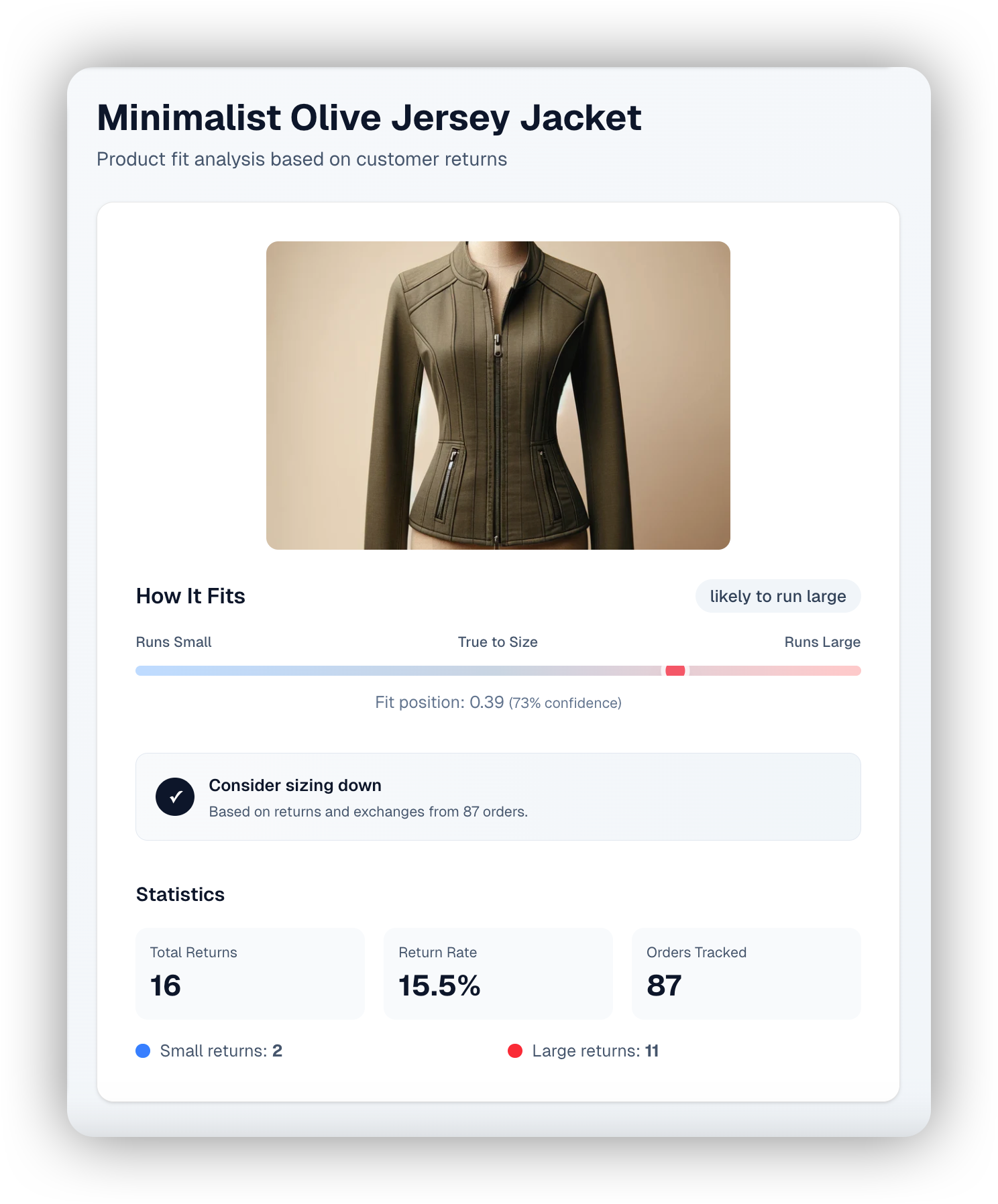
Help customers choose the right size with AI-powered recommendations displayed directly on product pages to boost conversion and reduce size-related returns. The Size Recommender analyzes return data and customer feedback to indicate whether items run small, large, or true to size and can be simply integrated via API or a customizable UI widget.
Learn more
***
#### :box-open-full: Latest Product & Carrier Updates
{% tabs %}
{% tab title="Improvements" icon="bolt" %}
{% hint style="info" icon="layer-group" %}
#### Platform
:grid-2: **App**
* Help button in global navigation now includes options to ask Copilot or connect directly with parcelLab support for assistance.
:bell-ring: **Notifications**
* The Notification Center role to view notifications and alerts for an account is now available to assign in User Management.
:sparkles: **Copilot**
* Updated Copilot chat module for smoother user experience, including multiple tabs for each open conversation.
:chart-simple: **Insights**
* A System Monitoring dashboard is now available from your profile to provide a centralized view of tracking performance, carrier reliability, and communication and integration coverage.
* AI report summary is now available for the Network Monitoring report (Returns Insights).
:ticket-perforated: **Voucher Codes**
* You can now filter your uploaded voucher codes by usage (that is: used or unused).
:plug: **Integrations**
* Magento 2 plugin updated to version 2.4.24 with PHP 8.2 compatibility improvements.
{% endhint %}
{% hint style="success" icon="cart-circle-check" %}
#### Convert
:clock-three: **Promise Configuration**
* The new Promise Overview dashboard provides quick links to managing your setup and an overview of the most recent changes.
* Promise rules can be configured to temporarily override settings for active delivery methods during a specific time period.
* Version history is now accessible for Service Levels, Warehouses, and Delivery Methods to enable visibility over configuration changes.
{% endhint %}
{% hint style="warning" icon="comment" %}
#### Engage
:truck-fast: **Trackings**
* A quick view of tracking details is now available in the Trackings page to enable customer service agents to access key information faster and resolve customer inquiries more efficiently.
:bolt: **Experience Design**
* The history timeline now displays user information alongside version changes.
* A warning is now shown in the email template and message previews to highlight if there are template responsiveness issues that may impact display on mobile devices.
:square-code: **Snippets**
* Snippet tags can now be copied and pasted directly into the HTML editor in email templates.
* Snippets can now be duplicated as a standard copy or using the AI generator for quick reuse of existing snippet configuration.
:message: **Messages**
* Messages can now be sent to dynamic recipients defined in order data and set in journey triggers to enable flexible communication flows beyond the primary customer, such as suppliers.
* Webhooks can now be tested using the draft version of the message.
:calendar: **Campaigns**
* Campaign previews are now available alongside campaign settings to make it easier to review banner display and adjust configurations in real-time.
:comment-exclamation: **On Demand Messages**
* On-demand messages can now be sent via webhook as well as email.
:box: **Order Status Page**
* The Order Status page snippet containing the parcelLab ID is now available in shop settings to copy for quick installation of the Order Status page.
{% endhint %}
{% hint style="danger" icon="arrow-u-turn-up-left" %}
#### Retain
:box-open: **Return Registrations**
* Return registrations can now be reviewed in the App in the Return Registrations section of the Returns module.
* Return Approvals can now be reviewed using the 'Pending approval' filtered view in the Return Registrations section.
:desktop: **Returns Portal Configuration**
* The default Returns Portal snippet for your account is now available to copy in the Snippet section of your Returns Portal configuration for quick installation of the widget.
* Recommended Recommended return reason sets per industry can be installed as recipes from the App Store.
* The Returns Portal configuration UI now supports JSON schema `allOf` definitions in advanced settings, ensuring all relevant configuration fields are displayed correctly in the frontend.
{% endhint %}
{% endtab %}
{% tab title="Fixes" icon="screwdriver-wrench" %}
{% hint style="info" icon="layer-group" %}
#### Platform
:chart-simple: **Insights**
* Resolved an issue where some users could not access reports in the App due to browser local network access restrictions.
:square-terminal: **APIs**
* Fixed a bug where creating v2 order API connections in Returns resulted in an error.
{% endhint %}
{% hint style="success" icon="cart-circle-check" %}
#### Convert
:clock-three: **Promise Configuration**
* Fixed a bug where cutoff times could not be set for Saturday and Sunday in Promise delivery methods configuration.
{% endhint %}
{% hint style="warning" icon="comment" %}
#### Engage
:truck-fast: **Trackings**
* Fixed an issue where the technical name was shown instead of the display name for messages in tracking notifications.
:rectangles-mixed: **Email Templates**
* Fixed a bug where invalid or missing content in email templates prevented saving without displaying an error message.
:message: **Messages**
* Fixed an issue where deleted messages remained visible and set as inactive in the list view and could not be reopened or removed.
:messages: **Journeys**
* Fixed a display issue with the trigger event selection pane in Journeys.
* Fixed a bug where invalid or missing content in email templates prevented saving without displaying an error message.
{% endhint %}
{% hint style="danger" icon="arrow-u-turn-up-left" %}
#### Retain
:desktop: **Returns Portal Configuration**
* Fixed an issue where clients in the Returns Portal setup drop-down did not display the shop key, preventing clear identification of accounts with multiple brands.
{% endhint %}
{% endtab %}
{% tab title="New Carriers" icon="truck" %}
{% hint style="info" icon="truck-arrow-right" %}
#### Outbound
* Blue Express - API
* GLS - Webhooks
{% endhint %}
{% hint style="danger" icon="arrows-rotate-reverse" %}
#### Returns
* Bring
* DPD (UK)
* Instabox
{% endhint %}
{% endtab %}
{% endtabs %}
{% endupdate %}
{% update date="2026-02-27" tags="agents" %}
## WISMO/R agent, message templates and more
We've released message templates for quicker setup and our upcoming WISMO/R agent for automated order and returns inquiries.
Take a tour of the latest updates in our interactive demo!
{% embed url="" %}
#### :user-robot: WISMO/R Agent (Coming Soon)
parcelLab’s WISMO/R agent enables intelligent automated responses to your customer’s order and return inquiries. Integrate the agent in your post-purchase emails or chatbots to scale reliable customer support using real-time data delivered in your brand’s voice.
Learn more
{% tabs %}
{% tab title="WISMO/R Agent for Email" %}
{% endtab %}
{% tab title="WISMO/R Agent for Chat" %}
{% endtab %}
{% endtabs %}
***
#### :box-open-full: Latest Product & Carrier Updates
{% tabs %}
{% tab title="Improvements" icon="bolt" %}
{% hint style="info" icon="layer-group" %}
#### Platform
:gear: **Admin**
* The Admin navigation menu is now organized into Access, Integrations, and Data Management sections to group administrative functions into related categories.
:users: **User Management**
* Permissions are now grouped by feature category with descriptions and collapsible sections to help administrators understand and assign access levels.
:sparkles: **Copilot**
* Your Copilot conversation history is now accessible from the top of the chat window. Select a conversation to continue it or click the delete icon to remove it from the list.
* The Insights agent now generates report summaries within the Copilot pane, so you can directly ask Copilot for further insights based on the summarized data.
:chart-simple: **Insights**
* Analytics reports in global accounts now include a brand filter so you can view performance metrics for multiple brands in one report.
{% endhint %}
{% hint style="warning" icon="comment" %}
#### Engage
:envelope: **Communication**
* The email preview in Communication now defaults to web view rather than mobile to make it easier for customer service agents to review sent messages.
:bolt: **Experience Design**
* The enhanced search and filtered views are now available in the Shops (search only), Audiences, Email Templates, Snippets, and A/B Tests sections of the App.
* The thumbnail preview in the email templates and snippets list view can now be toggled on or off via a new option.
* Multiple snippets can now be selected and inserted into email templates at once for more efficient template setup.
:store: **Shops**
* Additional shop settings are now available in the App to enable you to manage shop details without support.
:image-landscape: **Media**
* A media library is now available in the Experience Design Setup module to allow you to upload and manage files for use across your communications.
:message: **Messages**
* Message templates containing pre-populated placeholders and content are now available for selection when creating new messages.
* The journeys that messages are used in are now shown in the message types list view and can be selected for quick navigation to your journey configuration.
* The corresponding sent messages for a specific message type can now be viewed via a new option accessed from the Ellipsis button in the message types list view.
* Tracking numbers can now be used as well as tracking ID to preview and send test messages.
:messages: **Journeys**
* Enhanced trigger selection in Journeys with event descriptions and improved search for quicker configuration.
:spell-check: **A/B Tests**
* A/B test variants for messages can now be generated with AI to help you quickly create optimized tests.
:calendar: **Campaigns**
* Email content blocks for campaigns now include tooltips showing which placeholder it is associated with and whether it needs to be manually added to your email templates.
:box: **Order Status Page**
* The corresponding carrier is now shown for multi-order trackings in the App and the Order Status page.
{% endhint %}
{% hint style="danger" icon="arrow-u-turn-up-left" %}
#### Retain
:desktop: **Returns Portal Configuration**
* Returns portal templates containing standardized setup are now available for selection when creating new returns portals to speed up configuration.
* Returns module in the App has the following updates to improve user experience:
* Return window configuration is updated to enable the configuration of warranty return windows and extended return windows (for example: Black Friday, sales period)
* Order and Carrier API integrations are now configurable in the Integrations section
* When creating a complex label fee/charge setup, you can now define a translation sentence that is displayed only when the carrier option has a fee.
{% endhint %}
{% endtab %}
{% tab title="Fixes" icon="screwdriver-wrench" %}
{% hint style="info" icon="layer-group" %}
#### Platform
:chart-simple: **Insights**
* Fixed a bug where the AI report summary PDF for the Emails report could not be downloaded.
{% endhint %}
{% hint style="success" icon="cart-circle-check" %}
#### Convert
:clock-three: **Promise Configuration**
* Fixed a bug where the operating day name labels in Promise delivery methods did not display in the selected language.
{% endhint %}
{% hint style="warning" icon="comment" %}
#### Engage
:truck-fast: **Trackings**
* Fixed an issue where a missing order date showed the current date instead of a null value (that is: dash) in tracking details.
:envelope: **Communication**
* Fixed an issue where images did not display in the mobile email preview.
:message: **Messages**
* Fixed a bug where creating new messages incorrectly redirected to message type creation.
* Fixed a bug where the optional Country field was incorrectly treated as required when creating a message.
* Fixed a bug where invalid JSON could be saved in the message editor for webhooks without showing a validation error.
:messages: **Journeys**
* Resolved an issue where changing webhook integrations in published journeys would revert to the default integration.
:box: **Order Status Page**
* Fixed an issue where the country code drop-down in the SMS signup on the Order Status page could reset, causing phone number validation errors.
{% endhint %}
{% hint style="danger" icon="arrow-u-turn-up-left" %}
#### Retain
:desktop: **Returns Portal Configuration**
* Fixed an issue where adding additional return window filters did not persist as an extended return window.
{% endhint %}
{% endtab %}
{% tab title="New Carriers" icon="truck" %}
{% hint style="info" icon="truck-arrow-right" %}
#### Outbound
* DHL Express - Webhooks
* FedEx - Webhooks
* FragilePAK - Webhooks
* Oegema - Webhooks
* USPS - Webhooks
{% endhint %}
{% hint style="danger" icon="arrows-rotate-reverse" %}
#### Returns
* DPD (Romania)
* Maersk
* Packs
{% endhint %}
{% endtab %}
{% endtabs %}
{% endupdate %}
{% update date="2026-01-30" tags="return-registrations" %}
## Payment integration for Returns and App updates
This release introduces returns payment integration, along with other improvements for parcelLab App users.
Take a tour of the latest updates in our interactive demo!
{% embed url="" %}
#### :box-dollar: Payment Provider Integration
Integrated payments for returns lets your customers see and pay all return-related costs upfront during return registration. This provides an improved return experience by increasing clarity around refund deductions, while helping you recover return costs upfront.
{% hint style="info" %}
Payment integration in the Returns Portal is currently only available if you use **Adyen** to process payments.
{% endhint %}
Learn more
***
#### :box-open-full: Latest Product & Carrier Updates
{% tabs %}
{% tab title="Improvements" icon="bolt" %}
{% hint style="info" icon="layer-group" %}
#### Platform
:grid-2: **App**
* The transition to the parcelLab App ([app.parcellab.com](https://app.parcellab.com/)) from the parcelLab Portal ([prtl.parcellab.com](https://prtl.parcellab.com/)) is now complete.
:bag-shopping: **App Store**
* Configuration forms for recipes now retain the form input, so that if any application errors occur, the entered data is saved in the form.
:square-terminal: **APIs**
* The parcelLab API v4 is now the default and recommended integration path for new integrations ([read the docs](https://github.com/parcelLab/gitbook-documentation/tree/main/developers-v4/README.md)).\
**Note:** Use the API v2 LTS only if you already have an existing integration.
{% endhint %}
{% hint style="warning" icon="comment" %}
#### Engage
:truck-fast: **Trackings**
* The customer number is now displayed in the tracking details for returns as well as outbound trackings.
:message: **Messages**
* Message types can now be duplicated, including all underlying messages, to enable quicker reuse of existing content across multiple shops.
:messages: **Journeys**
* Journeys can now be filtered by communication channel to make it easier to review and manage content across email, SMS, and webhook.
:calendar: **Campaigns**
* Alt text can now be entered for banner images to ensure accessibility compliance.
:clipboard-list: **Surveys**
* Surveys are now embedded on the Order Status page so your customers can respond to the survey directly on the page for a smoother user experience.
:comment-exclamation: **On Demand Messages**
* On-demand message records now include details on the status of the message send, providing a clear overview of the success rate for the sent message.
{% endhint %}
{% endtab %}
{% tab title="Fixes" icon="screwdriver-wrench" %}
{% hint style="info" icon="layer-group" %}
#### Platform
:chart-simple: **Insights**
* Fixed an issue where zip code spacing was removed in exports to ensure search and export results match for formats like UK postcodes.
{% endhint %}
{% hint style="warning" icon="comment" %}
#### Engage
:truck-fast: **Trackings**
* Fixed an authorization issue on public tracking links to ensure shared pages load correctly.
:message: **Messages**
* Fixed a bug where the message history did not load when accessing via a direct link and the short info did not display in message revision comparisons.
:box: **Order Status Page**
* Fixed a bug where the order status page displayed incorrect courier details for multi-order shipments.
{% endhint %}
{% hint style="danger" icon="arrow-u-turn-up-left" %}
#### Retain
:desktop: **Returns Portal Configuration**
* Resolved an issue that prevented entering decimal values when updating return fees.
{% endhint %}
{% endtab %}
{% tab title="New Carriers" icon="truck" %}
{% hint style="info" icon="truck-arrow-right" %}
#### Outbound
* Blue Express
* Quick
* SDJ Taiwan
{% endhint %}
{% hint style="danger" icon="arrows-rotate-reverse" %}
#### Returns
* Bartolini
* Celeritas
* DPD (Switzerland)
* Mondial Relay
* Slovenia Post
{% endhint %}
{% endtab %}
{% endtabs %}
{% endupdate %}
{% endupdates %}
## Explore More Features
View more features added to the parcelLab platform here.
{% content-ref url="/pages/BTQTZyEzdSCWjsl8H7Vd" %}
[Previous Releases](/docs/whats-new/archive/previous-releases.md)
{% endcontent-ref %}
---
# Agent Instructions
This documentation is published with GitBook. GitBook is the documentation platform designed so that both humans and AI agents can read, navigate, and reason over technical content effectively. Learn more at gitbook.com.
## Querying This Documentation
If you need additional information that is not directly available in this page, you can query the documentation by asking a question.
Perform an HTTP GET request on the following URL with the `ask` and `goal` query parameters:
```
GET https://docs.parcellab.com/docs/whats-new/2026.md?ask=&goal=
```
`ask` is the immediate question: it should be specific, self-contained, and written in natural language.
`goal` is what the user is ultimately trying to achieve, the reason they need the answer. Sharing it helps GitBook give you a better, more relevant answer. A goal is most helpful when it describes the outcome the user wants rather than restating the question. For example, with `ask=how do I create an API token`, a goal like `automate deployments from our CI pipeline` lets GitBook tailor the answer to that use case.
The response will contain a direct answer to the question and relevant excerpts and sources from the documentation.
Use this mechanism when the answer is not explicitly present in the current page, you need clarification or additional context, or you want to retrieve related documentation sections.